SaaS

SaaS Design: A Complete Guide to UX, UI & Product Design 2026

Blog Author
Maniruzzaman Jubayer
Publish date:
05 Oct 2026
Single Blog Image

SaaS design is the practice of designing software-as-a-service products so they are intuitive, usable, and commercially effective across the entire customer lifecycle from sign-up and onboarding through daily use, renewal, and expansion. It brings together UX design (research, information architecture, and user flows), UI design (the visual interface, design system, and interactions), and product thinking that ties design decisions to business outcomes like activation, retention, and revenue. Because SaaS runs on recurring subscriptions, design isn't cosmetic; it's a growth lever that directly influences trial conversion, churn, and account growth.

What Is SaaS Design?

SaaS design is the end-to-end discipline of designing web-based subscription software so it's easy to understand, pleasant to use, and effective at driving business results. It spans everything a user encounters the marketing site, sign-up flow, onboarding, core application, settings, billing, and support surfaces, and it treats those touchpoints as one continuous experience rather than isolated screens.
__wf_reserved_inherit

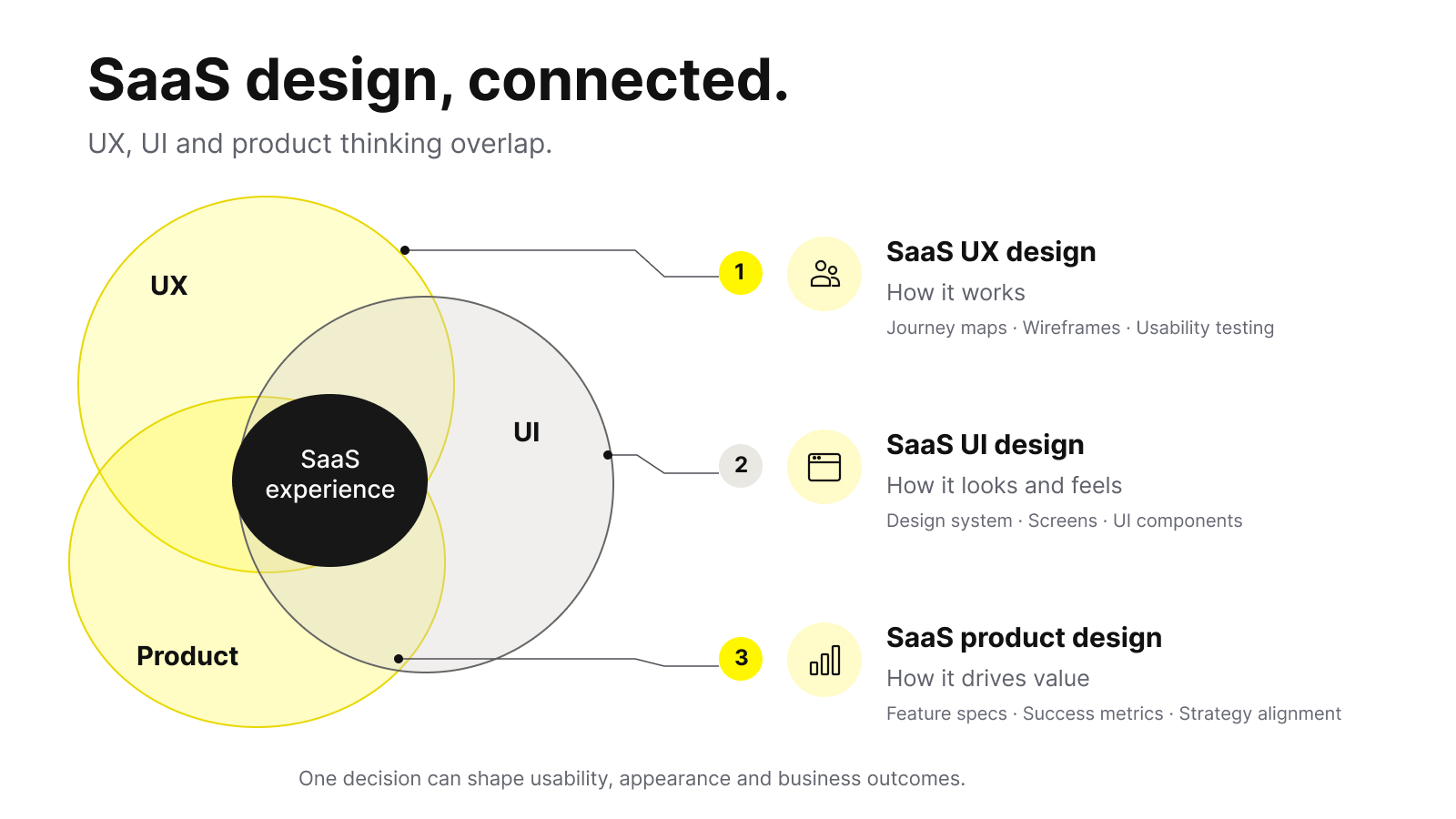
It helps to break the term into its three overlapping layers, because people often use "SaaS design" to mean any one of them.

Layer What it covers Typical outputs
SaaS UX design How the product works: research, user flows, information architecture, interaction logic, and usability Journey maps, wireframes, prototypes, usability findings
SaaS UI design How the product looks and feels: layout, typography, color, iconography, components, and micro-interactions Design system, high-fidelity screens, UI kit
SaaS product design How design connects to strategy: prioritisation, metrics, and trade-offs tied to business goals Feature specs, success metrics, design–product alignment

In practice, these blur together. A designer choosing where to place a "Create project" button is making a UI decision, a UX decision (is this the moment the user needs it?), and a product decision (does this action drive activation?) all at once.

How SaaS design differs from other digital design

SaaS design has constraints that a marketing site or a mobile game does not:

  • It's used repeatedly, often daily. A landing page has one job and a few seconds to do it. A SaaS app is a workspace people return to constantly, so efficiency and consistency matter far more than novelty. Delight that gets in the way on the hundredth use is a liability.
  • It serves multiple roles. A single product might be used by an admin configuring permissions, a manager reviewing reports, and an individual contributor doing daily work, each with different needs and expertise.
  • It grows in complexity over time. Features accumulate. Without deliberate structure, a clean product becomes a maze. SaaS design is partly the ongoing job of keeping complexity manageable.
  • It's tied to a business model where retention is everything. Because revenue is recurring, the design goal isn't a one-time conversion. It's a relationship that lasts months or years.

Understanding these constraints is the first step to designing for them well.

Is Your SaaS Product Ready to Scale?

Wolfpixel helps SaaS teams improve UX, simplify complex workflows, build scalable design systems, and create product experiences that support activation and retention.


Free 30-min call
primary-btn__arrowprimary-btn__arrow

Why SaaS Design Directly Affects Revenue and Retention

In a subscription business, you don't win a customer once; you re-earn them every billing cycle. Design is where much of that re-earning happens, because the product experience is what customers actually pay for month after month. Here's how design decisions translate into business outcomes.

  • It shortens time-to-value. The faster a new user experiences the core benefit of your product their "aha" moment the more likely they are to convert from trial to paid and to stick around. Onboarding design, empty-state guidance, and sensible defaults all compress the distance between sign-up and value. A shorter time-to-value tends to lift activation rates, which is one of the strongest early predictors of retention.
  • It reduces churn. Much of avoidable churn is quiet: users who never fully understood the product, got stuck on a workflow, or found a competitor easier. Thoughtful design removes those friction points before they become cancellation reasons. It also makes advanced features discoverable, so customers grow into higher-value usage instead of plateauing.
  • It supports product-led growth (PLG). In PLG motions, the product carries the sales and expansion load. That only works when the product can sell itself clear value up front, low-friction sign-up, and natural upgrade prompts at the right moments. Design is the mechanism that makes self-serve adoption viable.
  • It builds trust and reduces perceived risk. A polished, coherent interface signals that a company is competent and stable, which matters when a buyer is deciding whether to route their team's critical workflows through your software. Sloppy or inconsistent UI raises doubt, especially for higher-priced or security-sensitive products.
  • It lowers support costs. Every confusing screen generates tickets. Clear design is a form of scalable customer support: it answers questions before they're asked, which frees your team and improves satisfaction at the same time.
  • The through-line is that SaaS design isn't a cost centre bolted onto engineering. It's an investment that compounds across the funnel, acquisition, activation, retention, and expansion which is exactly why growth-minded teams treat it as a strategic priority rather than a finishing touch.

Core Principles of Effective SaaS Design 

Strong SaaS products tend to share a set of underlying SaaS design principles. These aren't style rules, they're durable ideas that hold up as your product and audience evolve.

  1. Clarity beats cleverness: Users should never have to decode your interface. Labels should say what they mean, primary actions should be obvious, and the most important thing on any screen should be visually dominant. When in doubt, make it more obvious, not more elegant.
  2. Design for the job, not the feature: People don't want features; they want outcomes. Anchor every screen to the job the user is trying to complete, and design the shortest credible path to that outcome. Features exist to serve jobs, not the other way around.
  3. Reduce cognitive load: Every decision, field, and option you put in front of a user costs mental energy. Hick's Law - the idea that more choices slow decisions - is a useful reminder to simplify. Use sensible defaults, progressive disclosure (revealing complexity only when needed), and clear hierarchy so users focus on one thing at a time.
  4. Be consistent and predictable: Jakob's Law holds that people expect your product to work like the other products they already use. Consistent patterns within your app and with broader conventions let users transfer knowledge instead of relearning. A shared design system is how teams enforce this at scale.
  5. Make the system's state visible: Users should always know where they are, what's happening, and what will happen next. Clear feedback on actions, loading states, confirmations, and error messages keeps people oriented and confident.
  6. Design for the full lifecycle, not just the happy path: Empty states, error states, edge cases, permissions, and the experience of a power user with thousands of records all deserve attention. Products often feel great in a demo and fall apart in real, messy use because only the happy path was designed.
  7. Accessibility is a baseline, not a bonus: Designing to standards like WCAG sufficient color contrast, keyboard navigation, screen-reader support, and clear focus states makes your product usable by more people and is increasingly a procurement requirement for enterprise buyers.
  8. Design decisions should be measurable: Good SaaS design ties back to outcomes you can observe: activation rate, feature adoption, task completion, time-on-task, and retention. Principles guide the work; metrics tell you whether it worked.

Treat these as a checklist you return to, not a one-time reference. The best teams revisit them every time complexity threatens to creep back in.

The SaaS Design Process, Step by Step 

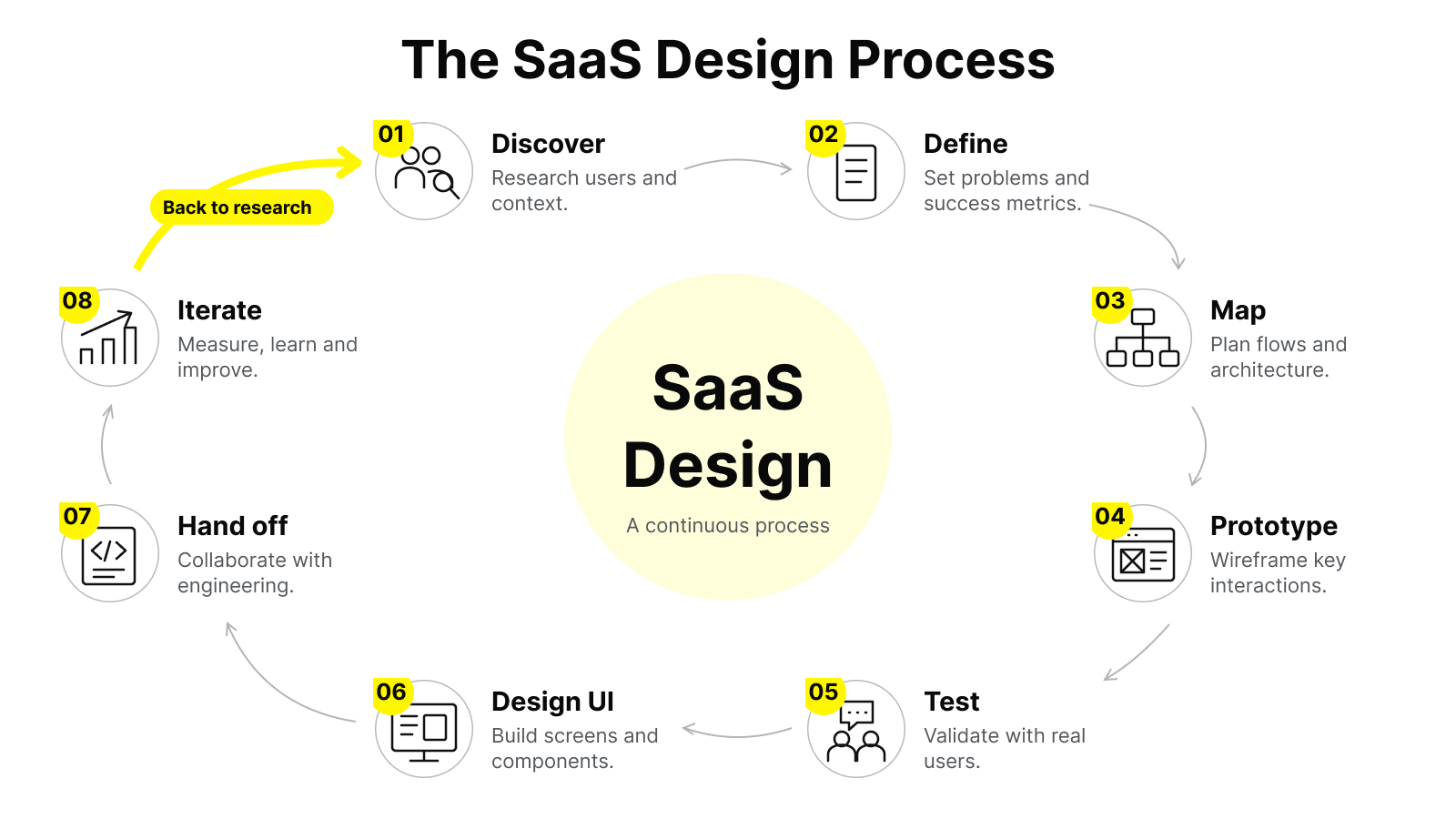
Great SaaS design is rarely a flash of inspiration. It's a repeatable process that moves from understanding the problem to shipping and refining a solution.
SaaS Design Process

Here's a practical version of that process.

‍

  1. Discover and research. Start by understanding the users, their jobs, and the context of use. This means user interviews, reviewing support tickets and analytics, competitive teardowns, and stakeholder conversations. The goal is to define the real problem before designing anything.

  2. Define the problem and success metrics. Translate research into a clear problem statement and the metrics that will tell you whether the design worked (for example, "increase trial-to-paid conversion" or "reduce time to first project creation"). Without this, design becomes subjective.

  3. Map the flows and architecture. Before pixels, design structure: user journeys, task flows, navigation, and information architecture. This is where you decide how the product is organised and how users move through it decisions that are expensive to change later.

  4. Wireframe and prototype. Create low-fidelity layouts to test structure and logic quickly, then build interactive prototypes for the flows that matter most. Prototypes let you feel the experience and catch problems before engineering time is spent.

  5. Test with real users. Put prototypes in front of people who resemble your actual users and watch where they hesitate, misunderstand, or fail. Even a handful of usability sessions surfaces the majority of serious issues.

  6. Design the high-fidelity UI. Apply your visual system typography, color, components, and interaction details to produce production-ready screens. A mature design system makes this faster and keeps the product consistent.

  7. Hand off and collaborate with engineering. Provide clear specs, component behavior, edge cases, and states. The best outcomes come from design and engineering working closely, not from a one-directional handoff.

  8. Measure, learn, and iterate. After launch, watch the metrics you defined and gather qualitative feedback. Design is never "done" in SaaS; it's a continuous loop of refinement as the product and its users evolve.

A few notes on applying this in the real world: the process should flex to the stage of your company. An early-stage startup validating a concept might compress steps 1–5 into a fast, scrappy sprint. A scaled product with paying customers should invest more heavily in research and testing because the cost of a wrong turn is higher. What stays constant is the discipline of understanding before building and measuring after shipping.

SaaS UI and UX Design Best Practices 

Principles are the "why"; SaaS design best practices are the "how." Below are field-tested practices for the surfaces where SaaS products most often succeed or fail. They're grouped so you can apply them to specific parts of your product.

Onboarding and first-run experience

  • Get users to value fast. Skip long tours. Guide the user to complete one meaningful action that demonstrates the product's core benefit as quickly as possible.
  • Use empty states as guidance. A blank dashboard is an opportunity, not a dead end. Show users what to do next with a clear prompt or example data.
  • Reduce setup friction. Pre-fill what you can, offer templates and sensible defaults, and defer non-essential configuration until it's actually needed.

Navigation and information architecture

  • Keep primary navigation stable and shallow. Users should be able to predict where things live. Avoid deeply nested menus that hide core functionality.
  • Match structure to how users think, not your org chart. Group features around user jobs and mental models, not internal team boundaries.
  • Make search reliable once the product holds enough data that browsing alone becomes inefficient.

Dashboards and data display

  • Lead with what matters: Surface the few metrics or items a user actually needs, and let them drill into detail. Dashboards fail when they show everything with equal weight.
  • Scale design: A table that's elegant with ten rows must still work with ten thousand. Plan for sorting, filtering, pagination, and bulk actions early.
  • Use visual hierarchy deliberately: size, weight, color, and spacing to direct attention rather than leaving users to scan a wall of uniform content.

Interface and interaction (SaaS UI design)

  • Build on a design system. Reusable components ensure consistency, speed up shipping, and keep the product coherent as it grows.
  • Give clear feedback. Every action should produce a visible response, success confirmations, loading indicators, and helpful, human error messages that explain what happened and how to recover.
  • Use micro-interactions with restraint. Subtle motion can clarify state and add polish, but animation that slows down a frequent task is friction dressed up as delight.

Cross-cutting best practices

The table below maps common SaaS UX and UI decisions to the practice that tends to serve users best.

Design decision Weaker approach Stronger approach
New-user onboarding Long feature tour up front Guided path to one "aha" action
Error handling "Something went wrong" Plain-language cause + recovery step
Feature discovery Everything visible at once Progressive disclosure as needs grow
Settings and configuration Required before first use Smart defaults, configure later
Visual consistency One-off screens Shared design system and components
Performance perception Blank screen while loading Skeleton states and optimistic UI

Best practices are guidelines, not laws. The right call always depends on your users and context which is exactly why research and testing sit at the center of the process. Use these as strong defaults, then validate against your own product.

Is Your SaaS Product Ready to Scale?

Wolfpixel helps SaaS teams improve UX, simplify complex workflows, build scalable design systems, and create product experiences that support activation and retention.

Free 30-min call
primary-btn__arrowprimary-btn__arrow

SaaS Design Trends Shaping Modern Products 

  • ‍SaaS design trends move quickly, and not every trend deserves adoption. The ones worth attention tend to solve a real user or business problem rather than chase aesthetics. Here are the shifts genuinely shaping modern SaaS products, along with an honest note on where each helps and where it can backfire.
  • ‍AI-assisted and conversational interfaces. Many SaaS products now embed AI to summarize, generate, search, or automate. Done well, this collapses multi-step tasks into a single request. The design challenge is trust and control: users need to understand what the AI did, be able to review and edit it, and stay in charge of outcomes. Bolting a chat box onto a product rarely works; the AI has to fit the actual workflow.
  • ‍Progressive disclosure and "simple by default, powerful on demand." As products mature and accumulate features, leading teams are hiding complexity behind clean primary surfaces and revealing depth only when users seek it. This keeps products approachable for new users without stripping capability from power users.
  • ‍Personalization and adaptive experiences. Interfaces increasingly adjust to the user's role, plan, or behavior  showing relevant features, hiding what's irrelevant, and surfacing timely prompts. The trade-off is complexity and predictability; over-personalization can make a product feel unstable if users can't rely on where things are.
  • ‍Design systems and tokens as infrastructure. Mature teams treat their design system as a product in its own right, with reusable components and design tokens that keep UI consistent across a growing surface area and speed up delivery. This is less a visual trend than an operational one, but it underpins nearly everything else.
  • ‍Accessibility and inclusive design moving mainstream. Once treated as optional, accessibility is now both an ethical baseline and a commercial one, particularly for products selling into enterprise and the public sector, where it's frequently required.
  • ‍Dark mode, density options, and user control. Giving users control over appearance and information density, light/dark themes, and compact/comfortable layouts respects the fact that people use SaaS products for hours and in different environments.
  • ‍Thoughtful minimalism over flat sameness. There's a move back toward interfaces with more depth, texture, and personality: subtle shadows, considered color, and distinctive brand expression as a reaction to years of interchangeable, generic-looking apps. The caveat: personality should never come at the cost of clarity or usability.

A practical way to evaluate any trend: ask whether it makes a real user's real task faster, clearer, or more valuable. If it only makes the product look current, it's decoration and decoration ages fast. Adopt trends deliberately, not reflexively.

When to Hire a SaaS Design Partner and How to Evaluate One

At some point, most SaaS companies face a decision: keep design in-house, hire a specialist, or bring in an external partner. There's no universally correct answer but there are clear signals and criteria that make the decision easier.

Signs you may need professional SaaS design support

  • Your product works, but users struggle, and support tickets or churn point to usability, not bugs.
  • Onboarding or trial-to-paid conversion is underperforming and you suspect the experience is the cause.
  • Your interface has grown inconsistent as features piled up, and there's no design system holding it together.
  • You're preparing to raise, launch, or move upmarket, and the product's design no longer matches its ambition.
  • Engineering is shipping features but no one owns the overall experience.
  • You need senior design capability but can't yet justify a full-time, in-house team.

In-house vs. freelancer vs. agency

Option Best when Trade-offs
In-house designer(s) You need ongoing, deeply embedded design and can support the role Higher fixed cost; slower to hire; range limited to those individuals' strengths
Freelancer/contractor You have a defined project or need flexible capacity Variable availability; less process and team depth; continuity risk
Design agency/studio You need a full team, senior craft, and proven process for a significant initiative Higher project cost; requires clear scope and collaboration

Many teams use a blend; for example, an agency to establish a design system and redesign core flows, then in-house designers to maintain and extend the work.

How to evaluate a SaaS design partner

Use these criteria to separate strong partners from risky ones:

  1. Relevant, real SaaS experience. Look for a portfolio of shipped SaaS products not just concept work or marketing sites. Ask what problem each project solved and what changed as a result.
  2. Process over deliverables. A credible partner can explain how they work: research, testing, iteration, and collaboration with engineering. Beware anyone who jumps straight to visuals.
  3. Outcome orientation. The best partners talk in terms of activation, retention, and usability outcomes not just how screens look. Be cautious of anyone who guarantees specific numbers, since results depend on many factors beyond design.
  4. Collaboration and communication. You'll work closely for weeks or months. Clear communication, realistic timelines, and a genuine interest in your business matter as much as raw talent.
  5. Design systems capability. For anything beyond a small project, the ability to build or work within a scalable design system protects your investment over time.
  6. Fit with your stage and team. A partner who excels with enterprise platforms may not be right for an early-stage MVP, and vice versa.

What good SaaS design delivers

When the engagement works, you can reasonably expect a clearer, more consistent product, smoother onboarding, a reusable design system, and an experience that supports rather than obstructs growth. What no honest partner can promise is a specific revenue figure; design is a powerful lever, but it operates alongside pricing, positioning, market, and product.

A note on investment

SaaS design costs vary widely based on scope, seniority, and engagement model, from a focused freelance project to a multi-month agency engagement covering research, systems, and redesign. Rather than anchoring on price alone, weigh cost against the value at stake: for a product where design friction is suppressing conversion or driving churn, the return on getting it right is often far larger than the design spend. Scope the smallest engagement that addresses your highest-impact problem, prove the value, and expand from there.

If you're weighing outside help, the most useful next step is a focused conversation about your specific product and goals — a good partner will tell you honestly whether they're the right fit before any commitment

Common SaaS Design Mistakes and How to Avoid Them 

Knowing what not to do is often as valuable as knowing best practices. These are the mistakes that most reliably undermine SaaS products and how to steer clear of them.

  • Designing for the demo, not daily use. Products optimized to impress in a sales demo often frustrate in real, repeated use. Avoid it by designing for your power users and edge cases, not just the polished first impression.
  • Adding features without editing. Every product accumulates features; few remove or reorganize them. The result is bloat and confusion. Avoid it by treating simplification as ongoing work — audit navigation and surface area regularly, and be willing to hide, merge, or retire what isn't earning its place.
  • Skipping user research and testing. Designing from internal assumptions is the fastest way to build the wrong thing well. Avoid it by talking to users before designing and testing prototypes before building — even lightweight research beats none.
  • Neglecting onboarding. Teams pour effort into the core product and leave the first-run experience as an afterthought, then wonder why trials don't convert. Avoid it by treating onboarding as a first-class part of the product and measuring activation explicitly.
  • Ignoring empty, error, and edge states. Products are often designed only for the ideal, data-filled scenario. Real users hit blank screens, errors, and limits. Avoid it by designing these states deliberately — they're where trust is won or lost.
  • Inconsistent UI from a missing design system. Without a shared system, different screens drift apart, creating a fragmented, untrustworthy feel. Avoid it by investing in reusable components and patterns early enough to prevent drift.
  • Chasing trends over substance. Adopting the latest look without a reason adds churn and risk. Avoid it by judging every trend against whether it improves a real user task.
  • Treating accessibility as optional. Beyond excluding users, this can block enterprise deals with accessibility requirements. Avoid it by building to accessibility standards from the start rather than retrofitting later.
  • Measuring nothing. If you can't tell whether a design change helped, you can't improve deliberately. Avoid it by defining success metrics before you design and reviewing them after you ship.

The common thread across these mistakes is a short-term, screen-by-screen mindset. Strong SaaS design takes the long view: it treats the product as a living system serving real people over years, and it stays honest by measuring outcomes rather than admiring visuals.

Frequently Asked Questions

What's the difference between SaaS UX design and SaaS UI design?

SaaS UX design is about how the product works — research, user flows, information architecture, and usability — while SaaS UI design is about how it looks and feels, including layout, typography, color, components, and interactions. They're distinct skill sets that overlap constantly; a strong SaaS product needs both working together.

How long does a SaaS redesign typically take?

It depends heavily on scope. A focused redesign of a few core flows might take a few weeks, while a full redesign with research, a new design system, and multiple product areas can run several months. The right timeline is the one that includes real research and testing rather than rushing straight to visuals.

Can good design really reduce churn?

Design can meaningfully reduce avoidable churn — the kind caused by confusion, friction, or users never reaching value. It can't fix churn rooted in pricing, market fit, or a missing capability. Design is a powerful lever, but it works alongside the rest of your business, not instead of it.

Do early-stage startups need to invest in SaaS design?

Yes, though proportionally. Early on, the priority is validating the right problem and getting users to value quickly, which is a design challenge as much as an engineering one. You don't need a large design investment at the start, but ignoring usability and onboarding early tends to be expensive to fix later.

How do we measure whether our SaaS design is working?

Tie design to outcomes you can observe: activation rate, trial-to-paid conversion, feature adoption, task completion and time-on-task, support ticket volume, and retention. Define which metrics matter before you design, then review them after you ship so you can tell what actually improved.

Should we build a design system before or after redesigning the product?

Often in parallel. A redesign is a natural moment to establish reusable components and patterns, and having a system in place makes the redesign faster and more consistent. For smaller products, a lightweight component library is enough; invest in a fuller system as your surface area grows.

Single Blog Author Img
Maniruzzaman Jubayer
COO & Co-founder

Maniruzzaman Jubayer is the COO & Co-founder of Wolfpixel, where he leads operations and helps the senior team deliver conversion-focused UI/UX, SaaS, web, and brand design for startups and growing businesses worldwide.