


12 Oct 2026
Brand Identity
Brand Guidelines: What to Include, Real Examples, and How to Build Yours


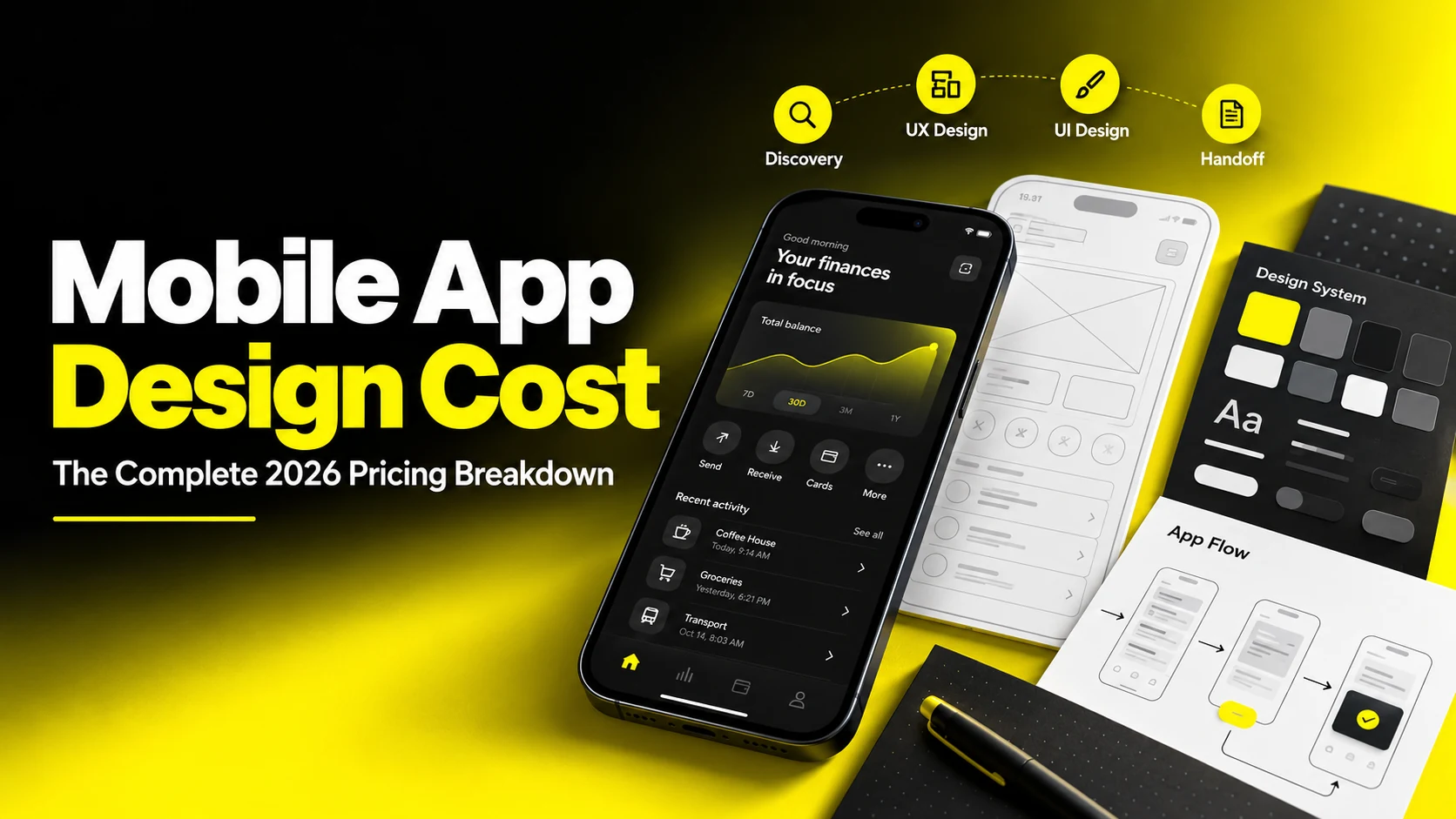
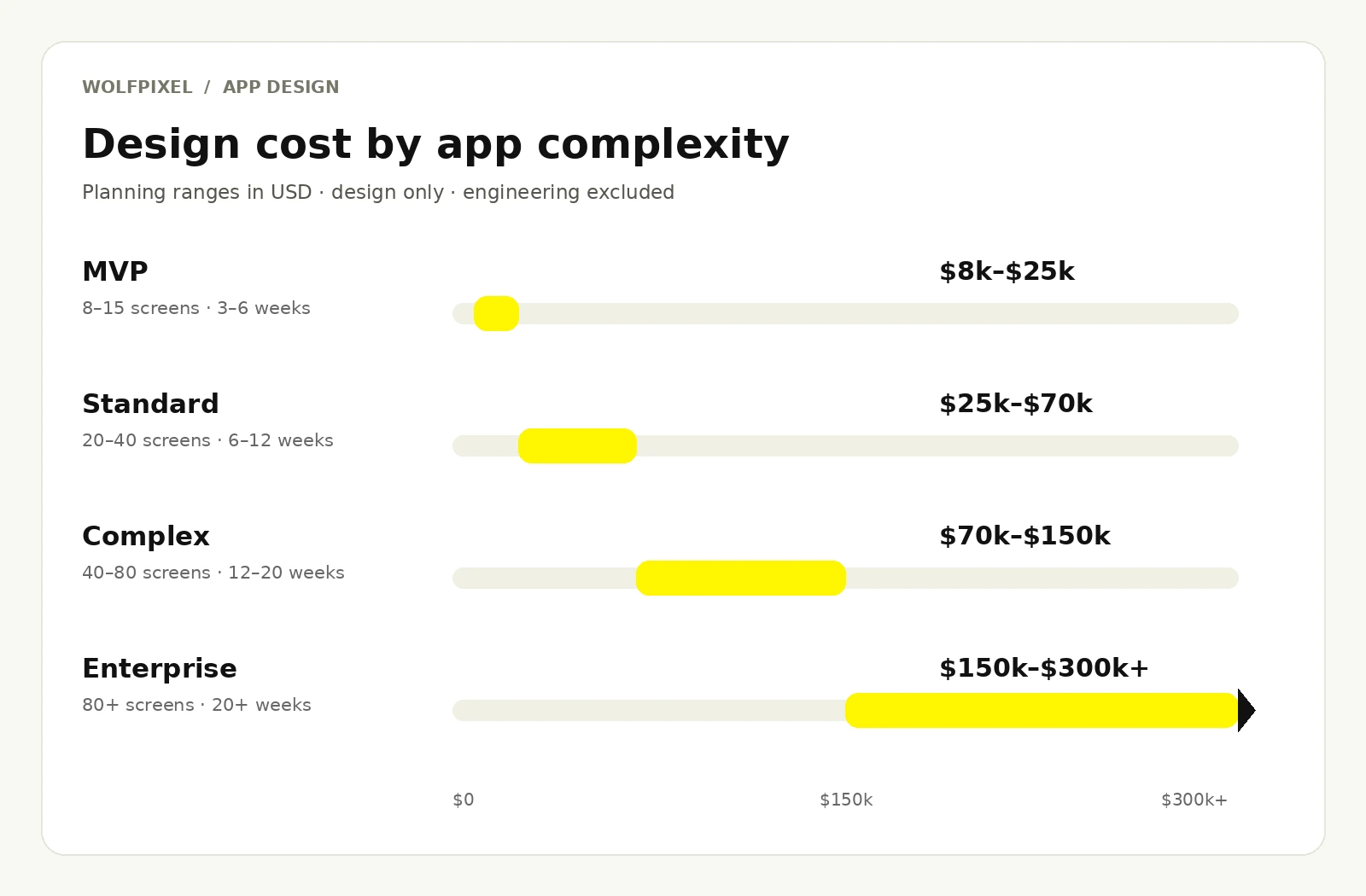
Mobile app design costs depend on the scope: plan roughly $8,000–$25,000 for a focused MVP, $25,000–$70,000 for a standard consumer app, $70,000–$150,000 for a complex multi-role product, and $150,000–$300,000+ for an enterprise program. These are indicative design-only budgeting bands, not a surveyed market average or a Wolfpixel quote. They exclude engineering, new brand identity and ongoing retainers. Screen states, research depth, platform coverage and delivery model determine the final proposal.
Ask five design partners what it costs to design your app and you will get five numbers that barely overlap. One quotes $9,000. Another quotes $85,000. A third refuses to quote at all until you sit through a discovery call. If you are a founder trying to build a board-ready budget, or a product leader defending a line item to finance, that spread is maddening.
The spread is real, and it is not usually dishonesty. It is that "app design" is not one deliverable. It is a bundle of very different jobs, including research, information architecture, interaction design, visual design, prototyping, design systems, motion, accessibility, and developer handoff. Two studios can quote the same app and be pricing completely different bundles. Until you know which bundle you are buying, comparing prices is meaningless.
This guide breaks the number apart. You will get realistic cost ranges by app complexity, a phase-by-phase app design cost breakdown, the factors that genuinely move the price, what different hiring models cost, how app redesign cost differs from designing from scratch, and a step-by-step way to scope and evaluate a partner. Everything here is framed the way an experienced design team scopes work internally, so you can read a proposal and know exactly what you are paying for.
For a broader comparison across digital products, see our UI/UX design cost guide.
The single biggest reason quotes vary tenfold is scope definition. When someone asks how much does it cost to design an app, they are usually picturing screens: colors, layouts, buttons, icons. Screens are the visible output. Research, flows, testing and handoff can account for much of the remaining work.
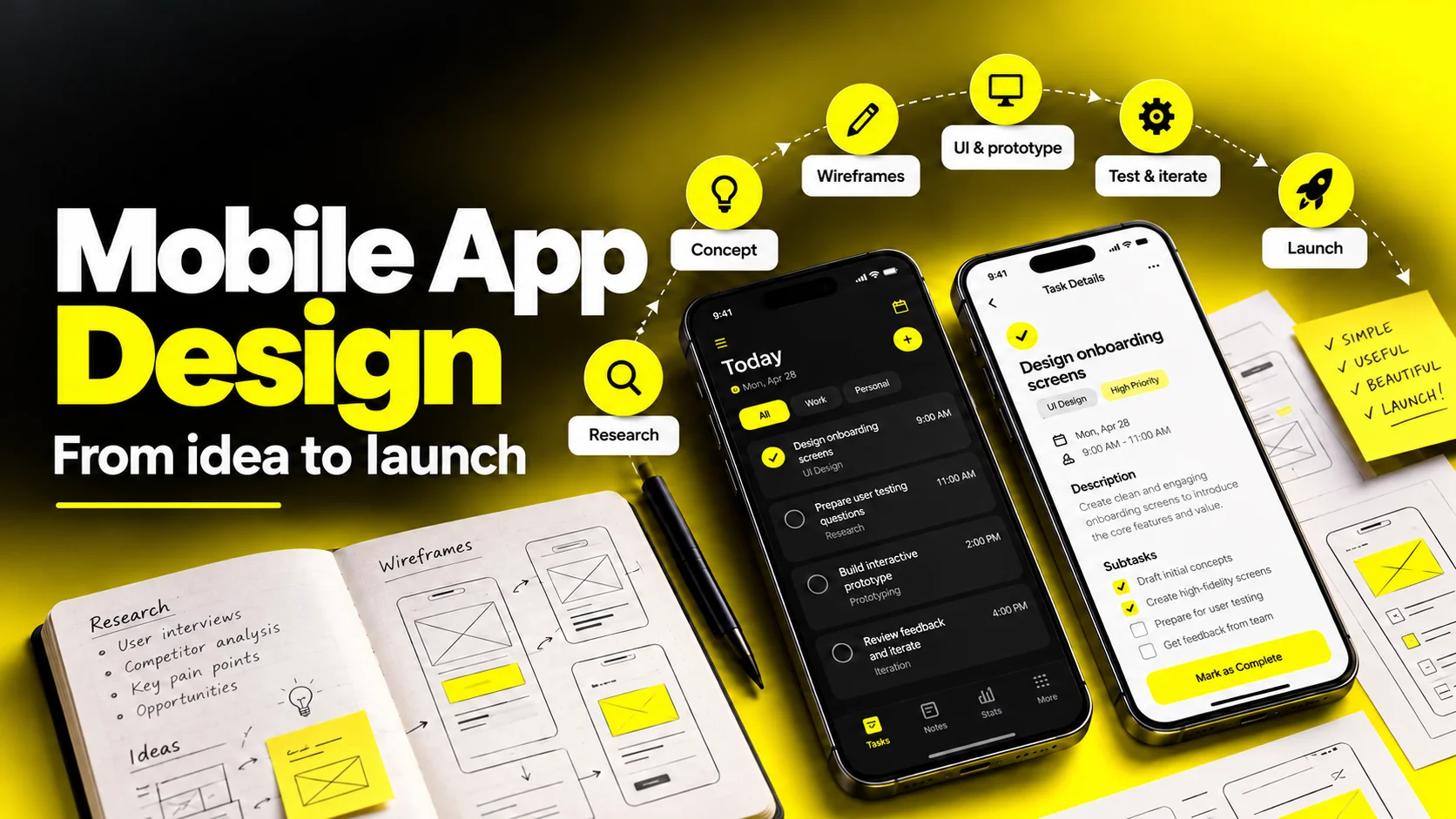
A complete app design engagement typically includes the following.
Product discovery and definition. Stakeholder interviews, competitive teardown, feature prioritization, and success metrics. This is where you decide what not to build, which is where the real savings live.
UX research. User interviews, surveys, analytics review, or usability testing on an existing product. Some teams skip it. Some teams spend 20% of the budget here. Both can be correct depending on how well you already know your user.
Information architecture and user flows. How screens connect, what states exist, and what happens when things go wrong. Weak flow work is the most common cause of expensive mid-build rework.
Wireframing. Low-fidelity structure and layout before any visual polish. Cheap to produce, cheap to change, which is exactly the point.
Visual and UI design. The high-fidelity screens, typography, color, iconography, imagery, and the overall feel. This is what most people mean by app UI design price.
Design system and component library. Reusable components, tokens, states, and documentation. It costs more upfront and saves considerably from the second release onward.
Prototyping and usability testing. Clickable prototypes that let you validate before engineers write code.
Accessibility and platform compliance. Contrast, touch targets, dynamic type, screen reader support, and adherence to Apple’s Human Interface Guidelines or Material Design.
Motion and micro-interactions. Transitions, loaders, and state animations that make a product feel finished.
Developer handoff and design QA. Specs, annotations, asset export, and reviewing builds against the designs. Skipping this is the fastest way to lose the quality you paid for.
Two other items often live adjacent to app design and get bundled inconsistently: brand identity (logo, color system, voice, brand guidelines) and app store creative (icon, screenshots, preview video). If you do not already have a brand, budget for it separately rather than assuming the app design quote absorbs it.
When you compare proposals, map each one against this list. A $12,000 quote and a $55,000 quote often differ less in quality than in how many of these lines they include.
Our mobile app design services cover product flows and app interfaces. For cross-product research and reusable components, explore our UI/UX design services. If the visual foundations are missing, scope brand identity design as a separate workstream.
Share your product idea or existing app. We’ll review the core flows, clarify what can be deferred, and discuss a realistic scope, budget and timeline before you commit.


Complexity is the strongest single predictor of price, and it is measured less by feature list than by unique screen count, number of user roles, and state complexity. A screen with six conditional states can require substantially more work than a static one, which is why "how many screens?" is an incomplete question.
Here is how engagements typically band out. These ranges assume a competent senior team and include UX, UI, prototyping, and handoff, but exclude engineering, branding from scratch, and ongoing retainers.
| Tier | Typical scope | Screens | Timeline | Typical design cost |
|---|---|---|---|---|
| MVP / single-flow app | One core job, one user role, standard patterns, minimal integrations | 8–15 | 3–6 weeks | $8,000 – $25,000 |
| Standard consumer app | Onboarding, profiles, content feed, payments or booking, light personalization | 20–40 | 6–12 weeks | $25,000 – $70,000 |
| Complex / multi-role product | Two or more user types, dashboards, real-time data, offline states, deep settings | 40–80 | 12–20 weeks | $70,000 – $150,000 |
| Enterprise or platform-grade | Multi-platform, regulated industry, accessibility certification, full design system, research program | 80+ | 20+ weeks | $150,000 – $300,000+ |
A few honest caveats about these numbers.
The low end of each band assumes discipline. MVPs land near $8,000 when the client has a clear spec, one decision-maker, existing brand assets, and tolerance for standard platform patterns. Add a second stakeholder with veto power and the same project drifts toward $20,000.
The bands overlap for a reason. A 15-screen fintech app with regulatory constraints can legitimately cost more than a 35-screen content app. Regulated categories including finance, healthcare, and anything handling identity documents carry additional compliance and edge-case work.
Per-screen pricing is a rough sanity check, not a quoting method. Studios often land somewhere between $300 and $1,500 per unique high-fidelity screen once everything is averaged out. Use it to spot a quote that is wildly off, then ignore it, because it undervalues flows and overvalues duplicates.
At the $8,000–$25,000 level, expect a focused engagement: a short discovery, user flows for the core journey, wireframes, high-fidelity screens for the happy path plus key error and empty states, a lightweight component library, a clickable prototype, and handoff. You should not expect a multi-round research program, a documented design system, or bespoke illustration. That is not a downgrade. For a pre-product-market-fit startup, it is the correct scope, because the goal is to learn fast rather than to build a permanent asset.
For a concrete scope example, our Leafy Plant mobile app case study describes plant discovery, personalized recommendations, scanning, wishlist, checkout and order tracking. It shows the breadth of flows behind an app; it does not disclose a project fee.
A proper app design cost breakdown by phase tells you far more than a lump sum. Here is how a full-scope engagement typically distributes effort, with a worked example on a $40,000 budget.
| Phase | Planning range | Share | Amount | What you receive |
|---|---|---|---|---|
| Discovery & definition | 8–12% | 10% | $4,000 | Stakeholder workshops, competitive audit, scope and success metrics |
| UX research | 5–15% | 10% | $4,000 | Interviews, analytics review, personas, journey maps |
| IA, flows & wireframes | 20–25% | 22% | $8,800 | Sitemap, user flows, low-fidelity screens, content structure |
| UI / visual design | 30–35% | 32% | $12,800 | High-fidelity screens, states, iconography, visual language |
| Design system | 10–15% | 12% | $4,800 | Components, tokens, variants, documentation |
| Prototyping & usability testing | 8–12% | 8% | $3,200 | Interactive prototype, test sessions, revision round |
| Handoff & design QA | 5–10% | 6% | $2,400 | Specs, assets, build review, fixes |
| Total | Ranges vary by scope | 100% | $40,000 | Illustrative allocation, not a quote |
Phase ranges are alternatives and do not add to a fixed total. The separate example allocation sums to exactly 100% and $40,000.
Two patterns are worth internalizing.
Visual design is the largest line but not the majority. If a proposal allocates 70% to UI screens and almost nothing to flows or handoff, you are buying a portfolio piece rather than a shippable product. Beautiful screens that no one specified, tested, or QA'd against the build are the most expensive kind of cheap.
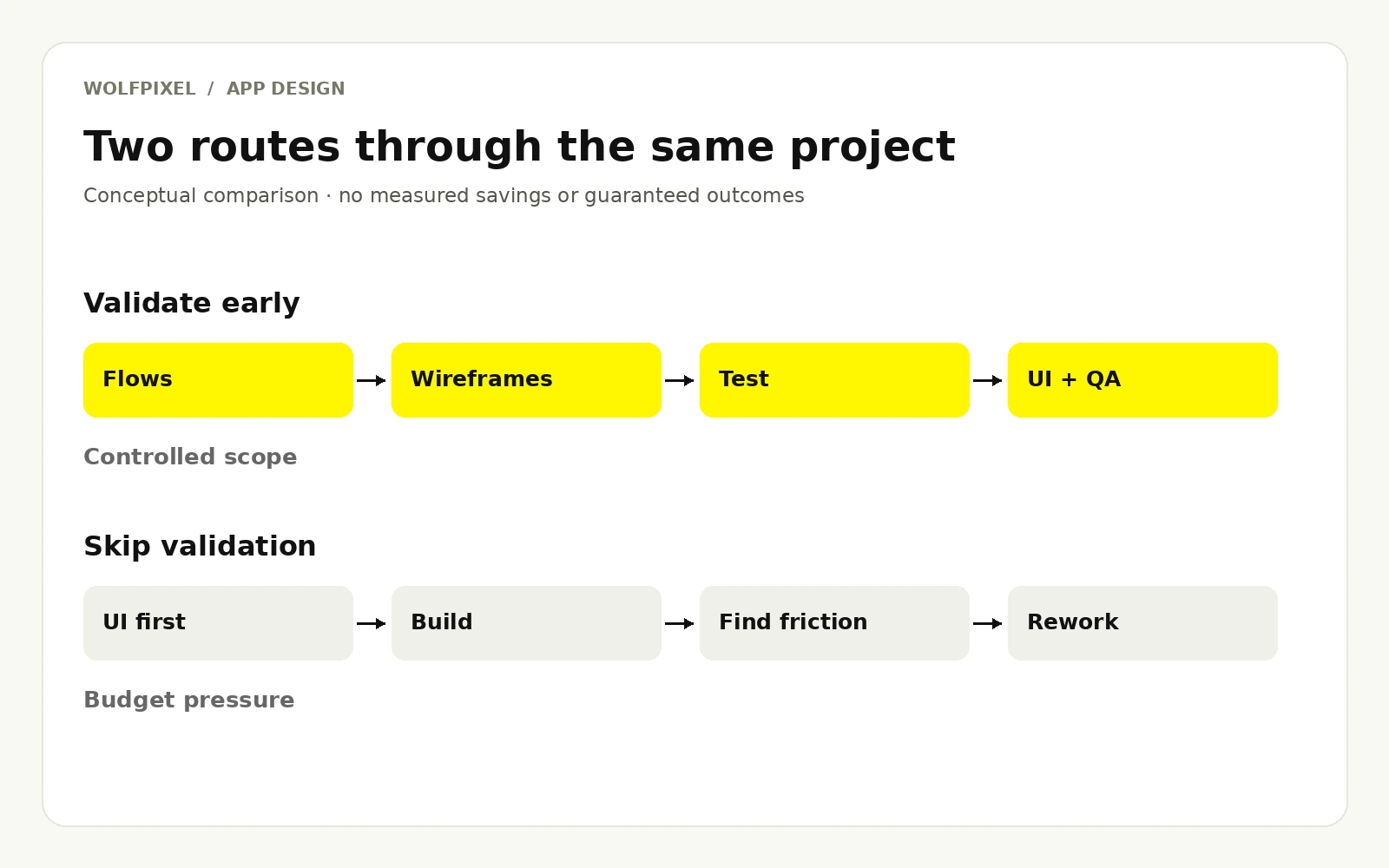
Research and QA are the first things cut and the most expensive things to skip. Cutting a $3,000 usability round to save money routinely costs multiples of that in engineering rework after a flawed flow reaches production. Design changes are cheap in Figma and expensive in Swift or Kotlin.
| Add-on | Typical cost | When it is worth it |
|---|---|---|
| Brand identity (logo, palette, type, guidelines) | $5,000 – $30,000 | Pre-launch companies with no existing brand |
| Standalone design system | $10,000 – $50,000 | Multi-squad teams, or a roadmap of 3+ releases |
| Motion design & micro-interactions | $3,000 – $15,000 | Consumer apps competing on feel and delight |
| App store creative (icon, screenshots, video) | $1,500 – $8,000 | Every consumer app; it directly affects install rate |
| Illustration or 3D asset set | $2,000 – $20,000 | Differentiation in crowded consumer categories |
| Accessibility audit & remediation | $3,000 – $15,000 | Public sector, healthcare, finance, or any regulated buyer |
| Ongoing design retainer | $4,000 – $25,000/month | Post-launch iteration, experimentation, feature velocity |
Use our published design pricing and engagement models to compare Wolfpixel’s current packages. Subscription deliverables and a complete app program have different scopes, so request a scoped proposal rather than treating the ranges above as our price list.
When a quote surprises you, one of these nine is almost always responsible.

Onboarding can hide many of these states. Our SaaS user onboarding guide explains how to plan the path from signup to first value.
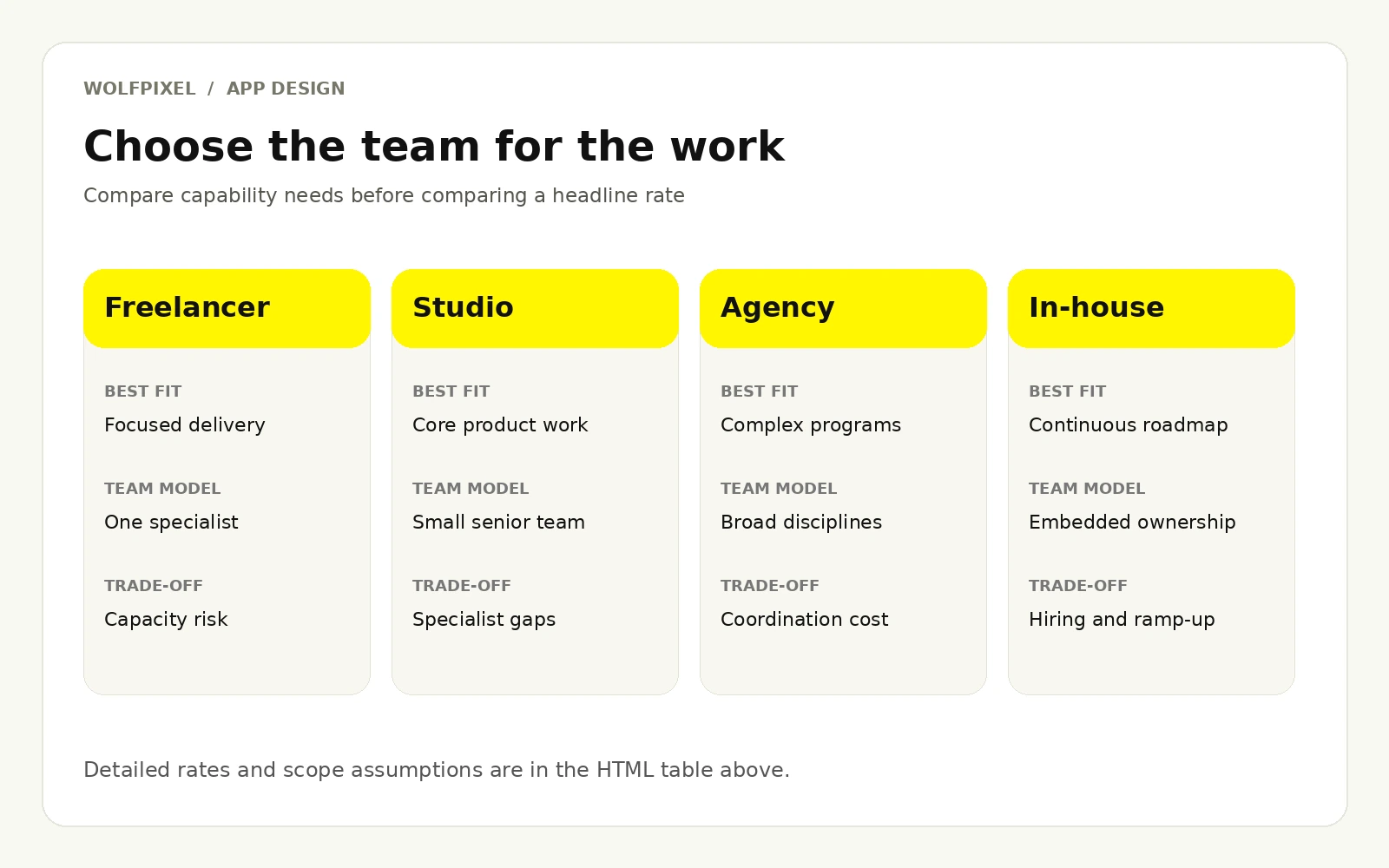
Who you hire changes the price more than what you build. Here is the honest comparison, including what each model is genuinely good at.
| Model | Typical rate | Project cost | Best for |
|---|---|---|---|
| Offshore studio | $25 – $60/hr | $6,000 – $35,000 | Budget-conscious builds, well-defined scope |
| Freelance designer (mid) | $50 – $90/hr | $8,000 – $30,000 | Focused scopes, single flows, extending an existing team |
| Freelance designer (senior/specialist) | $90 – $175/hr | $20,000 – $60,000 | Startups needing a seasoned product thinker, not just execution |
| Boutique design studio | $80 – $150/hr | $25,000 – $90,000 | Most funded startups and scale-ups |
| Full-service agency | $150 – $300/hr | $60,000 – $250,000+ | Enterprise, regulated industries, multi-platform programs |
| In-house designer (US) | $80,000 – $150,000 / year | Ongoing | Products with a continuous roadmap |
| Design subscription | $4,000 – $12,000 / month | Ongoing | Steady, unpredictable design queues |
The in-house range is annual salary only; benefits, taxes and other employer costs are additional. Subscription prices are monthly. For wage context, the U.S. Bureau of Labor Statistics reports a May 2025 median annual wage of $104,000 for web and digital interface designers. Salary is not the same as an agency billing rate or a fully loaded employment cost.
Agency rates look high until you unpack them. A $200/hour agency rate is not buying you a $200/hour designer. It covers a blended team: a design lead, one or two product designers, a researcher, a project manager, and quality review, plus the overhead of having those people available when your project needs them. That structure is why app design agency cost carries a premium and also why agencies absorb complexity that would break a solo designer.
The practical question is not "which is cheapest" but "which failure mode can I afford." A freelancer failing mid-project on a funded launch is far more expensive than the premium you saved. Conversely, paying enterprise agency rates to design a 10-screen MVP is money spent on coordination you do not need.
A blended approach often wins. Many well-run teams hire a senior freelancer or boutique studio for the foundational work (flows, visual language, core screens, design system) and then move to a lower-cost retainer or in-house hire for ongoing iteration. You pay senior rates where judgment matters and standard rates where execution is repeatable.
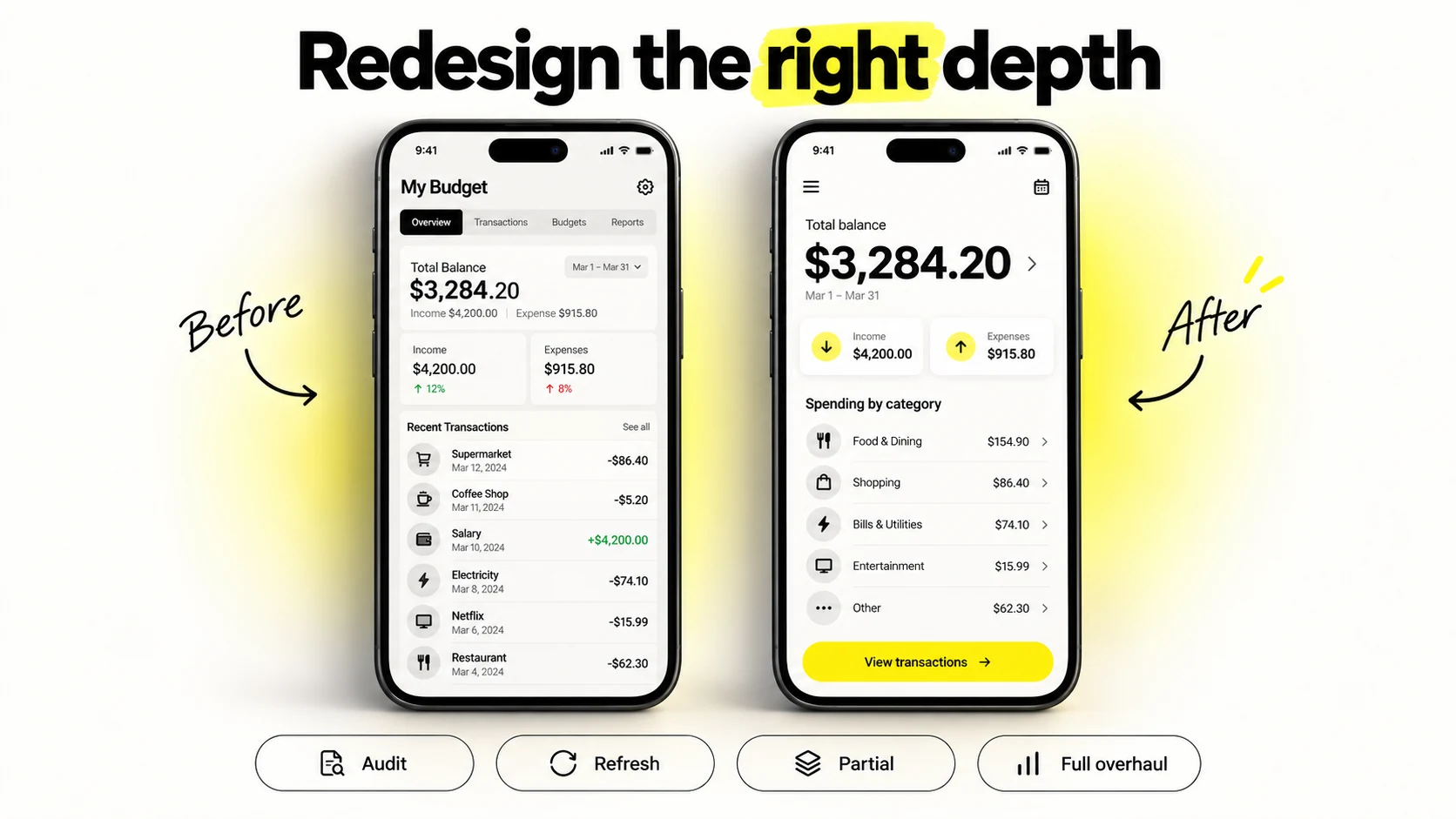
App redesign cost is frequently misjudged in both directions. Some teams assume a redesign is cheaper because "the screens already exist." Others assume it is a rebuild and over-budget dramatically. The truth depends entirely on how deep the redesign goes.
| Redesign type | What changes | Typical cost | Typical timeline |
|---|---|---|---|
| UX audit only | Nothing is redesigned; you receive a prioritized findings report | $3,000 – $12,000 | 1–3 weeks |
| Visual refresh | Color, type, spacing, icons, components. Flows and IA stay intact | $10,000 – $35,000 | 3–6 weeks |
| Partial redesign | Two or three critical flows (onboarding, checkout, core task) rebuilt end to end | $20,000 – $60,000 | 5–10 weeks |
| Full UX + UI overhaul | New IA, new flows, new visual language, new design system | $50,000 – $150,000+ | 12–24 weeks |
| Platform migration or rebrand rollout | Design applied across a full existing surface area | $60,000 – $200,000+ | 16+ weeks |
Three things make redesigns behave unlike greenfield work.
Legacy constraints add hidden hours. You are designing around an existing data model, existing engineering architecture, and existing user habits. Every proposed change gets tested against "can we actually ship this without a six-month backend project?" That negotiation takes design time.
Migration design is real work. Existing users need to be brought across without churn. That means transitional states, onboarding for the new experience, feature parity mapping, and often a phased rollout design. Greenfield apps have none of this.
The audit pays for itself. Starting with a $5,000–$10,000 UX audit before committing to a $60,000 overhaul is one of the highest-leverage spends available. It frequently reveals that three flows, rather than the whole product, are responsible for most of the drop-off, which converts a full overhaul into a partial redesign and saves the majority of the budget.
If you are considering a redesign primarily because the app "looks dated," pause and instrument first. Analytics and session recordings usually show whether the problem is aesthetic or structural. A visual refresh applied to a broken information architecture produces an attractive app that still fails.
For migration and rollout considerations, read our SaaS redesign guide. To scope an audit before redesign, discuss your current flows through our UX audit and product redesign services.
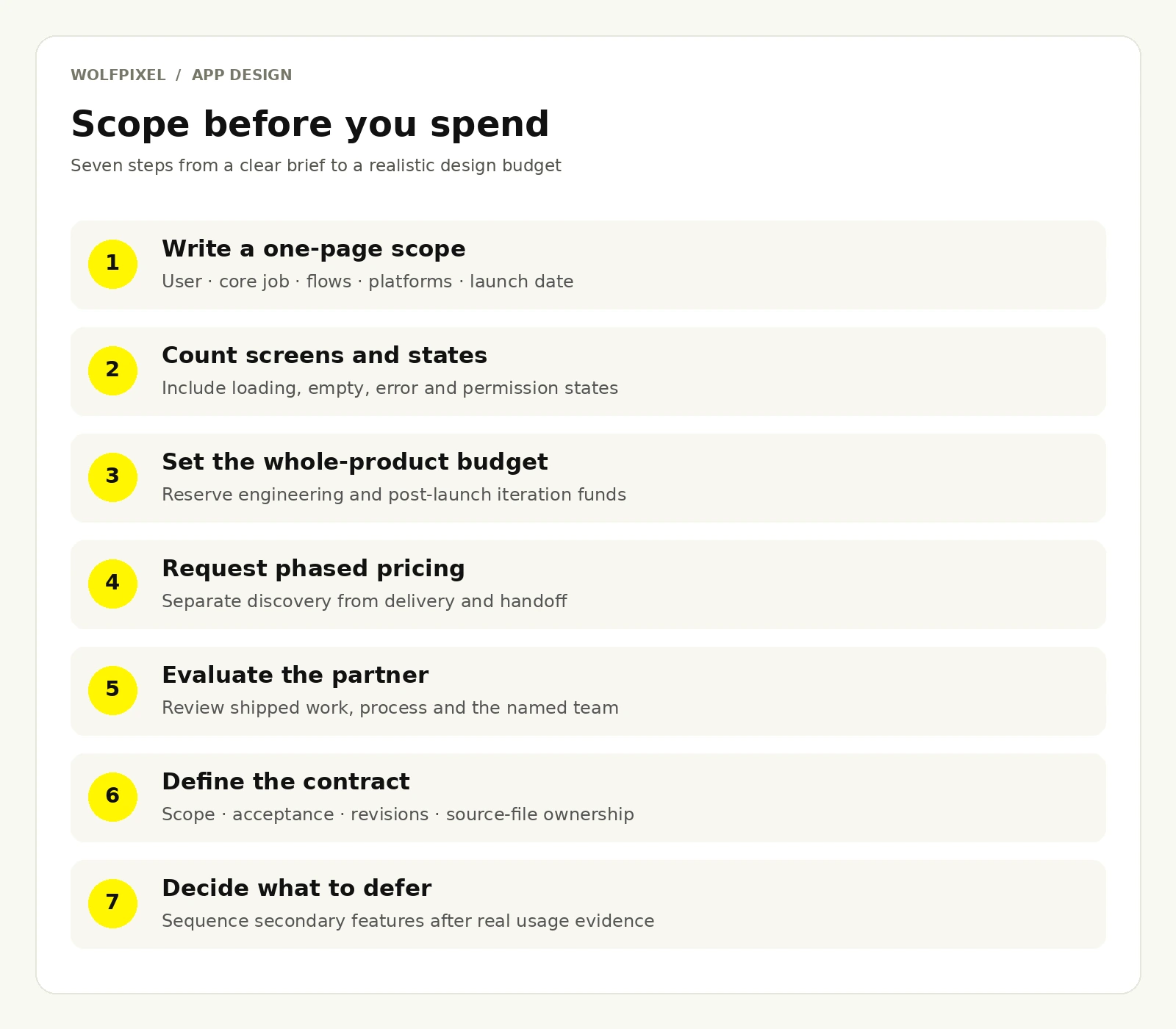
This is the part most cost guides skip. Knowing the number does not help unless you can build a defensible budget and pick the right team. Here is a process that works.
Include your core user, the single job the app must do, your must-have flows, your platform targets, your launch date, and what already exists (brand, research, spec, existing app). Partners quoting against a clear one-pager give you comparable numbers. Partners quoting against a vague idea pad heavily to protect themselves, and you pay for that uncertainty.
List every screen, then for each one note the states it needs. Multiply. This exercise routinely doubles a founder's initial estimate, which is exactly why it is worth doing before you commit to a budget rather than after.
Design typically represents 15–30% of an app's total build cost. If your entire runway for version one is $80,000, allocating $60,000 to design leaves you with designs you cannot build. Set the design budget as a proportion of the whole, not in isolation.
Ask for discovery priced separately from the rest. A paid discovery sprint of $3,000–$10,000 lets both sides validate fit before a six-figure commitment, and it produces a far more accurate estimate for the remaining phases. Good partners welcome this. Partners who insist on all-or-nothing pricing before understanding your product are guessing.
Use these when reviewing candidates:
Some spend is better made after launch, once you have real usage data. Advanced personalization, elaborate motion systems, tablet layouts, and secondary user roles are common candidates. Deferring them is not cutting corners. It is sequencing investment against learning.
Review our product design portfolio alongside the named team and process. You can also see the Wolfpixel senior design team before selecting an engagement.
Most budget overruns are not caused by expensive designers. They are caused by predictable process failures. These are the ones that recur most often.
Starting UI before the flows are settled. High-fidelity screens built on unstable flows have to be rebuilt every time the structure shifts. Wireframes exist precisely because changing them is nearly free. Teams that skip them to "see something real" almost always pay for the same screens twice.
Designing every feature on the roadmap for version one. The roadmap is a hypothesis. Designing eighteen months of hypothetical features before a single user touches the product is the largest avoidable expense in app design. Design the core loop, ship it, then design against evidence.
Unclear decision authority. When no one can give final approval, feedback accumulates instead of resolving. Nominate a single decision-maker per phase and require consolidated feedback. This one change saves more money than any rate negotiation.
Treating design as a phase that ends at handoff. Designs get compromised during implementation, sometimes unintentionally. Without design QA, you ship an approximation of what you paid for and then pay again to fix it post-launch.
Choosing on price alone. The cheapest quote is often the one that scoped the least. It converges toward the market rate through change orders, and you lose the ability to plan. Compare inclusions before comparing totals.
Ignoring the design system until release three. Every screen built without shared components is technical and design debt. The system costs 10–15% upfront and compounds in savings across every subsequent feature.
Buying screens instead of outcomes. A deliverable list is not a result. Anchor the engagement to something measurable, such as activation rate, task completion, or support ticket volume, and review against it.
Skipping accessibility until legal asks. Retrofitting contrast, touch targets, and screen reader support across a finished product costs multiples of designing it in from the start, and in some markets it is not optional.
The reason design commands these prices is that interface decisions determine acquisition economics. Onboarding friction directly affects activation. Confusing navigation drives support volume. A weak app store presence raises effective cost per install. Poor first-run experience compounds through churn.
None of this means spending more is automatically better. It means the correct question is not "how do I minimize app design cost" but "what is the smallest investment that produces a product people can actually use and return to." For most early-stage teams, that number is higher than they hoped and considerably lower than an enterprise quote suggests.
For the connection between product friction and business outcomes, read why SaaS products stop converting.
Sometimes. Full-service development agencies often bundle design into a single development quote, which typically allocates 15–30% of the total to design. Standalone design studios price it separately. Always ask for the design line item to be itemized so you can evaluate what you are actually getting.
An MVP design typically takes 3–6 weeks, a standard consumer app 6–12 weeks, and a complex multi-role product 12–20 weeks or more. Timeline is driven as much by your review speed as by the designer's capacity, so decision-making cadence is worth planning deliberately.
Fixed price works when scope is genuinely well defined and you want budget certainty. Hourly suits exploratory or evolving work where a fixed price would be padded for risk. Retainers fit ongoing post-launch iteration. Many engagements use a fixed-price discovery followed by hourly or milestone-based delivery.
They meaningfully reduce time spent on early exploration, asset generation, and repetitive layout production, which can compress certain phases. They do not replace the judgment-heavy work: deciding what to build, structuring information, resolving edge cases, and testing with real users. Expect efficiency gains within phases rather than removal of phases.
Templates can work for a genuinely simple internal tool or a first prototype. For anything user-facing and competitive, a template gets you a generic product with mismatched patterns, because the template was designed for a different user and a different job. Templates save on visual design and save nothing on UX.
At minimum: source files with full edit access, organized and named layers, a component library, a clickable prototype, exported assets in the required densities, a specification or annotation layer for engineers, and any research artifacts produced along the way. Get this list into the contract.
An iOS-only scope can cost less than designing for both platforms at once because there is one set of conventions to address. Android adds platform-specific navigation, components and device testing. A shared design system can reduce duplicate work, but the actual uplift depends on the product.
Enough to validate the core loop and no more. For most pre-seed teams that means a focused MVP engagement in the $8,000–$25,000 range, deliberately excluding features that have not been validated. Preserve budget for iteration after launch, because the second version informed by real usage is usually worth more than a more elaborate first one.




.svg)



.svg)

.svg)

.svg)

.svg)

.svg)
.svg)
