


October 27, 2026
UI/UX Design
UI vs UX Design: Key Differences Explained for 2027



The main difference between UI and UX design is scope. UI design shapes the interface people see and operate: its layout, controls and feedback. UX design addresses the wider experience of achieving a goal, including the journey, information and usability. UI is part of UX, and the work overlaps.
A checkout can look polished and still hide delivery costs until the last step. A dashboard can contain the right information and still make it difficult to read. The first problem needs a change to the journey; the second may need a change to the interface. Many products need both.
This guide explains UI vs UX design through practical differences, one shared invoice example, role boundaries and a short diagnostic you can use on your own product. It is for founders, product teams and people learning how digital design works.
By Maniruzzaman Jubayer, Wolfpixel’s Co-founder & COO and Product Design Specialist. His professional profile describes product-design and team-leadership work across SaaS, fintech and AI; his role is also listed on the Wolfpixel team page. Wolfpixel provides the design services mentioned here. Portfolio images show our published design work; illustrative examples are labelled and are not evidence of measured business results.
2027 planning note: prepared in October 2026 using currently available sources. The year in this guide refers to planning ahead, not to future research findings or guaranteed changes in design practice.
UI stands for user interface. UX stands for user experience. UI design makes the interface understandable and usable. UX design asks whether the whole experience helps the right person accomplish the right task. A useful comparison separates their focus without creating a rigid wall between them.
User interface design covers the parts of a digital product that people see and operate. That includes typography, spacing, navigation controls, buttons, input fields, icons, responsive layouts and feedback. A disabled button, visible keyboard focus and a helpful error message are interface decisions, too. UI is more than decoration.
User experience design investigates people’s needs and shapes how a product or service meets them. It can include research, information architecture, interaction design, content, prototyping and evaluation. The experience also depends on product capabilities, service policies and technical performance, which designers influence alongside other teams.
Nielsen Norman Group’s definition of UX includes people’s interactions with a company and its products and services. That wider scope explains why an attractive screen cannot compensate for a missing capability or a failed service.
| Dimension | UI design | UX design |
|---|---|---|
| Main question | Can people perceive, understand and operate this interface? | Can people achieve their goal through the overall experience? |
| Typical focus | Visual hierarchy, controls, states, layout and consistency. | User needs, task structure, information, journeys and usability. |
| Common activities | Design components, responsive screens and interaction feedback. | Investigate problems, map flows, prototype and evaluate tasks. |
| Common outputs | Screen designs, component states, visual specifications. | Research findings, task flows, wireframes, test findings. |
| Example | Make a form label readable and its error state actionable. | Remove an unnecessary requirement that blocks form completion. |
| Evidence | Interface checks plus observation of people using it. | Task outcomes, research evidence and experience feedback. |
| Relationship | A major contributor to the experience. | The wider experience that includes the interface. |
The shortcut “UI is how it looks; UX is how it works” is easy to remember, but incomplete. UI also governs interaction, and visual design changes the experience. Figma’s UI and UX guide likewise describes UI as part of the broader UX discipline.
For a wider introduction to the discipline, use our complete guide to UI/UX design. The comparison here stays focused on the distinction.
Share the task, the screen and the evidence you have. Discuss the right UI/UX scope before committing to a redesign.


UI design vs UX design is easier to compare when the person and task stay the same. Imagine a founder using an invoicing app to create and save a first invoice. This is an illustrative scenario, not a Wolfpixel client result. The task being evaluated is a correctly saved draft, ready to complete and send later.
The team investigates what the person needs to start. Does the app need full company information before a draft can be created? Can tax settings wait until they become relevant? What happens when the user has no customer details yet? Which step explains how to recover an unfinished invoice?
A UX change might let someone create a draft before completing billing setup. That changes the sequence and requirements. It should be checked against business, security and operational constraints rather than assumed to be better simply because it removes a step.
On the draft invoice screen, the designer establishes a readable type hierarchy, clear field labels and a prominent primary action. Required and optional fields are distinguishable. A validation message explains which field needs attention. Loading and success states make the result of a click clear.
A UI change might replace an ambiguous arrow with a labelled “Save draft” button and add a visible keyboard focus state. The underlying journey may remain the same, but people can operate it with more confidence.
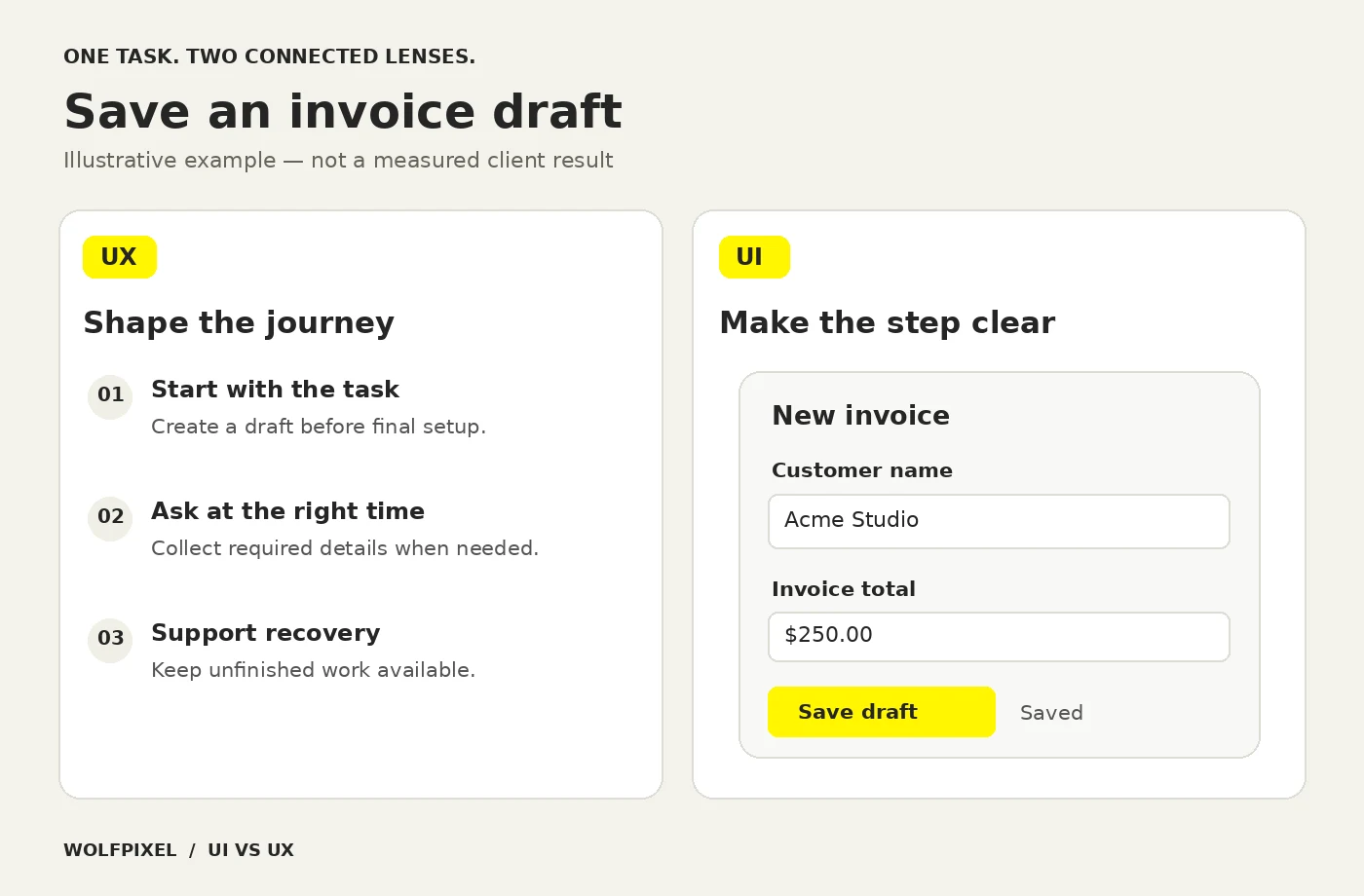
Test a meaningful task from beginning to end. Ask participants to create and save an invoice without explaining the interface to them. Observe where they hesitate, what they misunderstand and whether they can recover from an error. Then inspect the implementation, because a prototype cannot prove that a live product saves data correctly.
Suppose people can see the button but do not understand why company registration is mandatory. Making the button brighter will not explain the policy. If people understand the task but cannot distinguish a disabled field from an editable one, reorganizing the entire journey may be unnecessary. The evidence should decide the scope.
The following are candidate explanations for the same illustrative invoice task. None is a reported test finding. Writing down alternatives helps a team avoid turning a preference for new screens into an assumed user need.
| Candidate problem | Proposed change | Evidence to seek |
|---|---|---|
| People cannot find the save action. | UI: use a clear label and consistent action placement. | Can participants find and explain the action without prompting? |
| People cannot finish because setup requests unavailable information. | UX: reconsider when information is required, subject to product constraints. | Can users complete the task, and can the business safely support the revised sequence? |
| People save twice because the result is unclear. | Both: show persistent save feedback and define recovery behavior. | Do participants recognize success, and does the implementation prevent duplicate records? |
The lesson is practical: keep the user’s goal constant, compare plausible causes and choose evidence that could prove your proposed fix wrong.
UI and UX are areas of work. Job titles describe how an organization distributes that work. A UX designer may design detailed interfaces; a product designer may lead research; a UI/UX designer may cover both. Read the responsibilities and evidence of ability before drawing conclusions from a title.
| Work area | UX contribution | UI contribution |
|---|---|---|
| Research and problem framing | Study needs, tasks, constraints and existing friction. | Explore how interface patterns affect comprehension and use. |
| Structure and navigation | Define information architecture and task pathways. | Make navigation recognizable and states understandable. |
| Prototypes | Model behavior, sequence and alternative paths. | Make important interactions and visual feedback realistic. |
| Accessibility | Include varied needs in research and task evaluation. | Specify legibility, focus, target sizes and control states. |
| Handoff | Explain rationale, behavior, exceptions and requirements. | Specify components, responsive behavior and visual details. |
| Evaluation | Assess completion, confusion, effort and satisfaction. | Check interface usability and implementation consistency. |
Neither column works independently of engineering, content, product management or research specialists. A screen reader’s experience, for example, depends on semantic implementation as well as the visual specification.
For a small product, the useful output is a shared description of the experience: the task being supported, the evidence behind important decisions, key screens, component behavior and exceptions. A folder of attractive screens without error states or interaction notes leaves important decisions unresolved.
Ask to see the reasoning as well as the final artifact. A wireframe is not evidence that research happened. A component library is not evidence that users understand a workflow. Each deliverable should answer a question or help someone build, evaluate or maintain the product.
A design system can make interface decisions repeatable, but it does not decide whether you have chosen the right task or feature.
UX understanding usually informs the first structure, while interface exploration makes ideas concrete enough to examine. The work then loops: a prototype exposes a gap, testing challenges an assumption, and technical constraints reshape the design. UI does not begin only after every UX question has been permanently settled.
These steps describe collaboration, not a complete project methodology. Our UI/UX design process guide covers the broader workflow in detail.
Usability measures such as task efficiency and errors, alongside completion and feedback, can reveal problems, but a single metric does not tell you whether the cause is UI or UX. More clicks may mean engagement or confusion. A shorter task time may reflect a better flow or someone giving up early.
Define what completion means before comparing versions. For an invoice draft, that could be a correctly saved invoice with the required details. Pair behavioral data with observation, account for changes in audience and implementation, and avoid crediting every business improvement to design alone.
Start with a visible symptom and a testable explanation. “The app needs a redesign” is a conclusion. “New users cannot find a saved invoice” is a problem you can investigate.
| Observed symptom | Useful first question | Likely work to investigate |
|---|---|---|
| Users cannot read or distinguish controls. | Are hierarchy, contrast, labels and states clear? | UI review, accessibility checks and implementation fixes. |
| Users ask what they should do next. | Do they understand the task and the available paths? | UX investigation with UI and content review. |
| A task requires repeated work. | Is every requirement necessary at this point? | Flow, policy, data and technical review. |
| People hesitate before a high-impact action. | Do they understand the consequences and recovery options? | Interaction, content, safeguards and feedback. |
| A clear button produces an unexpected result. | Does the behavior match the promise? | UI wording plus UX, product and engineering investigation. |
| A product looks consistent but still loses users. | Where do people fail to receive the value they expected? | Broader UX and product investigation; styling alone is unlikely to explain it. |
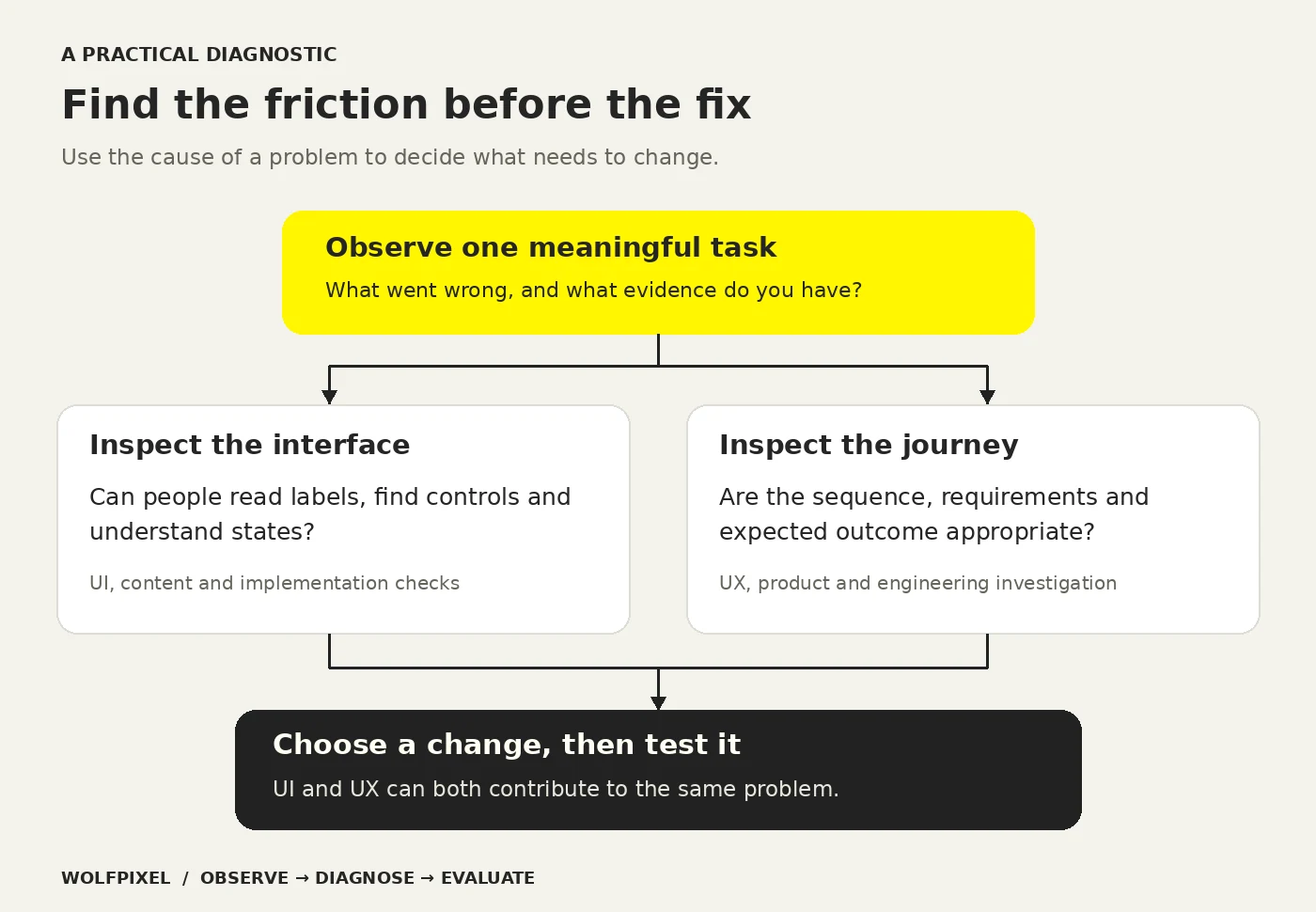
Choose a task that matters, such as booking a consultation, adding a customer or sending a report. Record the starting point, expected outcome and current failures. Review a few relevant sessions or observe people attempting it. You are trying to understand the cause, not collect praise for a preferred redesign.
If the issue is local and well understood, a focused interface fix may be enough. If the goal, sequence or required information is unclear, investigate the experience before polishing screens. For an existing product with several connected problems, a UX audit can organize findings and priorities.
When those findings need to become a design brief, Wolfpixel’s UI/UX design team can help connect flow decisions, interface states and developer handoff. Start with the task and evidence so the scope follows the problem.
Tools do not define the discipline. Figma can hold a visual design, a wireframe or an interactive prototype. The purpose of the work determines whether you are exploring an interface, a task flow or both.
A collaborative design tool can help a team explore layouts and components. A research repository can organize observations. Analytics and usability testing tools can reveal behavior or support evaluation. None of them automatically supplies representative research, sound interpretation or a successful experience.
Figma’s official documentation describes current AI-assisted design and prototyping features. Check current capabilities and access when selecting software; tool names and feature sets change faster than the underlying design questions.
There is no reliable universal rule that UI or UX pays more. An entry-level UI role and a senior research role are not a meaningful comparison. For a UI/UX designer salary comparison, match the country, seniority, employment type, responsibilities and compensation definition. Do not treat an unsourced global average as a personal earning forecast.
Look for practice in both making and evaluating decisions: understanding a problem, structuring a task, designing controls, prototyping and testing with relevant participants. Feedback should address reasoning and evidence, not just whether a screen looks fashionable. If a course covers only software commands, treat it as tool training rather than a complete introduction to UX.
A beginner can build one small case study around a real task. Explain the initial problem, what you learned, alternatives you considered and what changed after evaluation. Label assumptions and practice projects honestly. A defensible decision is more persuasive than a polished screen paired with invented research.
For 2027 planning, keep the distinction grounded in the work rather than predictions about job titles. Faster screen generation does not remove questions about user intent, permissions, errors or whether the product delivers the promised result.
An AI-generated prototype can help a team explore alternatives. It is still a proposal. A plausible persona or simulated response is not a participant you have observed. Nielsen Norman Group’s guidance on synthetic users explains why generated research should not replace research with real people.
For an AI-assisted invoice flow, UX questions include when to ask permission, what needs human confirmation and how to recover from a mistaken action. UI questions include how to show a suggestion, distinguish it from saved data and make confirmation clear. Both need attention; speed of generation does not prove quality.
Readable labels and visible focus are interface concerns. An understandable sequence, recoverable errors and a task that works with assistive technology affect the wider experience. Design, content and engineering need to address them together.
As one concrete example, WCAG 2.2’s minimum target-size criterion generally calls for pointer targets of at least 24 by 24 CSS pixels, with specified exceptions and spacing provisions. That is one criterion, not a complete accessibility checklist or proof that a whole product is accessible.
Wolfpixel’s Crimino CRM dashboard is a useful visual reference for information hierarchy, grouping and interface consistency. You can inspect the visible navigation, charts and data presentation in the published work.
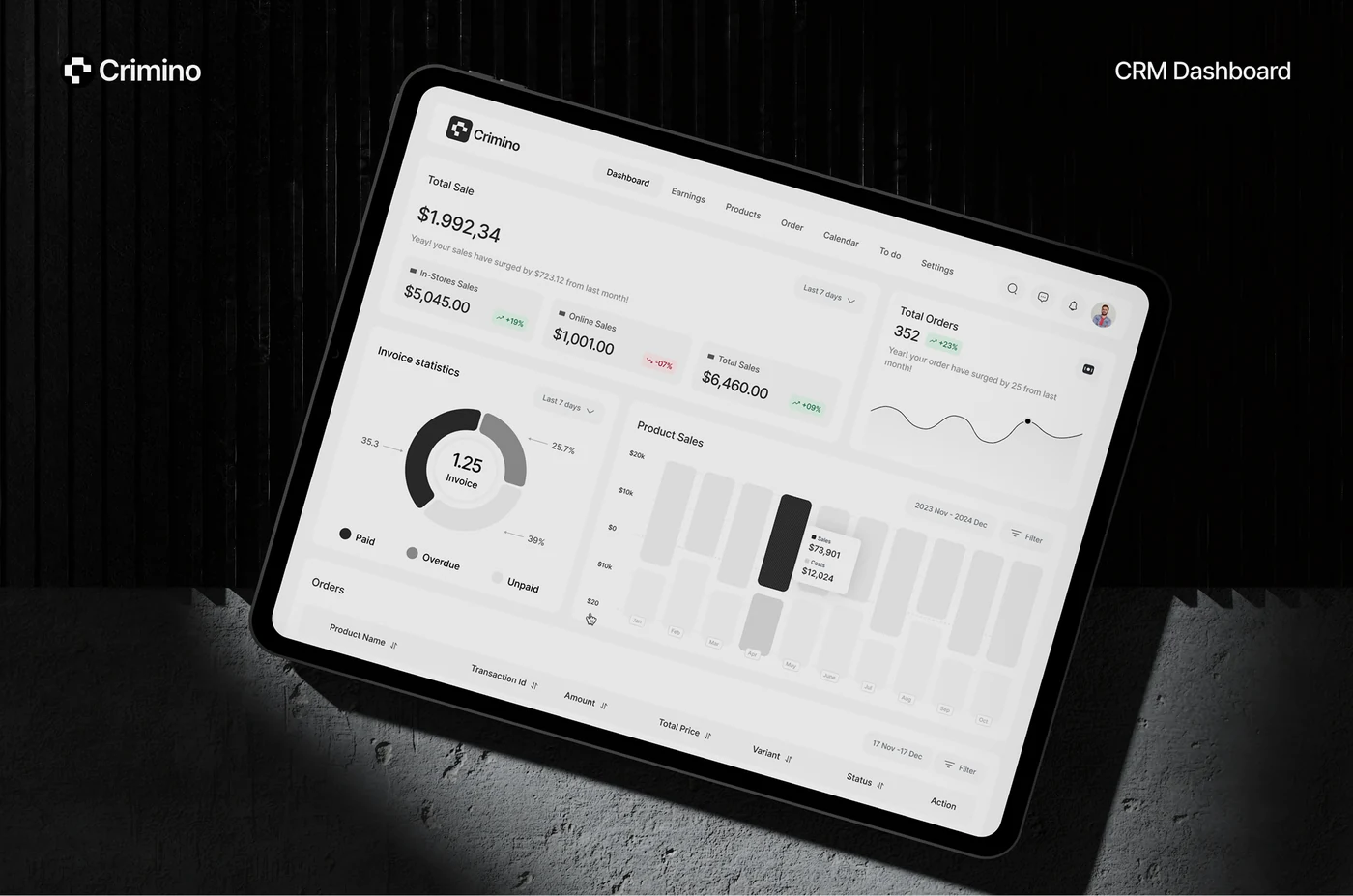
A screenshot alone cannot establish whether a salesperson can find the right contact, interpret a chart correctly or complete an invoice. Those are questions for task-based evaluation of an implemented experience. When reviewing UI/UX design examples, separate what is visible from what has been tested.
These are inspection questions derived from a visible portfolio screen. They make the example useful without inventing a client interview, usability score or performance improvement.
Before discussing a design change, write down these six things:
An illustrative brief could read: “Freelancers need to save an invoice draft. We suspect the saved state is unclear. We will observe the current task, test persistent feedback if needed and check the implementation.” That brief connects the UI decision to a UX outcome without assuming that visual polish solves everything.
The distinction to keep: UI is the interface through which an interaction happens. UX is the experience of trying to achieve something through the product or service. Improving the interface is one way to improve that experience; the cause of a problem determines whether it is enough.
If you can name the symptom but cannot tell whether it comes from the interface or the journey, bring three things to a design conversation:
Explore our UI/UX design services for product teams to understand the available scope, or discuss a specific workflow with Wolfpixel. We can use that context to discuss whether a focused interface change, flow investigation or broader engagement is appropriate.
Sources and author-role references checked October 27, 2026. The invoice scenario and diagnostic illustrations are explanatory examples. The Crimino screen is published Wolfpixel portfolio work; no measured project result is claimed.
Neither role is inherently better. UX work is useful when the problem concerns needs, structure or the broader journey; UI work focuses on making the interface clear and operable. For a career, compare the actual activities you enjoy. For a project, identify the problem and the skills needed rather than ranking titles.
Neither consistently pays more across all markets. Location, seniority, specialization, employer and the scope of the role can change the comparison. Use current local data for equivalent positions and distinguish base salary from total compensation.
They involve different challenges. UX often requires working through ambiguous needs, conflicting evidence and constraints. UI requires careful visual judgment, interaction detail, accessibility and consistency across states and devices. Difficulty depends on the task and your existing skills; neither is an easy substitute for the other.
Figma is used for both. Designers can create interface layouts and components, explore wireframes and build prototypes in it. Using the tool does not by itself establish whether the underlying user problem has been understood or the proposed experience has been validated.
UI means user interface, and UX means user experience. UI refers to the interface people operate; UX refers to their broader experience of using a product or service to achieve a goal.
Yes. Some UI/UX and product designers work across research, flows, interfaces and evaluation. The appropriate arrangement depends on the complexity of the product and the person’s skills. Covering both in a job title does not prove equal depth in every activity.
Understanding the user’s task and constraints should inform initial design. In practice, flow design, interface exploration and testing inform each other through iteration. Treating UX as permanently finished before any UI work starts can hide useful feedback.
Coding is not required for every design role, but understanding implementation helps designers collaborate with engineers. Prototyping tools can model behavior without production code. The live experience still needs appropriate engineering, accessibility and performance checks.
They can help you discover different perspectives and questions to investigate. Treat anonymous role descriptions, salary figures and career advice as anecdotes until verified. Check the context, location and date, and use primary documentation or relevant research for technical claims.
Learn the relationship first, then choose a small task to practice. Understand a user need, sketch a flow, design the interface and observe someone trying it. You can specialize as your interests develop, while retaining enough knowledge of the other discipline to collaborate effectively.




.svg)



.svg)

.svg)

.svg)

.svg)

.svg)
.svg)
