


October 22, 2026
Branding
Branding vs Brand Identity vs Logo Design: Key Differences


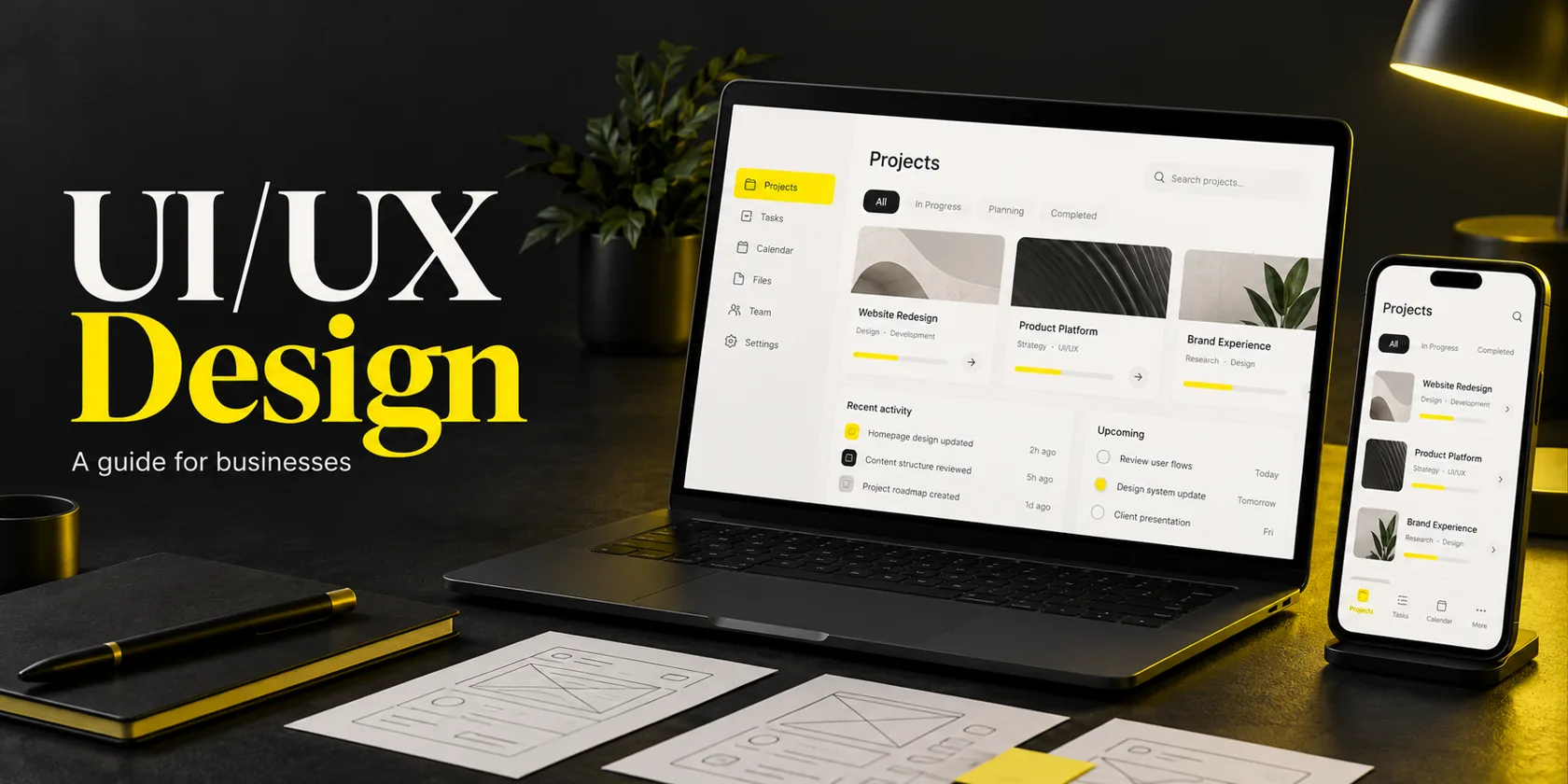
UI/UX design is the process of making a digital product useful, understandable and easy to use. User experience (UX) design shapes the journey people take to complete a task. User interface (UI) design shapes the screens, controls and feedback that guide them through it.
Think about the last time you abandoned a signup, struggled to find a report, or wondered whether a payment had gone through. Those moments are design problems with business consequences. Changing the button color might help one of them. Understanding the task, the uncertainty and the surrounding workflow is what tells you which change actually matters.
I’m Maniruzzaman Jubayer, Co-founder & COO and Product Design Specialist at Wolfpixel, with 7 years of experience across websites, apps, dashboards and digital products. This guide is for founders, business owners and product teams deciding what UI/UX work they need, what to expect from it, and how to judge the result. See Wolfpixel’s team and company background for the people behind the work.
User experience design is the work of understanding people’s needs and shaping the journey that helps them achieve a goal. It includes research, content structure, task flows and testing. For a booking product, UX covers finding availability, comparing options, confirming a reservation and recovering when something goes wrong.
User interface design is the work of designing the screens and interactive elements people use. It covers layout, typography, buttons, forms, navigation and feedback. On that booking product, UI makes the selected time obvious, labels the confirmation action and explains a failed request clearly.
UX and UI design are connected responsibilities. Research can change what the screen needs to show, and a prototype can reveal a missing step in the journey. Agree who owns the decisions rather than expecting the work to happen in isolated stages.
A booking page can look excellent while hiding the cancellation policy until the final step. That is a journey and content problem. The same page can have a sensible sequence but tiny controls and unreadable text. That is an interface problem. Either can stop someone from finishing.
Nielsen Norman Group’s definition of user experience includes the customer’s interactions with a company, its services and its products. That broader view matters: support, delivery and the actual service can undermine an otherwise well-designed app.
| Aspect | UX design | UI design |
|---|---|---|
| Main question | Can people achieve their goal? | Can people understand and operate this interface? |
| Typical work | Research, task flows, structure, testing | Layout, typography, controls, visual and interaction states |
| Example decision | When should an account be required? | How should the account form explain and handle errors? |
| Useful evidence | Task success, observed difficulties, feedback | Control discoverability, readability, consistent behavior |
| Common output | Research findings and tested flows | Responsive screens and reusable components |
No. A useful interface communicates what is clickable, what changed, what needs attention and what happens next. Loading, empty, error and success states are part of UI design. So are keyboard focus, responsive behavior and clear labels. A beautiful static screen can miss all of these.
Product design often includes UI and UX alongside wider product decisions such as priorities, feasibility and adoption. Web design describes a medium: it can include both UX and UI for a website. Development turns the agreed behavior into working software. Titles overlap, so agree on the work and ownership rather than relying on a job label.
If your brief mainly concerns color, type and hierarchy, our guide to visual design principles explains that part of the work. If people cannot complete a task, investigate the full journey before choosing a visual refresh.
Share your website or product, one difficult customer task and any supporting evidence. Discuss a focused UI/UX scope with Wolfpixel, from discovery and prototypes to developer handoff.


UI/UX design can make the path between customer intent and a useful result clearer. That can support conversion, activation, retention and operational efficiency. The value depends on the problem being solved, the quality of implementation and whether the product offers something people want. There is no universal return that every redesign produces.
A visitor may understand your offer but hesitate because a form asks for unexplained information, pricing is hard to compare, or the confirmation is unclear. Research helps you distinguish a confusing journey from weak demand. Design then gives the team a specific change to test rather than a general instruction to “improve conversion.”
A completed signup is the beginning of adoption. For a project tool, the first result might be creating a real project and assigning a task. For a booking service, it might be receiving a confirmed appointment. Our guide to SaaS user onboarding and activation explains how to work backwards from that first meaningful outcome.
When people can understand an invoice, recover from a failed upload or change a booking themselves, they may need less assistance. Look at repeated support questions before redesigning. They often reveal unclear content, missing feedback or an unsupported task. Track the relevant support category after release rather than assuming all tickets will fall.
A shared problem statement and a tested prototype give founders, product managers and engineers something concrete to assess. They reduce dependence on the most senior person’s taste. Research does not remove uncertainty, but it makes assumptions visible and helps the team decide what to learn next.
If customers struggle to use an existing website or product, Wolfpixel’s UI/UX design services can help define the problem, explore a usable solution and prepare it for implementation. Start the conversation with the task that is failing, not a list of screens you want repainted.
The examples below are illustrative product scenarios, not client case studies or measured before-and-after results. Each separates the user problem, the design decision and the evidence you would need to evaluate it.
A small business owner wants to try a scheduling tool. Before seeing any availability, they must enter company details, invite colleagues and configure billing. The fields may look tidy, but the product is demanding a commitment before it has shown value.
The UX question is which information is necessary to deliver the first useful result. The UI work includes clear labels, visible requirements, readable error messages and a primary action that explains the next step. Defer optional setup where the workflow allows it; retain information genuinely required for security, eligibility or the service.
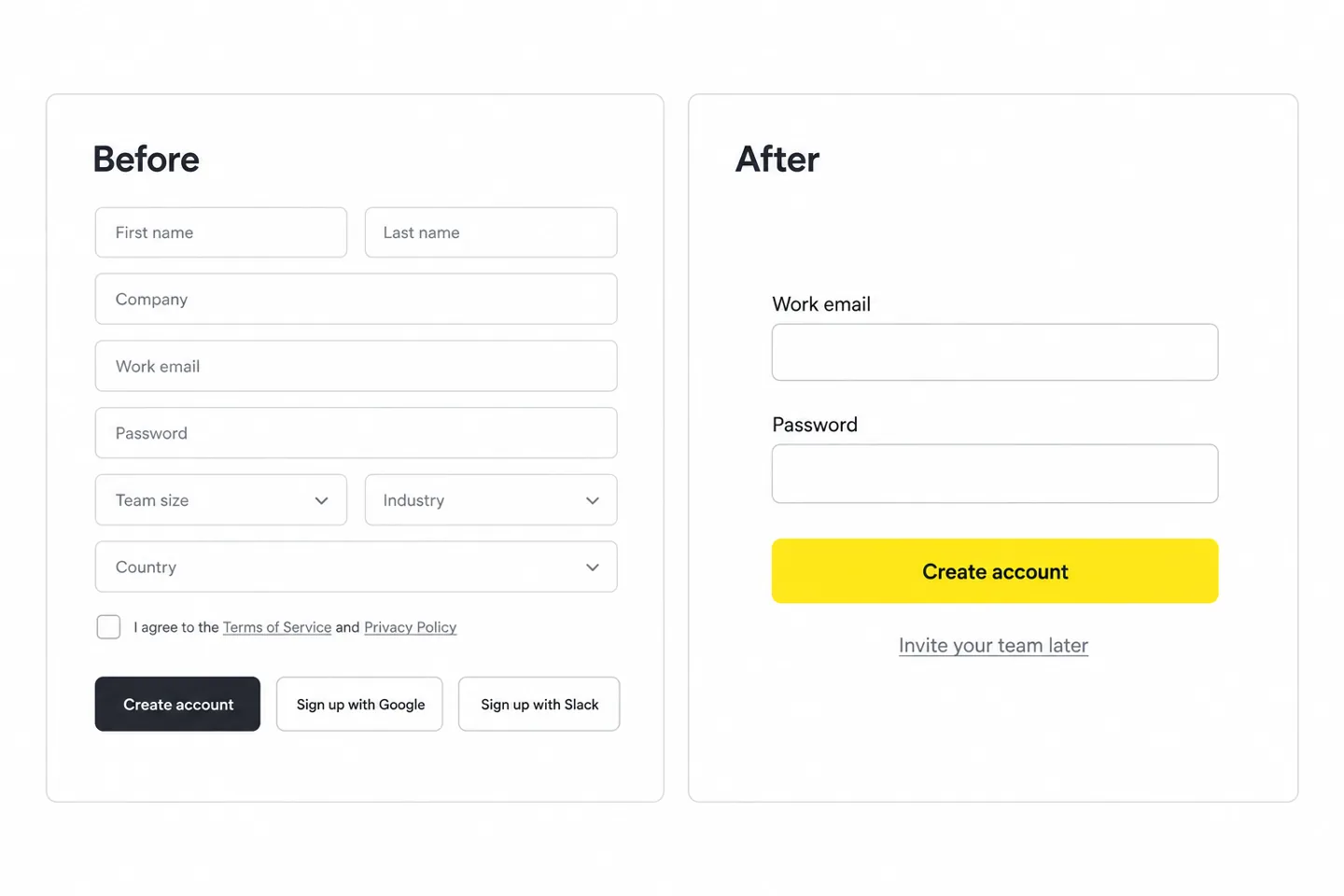
Test completion with representative first-time users, then measure whether more eligible signups reach the activation event. A shorter form that attracts unusable accounts is not an improvement. For more patterns, study our app onboarding examples and the decisions behind them.
An operations manager opens a dashboard to decide which requests need attention. Instead, the screen leads with several large totals and decorative charts. The useful answer is buried in a table below the fold.
UX work identifies the decision, the relevant role and the information needed to act. UI work makes urgent items easy to scan, uses understandable statuses and gives each row a clear action. The design should also handle missing data, unavailable permissions and an empty queue.
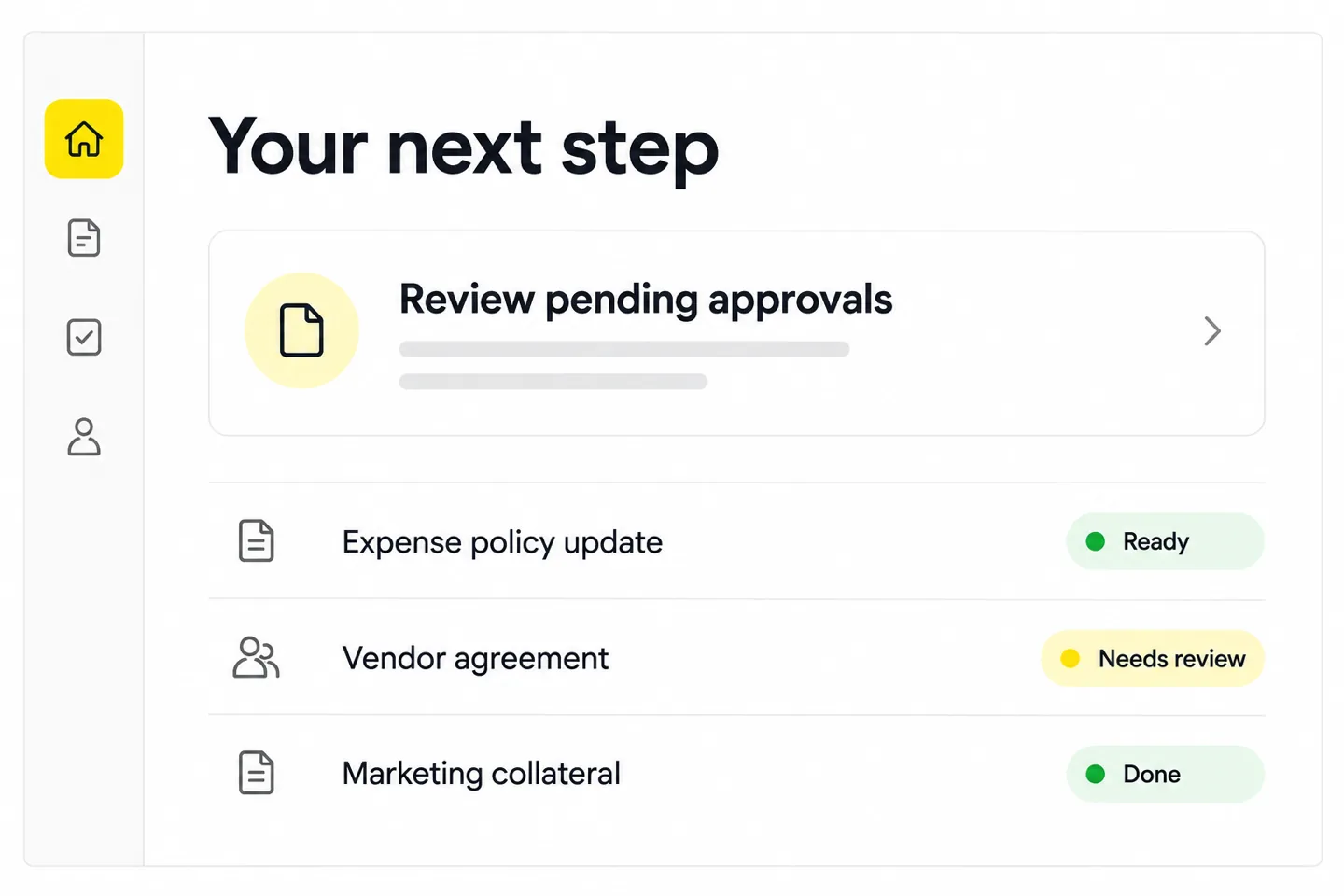
Evaluate whether the manager can identify and resolve the right request accurately. For complex products, our dashboard design best practices go deeper into hierarchy, filters and decision-focused layouts.
A customer chooses a time, enters details and taps a button labelled “Submit.” The page reloads without a clear confirmation. They do not know whether a booking exists, so they try again or call the business.
The UX work defines availability, review, confirmation, cancellation and recovery. UI design makes the selected time visible, uses an explicit action label and shows a confirmation with the next step. Engineering must prevent duplicate actions and handle slow responses correctly; a prototype cannot deliver that protection by itself.
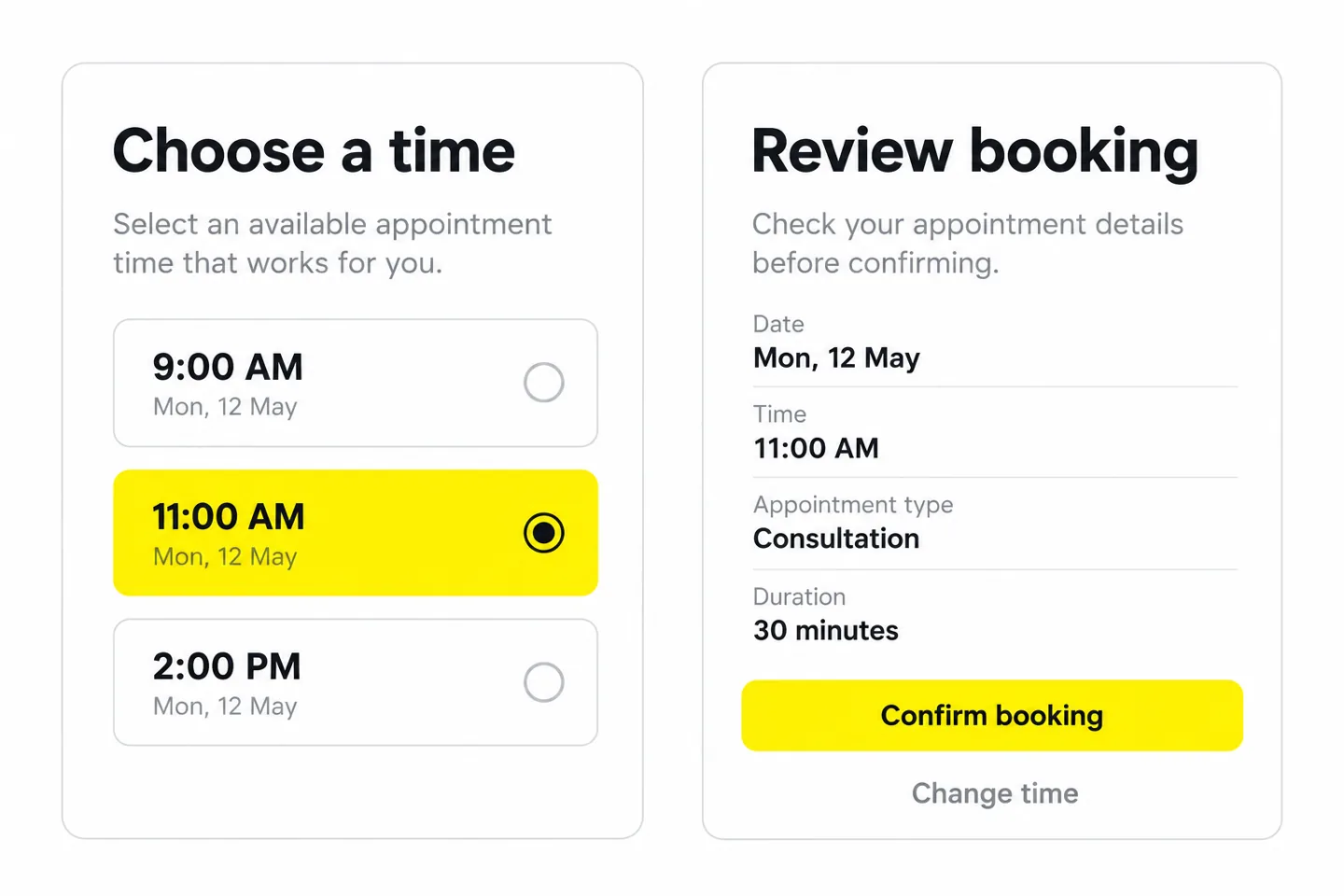
Measure successful bookings and duplicate or failed attempts together. If the journey involves money, our fintech app design guide to trust and transaction clarity covers related decisions around fees, review and confirmation.
The three mockups above explain common situations. The published projects below show how the same discipline applies to different product contexts. They are portfolio references, not evidence that the illustrative changes above produced a measured uplift.
Our Crimino CRM dashboard project describes challenges with navigation, filtering and visibility across leads, contacts and sales activity. The documented design approach includes clearer information architecture, status indicators and a modular interface covering analytics, contacts, invoicing and reporting.
The lesson for a business buyer: ask how the design organizes the work a person needs to do, then inspect the screens that support it. The public case study provides design context; it does not establish a controlled conversion or productivity result.
The Leafy Plant e-commerce app project connects product discovery, category filtering, saved favorites and order tracking. Its published brief identifies difficulty finding suitable plants and limited guidance as problems, which puts the design task beyond the appearance of a product card.
The lesson: a shopping journey includes deciding, saving and returning as well as paying. When reviewing an e-commerce design proposal, check which of those behaviors it supports. Do not infer a sales uplift from a portfolio screen; ask what was tested and measured.
A useful project moves from evidence to decisions, then tests those decisions and checks the implementation. Stages overlap: testing can reveal a missing requirement, and technical discovery can change a proposed flow. The Design Council’s Double Diamond is one way to describe this movement between exploring a problem and focusing on a solution.
| Stage | Main work | What the business should review |
|---|---|---|
| Discover | Understand users, tasks, constraints and existing evidence | Are we solving the right problem? |
| Define | Prioritize the task and agree success measures | Is the scope clear and worthwhile? |
| Structure | Map content, roles and user flows | Does the journey support real situations? |
| Explore | Create wireframes and a prototype | Can people find and complete the task? |
| Refine | Develop UI, content and component states | Is the experience clear and consistent? |
| Validate and ship | Test, document, support engineering and check the build | Does the implemented experience work? |
Bring analytics, recurring support issues, sales objections and customer feedback to discovery. These show where to investigate; they do not explain every cause. A drop-off chart can identify a step, while observation or interviews can help explain the difficulty. Be careful with session recordings: exclude sensitive data and follow your consent and privacy requirements.
“Do you like this design?” invites opinions. “Find the invoice for last month and download it” reveals behavior. Choose representative participants and realistic tasks. Record where people get stuck, what they misunderstand and whether they finish. A small qualitative study can uncover useful problems, but it does not establish a precise conversion rate for your entire audience.
Invite developers to review technical constraints while flows are still flexible. Agree how responsive layouts, permissions, validation and asynchronous actions will work. After implementation, check the real product with keyboard input, realistic content and slow or failed requests. Design quality can be lost between a Figma file and a release.
This article explains what the discipline means for your business. For the detailed stages, roles and review points, use our step-by-step UI/UX design process for product teams.
A list of screens tells you little about whether a design project is complete. The useful deliverables explain what the team learned, what it decided, how the interface behaves and what engineers need to build. A focused engagement may only need some of the items below; exclusions should be explicit.
| Deliverable | What it should make clear | How to review it |
|---|---|---|
| Problem brief | Audience, task, evidence, constraints and priorities | Can everyone describe the same problem? |
| Research summary | Methods, findings, limitations and implications | Can decisions be traced to evidence? |
| Flows and structure | Routes, roles, branches and recovery paths | Are important situations covered? |
| Prototype | The interactions being tested | Can a user complete a realistic task? |
| UI and components | Responsive layouts, content and states | Does the system stay clear across screens? |
| Handoff and QA | Specifications, assets, behavior and unresolved issues | Can engineering build and verify the experience? |
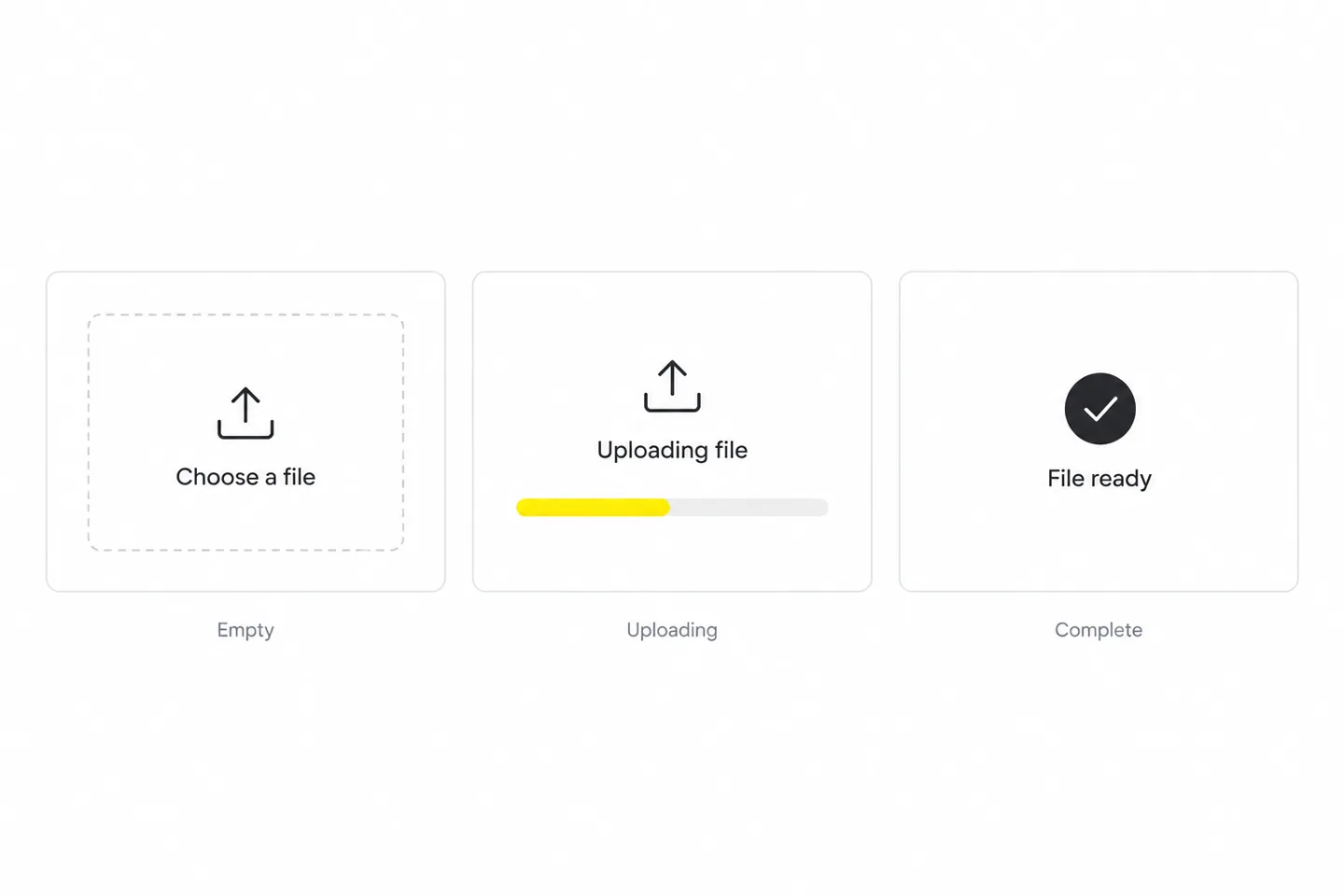
A file upload screen might need an empty state, progress, success, unsupported file, network failure and permission error. A dashboard might need different views for admins and members. These variations change the design and engineering scope even when the page count stays the same.
A library of attractive buttons is a start, but teams also need rules for use, naming, content and behavior. Agree which patterns belong in the first release and who maintains them. Our practical guide to building a design system explains how to connect reusable design decisions with implementation.
Before approving a booking flow, agree that the chosen time remains visible, validation preserves entered data, a failed request provides recovery, and success gives an unambiguous confirmation. Criteria like these make review more useful than “make it intuitive.” Assign someone to check them in the actual build.
The right starting point depends on what is known. If the product looks dated but people complete key tasks successfully, a visual refresh may be sufficient. If the team cannot explain where customers struggle, start with diagnosis. If the underlying workflow no longer fits the audience or product, broader UX work may be justified.
| Situation | Useful starting point | Keep in scope |
|---|---|---|
| Unclear cause of drop-off | Focused UX audit and task testing | Evidence and prioritized recommendations |
| Working flow, inconsistent interface | UI refresh | Components, content hierarchy and states |
| One important journey fails | Focused flow redesign | Research, prototype, implementation and measurement |
| New product with untested assumptions | Discovery and MVP design | Critical task, feasibility and user validation |
| Roles and workflows have fundamentally changed | Phased product redesign | Migration, permissions and existing-user impact |
These are starting points, not diagnoses. A confusing label may be fixed quickly; the same symptom may also reveal a missing capability or a workflow users do not need. Our guide to running a useful UX audit explains how to separate evidence from opinion before committing a redesign budget.
A service business may need a clear mobile enquiry or booking journey more urgently than a large component library. Start with the questions customers ask, the information they need and the action the business can reliably fulfil. Keep the system proportionate to how often the website changes.
Choose one important audience and one complete journey. Use an appropriate prototype to test whether people understand the value and can act on it. An MVP still needs credible content, recoverable errors and usable controls. Deferring secondary features is different from shipping an unreliable core experience.
Shared products introduce permissions, legacy workflows, localization and governance. A redesign may need a gradual rollout, migration support and training. For those constraints, our B2B SaaS UX guide for complex business workflows and guide to redesigning SaaS without disrupting existing users explain the tradeoffs in more detail.
Good UI/UX becomes visible when people try to do something. Review a design with realistic content, different devices and a task to complete. A presentation filled with ideal data and uninterrupted success paths hides the decisions that determine everyday usability.
Review contrast, keyboard access, visible focus, form labels and error identification throughout design and implementation. W3C’s WCAG 2.2 quick reference provides the relevant criteria and supporting techniques. A mockup or automated check alone cannot establish conformance; the implemented experience needs evaluation.
Avoid using color as the only way to communicate a status. Give controls understandable names and sufficient space. Test zoom, reflow and longer text. Accessibility work can expose problems that otherwise stay hidden until a customer uses a different device, input method or assistive technology.
A clear interface can still be frustrating when it responds slowly or shifts during use. Google’s Core Web Vitals guidance assesses loading, responsiveness and visual stability. Good thresholds are LCP at or below 2.5 seconds, INP at or below 200 milliseconds and CLS at or below 0.1, measured at the 75th percentile of visits. These are performance indicators, not a complete UX score.
AI tools can help explore layouts, draft interface text and summarize material. They can also invent user needs, produce inconsistent patterns or miss accessibility issues. Keep customer information protected, verify the output and test important decisions with real people. A generated screen is a proposal; it is not user research.
Price follows the work. A focused review, a new booking journey and a multi-role software product are different engagements. Asking for a price per screen before agreeing on states, research and implementation support can produce an estimate that looks precise while leaving the important work undefined.
For indicative budgeting scenarios, read our UI/UX design cost guide and scope breakdown. Treat those ranges as a starting point for a conversation, not a substitute for a written scope. Confirm whether the quote covers design only, front-end implementation, research recruitment, copywriting, accessibility evaluation and post-launch support.
A deadline needs more than a delivery date. Agree when research participants are available, when the product owner will make decisions and when engineers can review feasibility. A focused improvement may fit into a short engagement; a complex product with several roles and research rounds requires a broader plan. Ask for milestones, assumptions and exclusions rather than a universal turnaround promise.
A freelancer can be a good fit for well-defined work with a capable internal owner. An agency can provide several disciplines when research, UX, UI and delivery support are needed together. An in-house designer may suit continuous product work. Our agency-versus-freelancer comparison helps assess the tradeoffs without treating one model as the answer for every business.
Use our UI/UX design service page to assess Wolfpixel’s relevant capabilities and project fit. Bring a short brief and the evidence you have; the first useful outcome is a clearer scope, whether that leads to a small fix or a larger engagement.
Start with a baseline before making changes. Pick a primary user outcome, connect it to a business outcome and add guardrails so you do not improve one number by making something else worse. Segment results where device, role or acquisition source changes the experience.
| Journey | Primary signal | Guardrail |
|---|---|---|
| Signup to first useful action | Eligible users reaching the activation event | Account quality and setup failures |
| Appointment booking | Confirmed bookings per eligible session | Duplicates, cancellations and failed requests |
| Dashboard task | Correct task completion and time needed | Errors and missed important items |
| Self-service support | Successful resolution without assistance | Repeat contact and satisfaction |
| Checkout or payment | Completed legitimate transactions | Errors, refunds and customer complaints |
For example, suppose 30 of 100 eligible users finish a task before a change and 42 of 100 finish afterwards. The observed rate moves from 30% to 42%: a 12 percentage-point increase, or a 40% relative increase. These are hypothetical figures, not Wolfpixel results. They show why reporting the denominator and distinguishing percentage points from relative change matters.
A before-and-after comparison alone does not prove the design caused the difference. Traffic, pricing, seasonality and product changes may also affect results. Where appropriate, use a well-planned experiment. With low traffic, combine task testing, support evidence and longer-term observation while being clear about uncertainty.
Suppose customers reach the booking review page but do not confirm. “The button needs to stand out” is one hypothesis, not a diagnosis. Use the worksheet below to decide what to investigate before commissioning a redesign. This is an illustrative diagnostic tool created for this guide, not a validated scoring system.
| Possible cause | Evidence to collect | Design or business response |
|---|---|---|
| People miss the next action | Observe whether they notice and understand the confirmation control | Improve hierarchy and the action label; test again |
| The total cost is unexpected | Ask users to explain the price and compare it with their expectation | Clarify fees earlier; review pricing if the offer is the problem |
| The available appointment is unsuitable | Check availability and ask what time the customer needed | Improve alternatives or service availability; a brighter button will not create a suitable slot |
Prioritize the issue by how often it affects the target task, how serious the consequence is, how strong the evidence is and what it takes to fix. Keep those judgments visible. A high-traffic annoyance and a rare irreversible error need different responses; multiplying arbitrary scores can hide that distinction.
If those answers are missing, scope discovery first. If they are clear, a focused UI/UX design engagement for your product’s key journey can move into flows, prototyping and interface design with a stronger basis for decisions.
Ready to turn the brief into a workable scope? Discuss your UI/UX project with Wolfpixel. Share the product URL or prototype, the task users struggle with and the evidence you already have. You do not need a finished specification. We can use that starting point to discuss whether discovery, a focused flow improvement or a broader redesign fits the problem.
UI stands for user interface, and UX stands for user experience. UI concerns the interface people operate; UX concerns the wider experience of achieving a goal with a product or service.
It is the work of making a product understandable and useful for the people who need it. That includes learning about their tasks, planning the journey, designing screens and controls, and testing whether the experience works.
UX examines the overall journey and whether it meets user needs. UI shapes the screens, controls, visual hierarchy and interaction states within that journey. The responsibilities overlap and should be developed together.
A small business benefits from UI/UX work when customers struggle to understand an offer or complete an important task, such as booking or enquiring. The scope can be small: one useful journey may deserve attention before a complete website redesign.
UI/UX work typically includes research, flows, prototypes, interface design and documentation. Production coding is a separate responsibility unless it is included in the agreement. Designers and developers should collaborate early and check the implemented experience together.
Yes, particularly in a smaller team or a focused engagement. Check the person’s research, interaction and visual design capabilities against your scope. A complex product may also need specialist research, content, accessibility or engineering support.
The cost depends on research, journeys, roles, interface states, platforms and delivery support. Agree those items before comparing quotes. A design-only proposal and a design-and-build proposal cannot be compared fairly using page count alone.
The schedule depends on scope, access to users, technical constraints and review speed. Ask for milestones covering discovery, testing, design and implementation support. A small flow improvement and a complex multi-role redesign need different plans.
No. Web design describes work for websites, while UI/UX methods also apply to apps and software. A web design engagement may include UI and UX, but you should confirm whether research, testing, content and implementation review are included.
It can help when usability or clarity is stopping interested people from acting. Results also depend on demand, pricing, traffic and implementation. Measure the relevant journey and user outcomes rather than promising a fixed uplift from every redesign.
Definitions and principles are informed by the linked guidance from Nielsen Norman Group, the Design Council, W3C and Google’s web.dev. Project examples link to Wolfpixel’s published portfolio descriptions. The UI mockups and the booking worksheet are illustrative; the numerical measurement example is hypothetical. The guide separates design recommendations from verified project outcomes.




.svg)



.svg)

.svg)

.svg)

.svg)

.svg)
.svg)
