



October 25, 2026
Branding
Brand Identity Design for Small Businesses



Mobile app design is the work of planning how a smartphone or tablet app looks, behaves and helps people complete a task. It combines user research, information architecture, interaction design, interface design and testing, while accounting for touch input, device capabilities and iOS or Android conventions. The result should explain what to do, respond clearly and support the full journey, including mistakes and interruptions.
A customer can find your app attractive and still abandon a booking because the price changes at the last step or a failed request wipes their details. App design connects the screens with the decisions behind them: what information people need, which action comes next and how the product recovers when something goes wrong.
I’m Maniruzzaman Jubayer, Co-founder & COO and Product Design Specialist at Wolfpixel, with 7 years of experience. I oversee website, app, dashboard and digital product design. This guide helps business owners, founders and product teams understand the scope before choosing a platform, approving screens or hiring a design partner.
Mobile app design includes both UX and UI. UX work investigates whether the proposed experience serves the right people and supports their goals. UI work shapes the screens and controls they operate. Interaction design connects actions with responses, such as opening a date picker, showing progress or recovering from a failed payment.
Responsibilities overlap. A designer needs to understand technical constraints, and an engineer may identify a simpler interaction. Agree who owns research, content, accessibility evaluation, implementation and release checks. A clickable prototype can simulate a payment; the implemented product must securely process it and handle the actual response.
A responsive website adapts browser content to different screens. An app may need deeper device integration, repeat account-based tasks, notifications or offline work. A progressive web app can also offer installation and selected app-like capabilities. Choose according to the task, reach and operating constraints. For an occasional enquiry, a usable website may meet the need without asking someone to install anything.
Our business guide to UI/UX design explains the broader disciplines. For a phone-based product, Wolfpixel’s mobile app design services focus that work on mobile flows, platform behavior and the implementation handoff.
Share your app idea or an existing flow with Wolfpixel. Define the platform constraints, complete states and design handoff your team needs for the next release.


“Types” can describe how an app is built or what it helps people do. Separate those decisions. A shopping app is a product category; native iOS is an implementation approach. Neither label tells you whether the checkout will be usable.
These categories are practical shorthand; terminology varies. React Native’s documentation describes components that map to native platform UI. Capacitor’s documentation describes a runtime for bringing web applications to native platforms. They should not be treated as the same rendering approach simply because both can target iOS and Android.
For mobile web, Google’s introduction to progressive web apps explains installation and integration. Offline behavior and device features still need deliberate implementation and compatibility checks. Avoid assuming every PWA has every native capability, or that any framework is automatically faster or cheaper for your brief.
Write down the required device integrations, supported platforms, real-time behavior, offline tasks and team capabilities before choosing an approach. A designer and engineer should review those constraints together. Our guide to human interface guidelines across mobile platforms shows how platform guidance feeds into the design work.
A useful design review follows a complete task. Ask someone to find an appointment, select a time, check the details and confirm. Then change the conditions: the slot disappears, the network drops or the user comes back later. That reveals more than a gallery of ideal screens.
Group features around the language and tasks your users understand. Primary destinations should be easy to find, with a clear current location and predictable back behavior. A bottom navigation bar suits persistent destinations; a “Pay now” action belongs within the relevant flow. Do not turn every feature into a permanent tab.
Give the screen a clear priority. On a booking review, the service, time, location and total deserve attention before secondary promotions. Use spacing and grouping to show relationships. Check narrow screens, longer names and translated text; a layout that only works with short placeholder copy is unfinished.
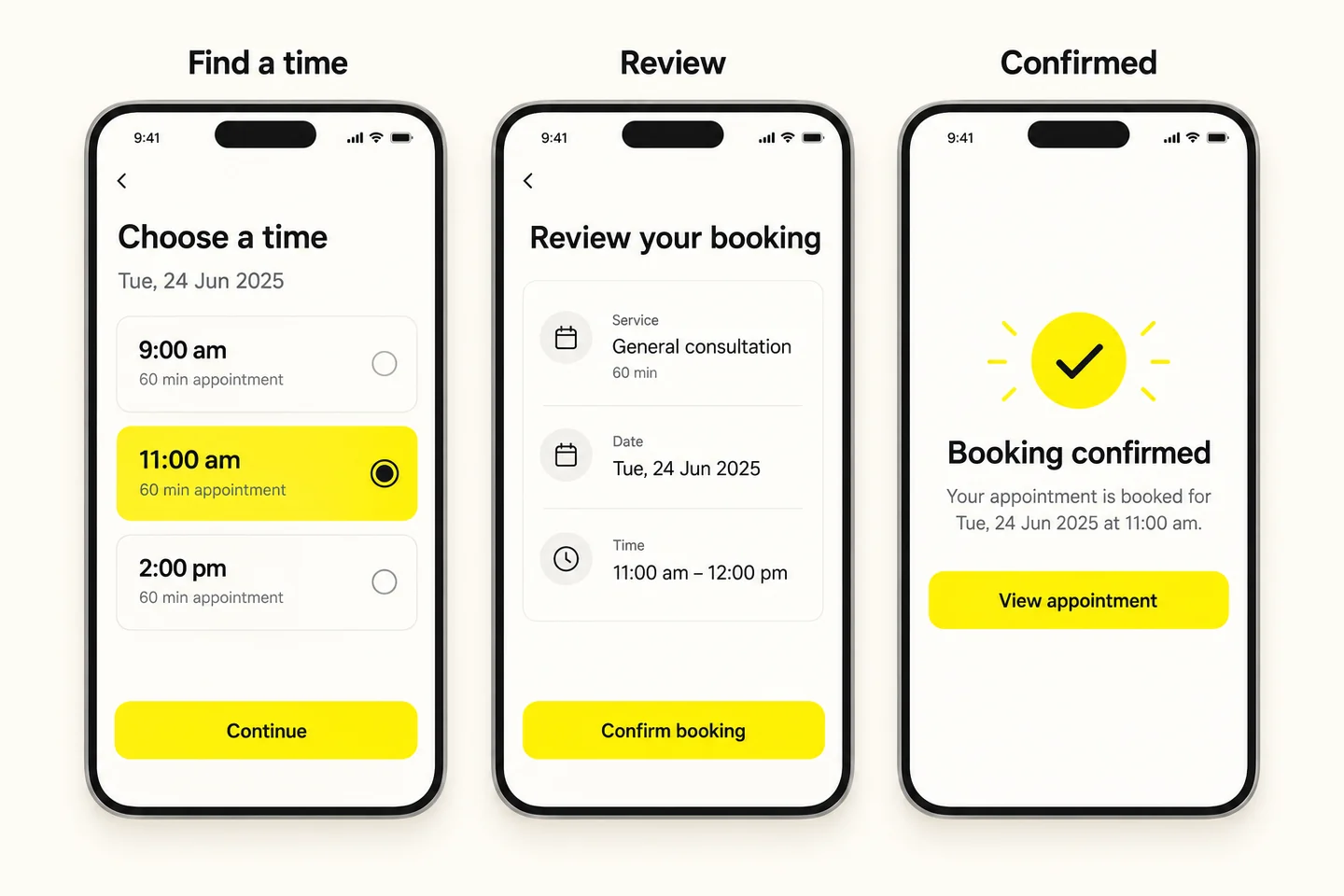
Use a readable text hierarchy and components with consistent meaning. A primary button should not compete with five equally loud actions. Color can reinforce status, but a failed request also needs a message and a recovery action. Prepare light and dark treatments where they are in scope, and check contrast in each.
Targets need enough space to tap without triggering a neighbor. Apple’s UI design tips recommend a hit region of at least 44 × 44 points. Android’s accessibility guidance recommends a touch target of at least 48 × 48 dp. These are platform units, not interchangeable physical pixels; the tappable area can extend beyond the visible icon.
Also plan accessible names, meaningful reading order, text resizing, focus, reduced motion and alternatives to gesture-only actions. Check VoiceOver or TalkBack in the running app. W3C’s WCAG overview provides accessibility criteria and context, but a static mockup or one automated scan cannot establish that the implemented experience is accessible.
Explain requirements before submission, use suitable keyboard types and preserve valid entries when a field fails. Ask for permissions when the feature needs them and explain the purpose. Provide a useful path when permission is declined where feasible. A location-based search may still allow a manually entered area.
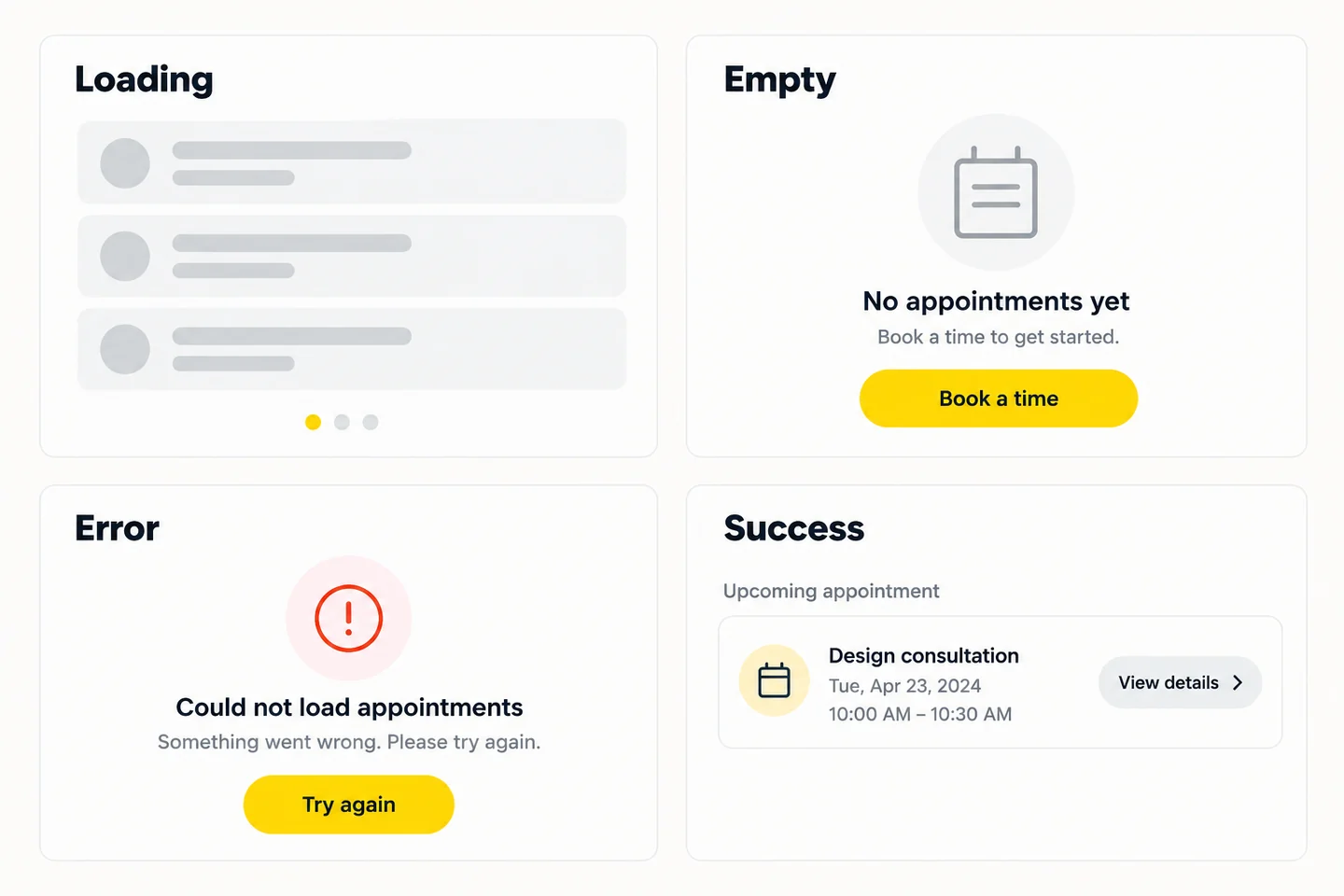
Distinguish “no appointments” from “appointments could not load.” Prevent repeat submissions while a request is processing, and give confirmation only when the system has actually confirmed success. Decide what remains available offline and how updates reconcile after reconnection; the interface and engineering behavior must agree.
Use motion to explain a transition or acknowledge an action. Keep essential information available without animation, and respect reduced-motion settings. Notifications should relate to something the person values, with useful controls. A reminder is a product decision involving timing and consent, alongside the visual treatment.
Document the components, variants, tokens and usage rules that connect the screens. A date picker needs selected, unavailable, focus and validation behavior as applicable. Our guide to building a practical design system explains the ownership and implementation work behind a library that teams can maintain.
Mobile app design can help a business remove obstacles between a user’s intention and a useful result. The commercial effect depends on demand, pricing, reliability, implementation and the service behind the app. Treat each expected benefit as a testable hypothesis rather than a guaranteed return.
Showing the total before confirmation may reduce uncertainty, but a higher completion rate is only useful if the booking is legitimate and expectations are met. Track cancellations, mistaken purchases and support issues alongside conversion. Hiding fees or making cancellation difficult can improve a short-term number while damaging the experience.
For a delivery app, the first useful result might be placing an order and receiving a reliable status. For a work tool, it might be finishing an assigned task. An extra minute in the app can mean engagement or confusion. Use our mobile app onboarding examples to examine how an introduction supports the first real task.
A clear transaction or order status can reduce uncertainty and repeated checking. Honest error messages and accessible controls can support confidence. The actual service must still deliver. A reassuring success screen cannot repair an unprocessed payment or an appointment the business cannot fulfill.
Choose one task, record its baseline and define success before release. For a booking flow, capture eligible starts, confirmed bookings, time to completion, failures and duplicate attempts. Segment where platform or user role matters. Compare cohorts carefully: acquisition changes, availability and pricing can affect results independently of the design. Use controlled experiments where practical and combine quantitative evidence with observed task testing.
When a task already fails and the cause is unclear, a focused UX audit can help identify the problem before you commit to a wider redesign.
Examples are most useful when you can identify the task, the constraints and the decisions behind the screens. The published Wolfpixel project below provides design context. The booking scenario is an illustrative teaching example, with no claimed conversion uplift or research results.
Our Leafy Plant mobile app project presents a plant e-commerce experience with browsing, filtering, personalized recommendations, wishlist, scanning and order tracking. The design challenge is helping people choose and revisit suitable products through a coherent shopping journey.
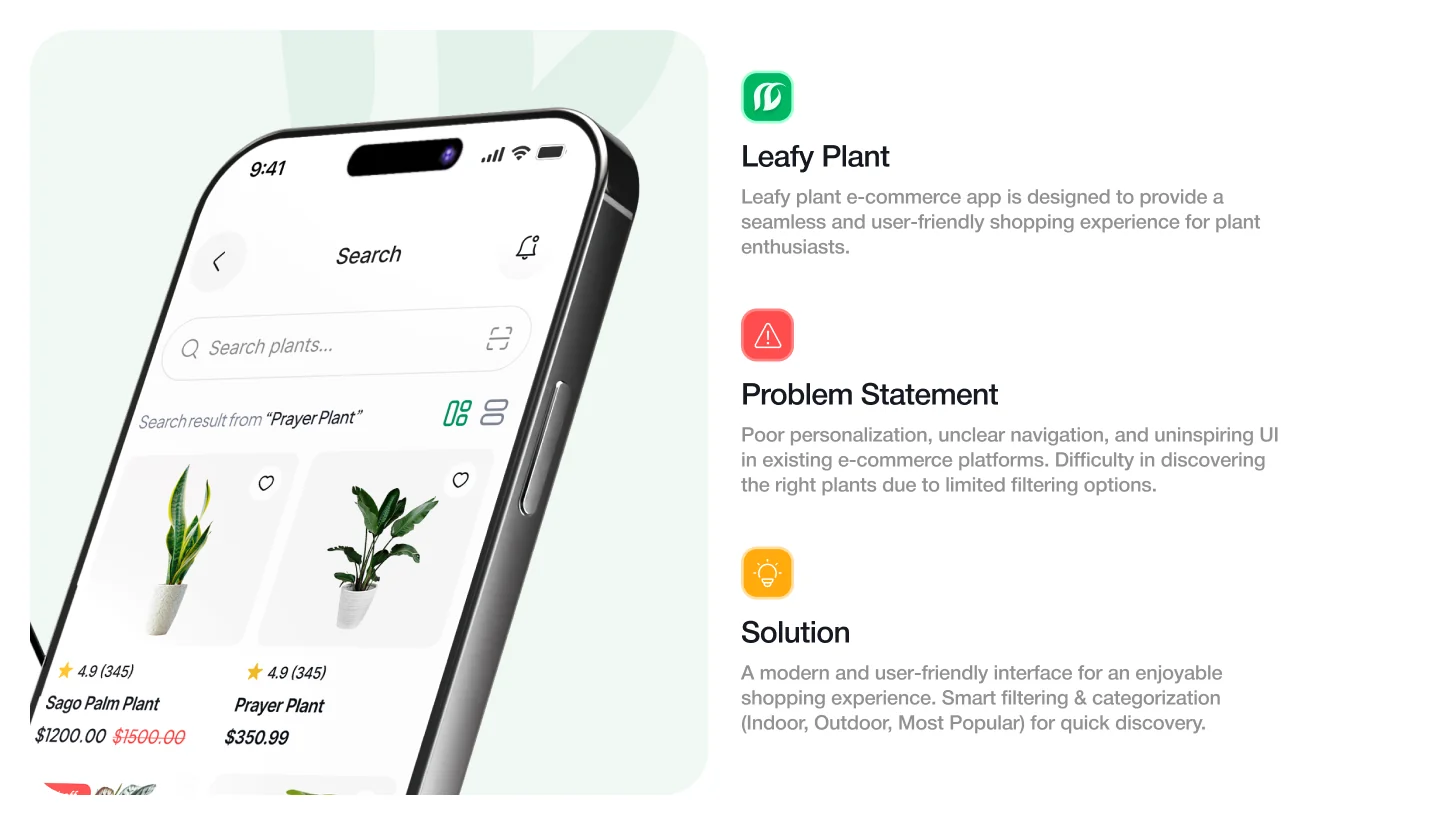
For a similar business, review whether categories help customers narrow the choice, whether product information answers practical questions and whether saved items remain easy to find. A scanning feature creates additional states: camera permission, uncertain identification and unavailable results. Those need review in the product as carefully as the attractive home screen. The portfolio presentation does not establish a measured sales outcome.
In the illustrative flow earlier, selecting a time should carry the same date and service into review. Confirmation should show the booked details and a useful next action. If another customer takes the slot, preserve the person’s other details, explain the change and offer available alternatives. The screen sequence needs that behavior before it is ready to implement.
For more product categories, see our app design inspiration library. If the task involves money, the fintech app design examples explain how fees, transaction status and review steps affect understanding.
The process moves from understanding a task to testing a proposed experience and checking the implemented result. The stages overlap; research or engineering feedback may change the direction. A sensible scope names the decisions and evidence expected at each stage.
For the detailed sequence, use our step-by-step mobile app design process. This overview defines the work without duplicating that implementation guide.
A wireframe describes structure and priority. A mockup shows a visual treatment. An interactive prototype links actions and responses so someone can attempt a task. None automatically proves that a real service, integration or offline requirement will work. Choose the fidelity needed to answer the current question, then test the technical risks in an appropriate build.
List important screens against relevant conditions: loading, empty, valid data, validation failure, permission denied, timeout and success. Add roles, text expansion and platform differences where needed. You do not need every possible state for every component; you need the states the actual task and system can produce.
A useful handoff includes editable design files, components and tokens, licensed assets, content, interaction rules and implementation checks. If native components or code are included, name the framework, ownership, testing and support. Do not assume a design-tool export is a finished production app. Review our mobile app design scope and delivery options against your team’s engineering responsibilities.
Tools help you express and test decisions; they do not determine whether the product is useful. Figma supports collaborative interface work and prototyping. Its official app design guide provides a starting point for learning the workflow. Confirm current plan limits and handoff needs directly with the tool provider.
Templates can accelerate a first exploration or a familiar pattern. Replace sample content with realistic data, check all relevant states and confirm the license. Test whether the navigation fits your users. A visually consistent template can still ask the wrong questions or omit the step your business needs.
Practice hierarchy, interaction, content, accessibility, prototyping and task testing together. Recreate a small flow to understand its structure, then explain the choices and test your own variation. Learn the platform guidance and collaborate with engineers. A portfolio of reasoned decisions is more useful than a collection of polished screens with no problem behind them.
For a search such as “mobile app ui-design github,” use the repository as an implementation reference. Check its license, maintenance, platform support and accessibility behavior before adopting it. The official Now in Android sample app is one way to study an Android implementation. A repository demonstrates code and patterns; it cannot establish that the same workflow suits your customers.
For a quick reference to mobile app design principles, revisit the elements section above and turn each principle into an acceptance check. That makes learning directly useful to your next review.
Start with a clear use case: who needs the app, what they do repeatedly and why the phone is the right place for it. If the task is occasional and already works well on the mobile web, first investigate whether installation adds enough value to justify the extra effort.
A small service business may need a dependable booking and account journey. A startup may need to test whether a proposed habit or transaction is useful before expanding features. An enterprise product may require permissions, audit history, offline work, localization and migration. Scope the complete priority task for the actual environment; do not use company size alone as the specification.
Research recruitment, platform coverage, integrations, roles, states, content and review cycles all influence effort. Ten screens with complex permissions can involve more work than twenty simple views. Separate design fees from engineering, third-party services, launch work and maintenance. Our mobile app design cost guide provides indicative design-only scenarios and the assumptions behind them.
Ask potential partners to explain a relevant flow, including failures and implementation tradeoffs. Request a complete scope and clarify access to editable files and assets. If the fit is still uncertain, our agency-versus-freelancer guide helps compare delivery models.
When you are ready to define a mobile product or improve an existing flow, explore mobile app design support from Wolfpixel. Bring the task, the evidence and the constraints so the conversation can lead to a useful scope. You can also share your app brief with our team.
Written by Maniruzzaman Jubayer for Wolfpixel. Reviewed for this draft on October 25, 2026. Platform and accessibility statements link to Apple, Android, W3C and framework documentation beside the relevant claim. The Leafy Plant example links to our published project. Booking mockups and evaluation checklists are illustrative; they do not report user research or business results. Salary context links to official U.S. occupation data, and tool plans and platform capabilities should be checked against the current provider documentation.




.svg)



.svg)

.svg)

.svg)

.svg)

.svg)
.svg)
