

 20 min read
 Published
Landing page SEO is how you get a landing page to rank in organic search without weakening the one thing it is for: getting a visitor to act. In practice that means picking a keyword whose results are already landing pages, putting it in the title tag, keeping the site navigation and internal links, answering the buyer’s questions on the page, showing a call to action in the first screen, and keeping the page fast and indexable.
Most advice on this topic pulls in two directions. Conversion guides say to strip a landing page down: remove the menu, cut the copy, show a form. SEO guides say to add content and links. We wanted to know what the pages that actually rank do, so we measured them.
I’m Maniruzzaman Jubayer, Co-founder & COO and Product Design Specialist at Wolfpixel, with 7 years of experience. We design and build landing pages for SaaS and B2B companies. We are designers, not an SEO agency, so the rules in this guide come from Google’s own documentation, and the evidence comes from 29 landing pages that rank on page one of Google today.
Key takeaways
- Ranking landing pages keep their navigation. All 29 landing pages we measured show the full site menu. None is a stripped-down, menu-free page.
- They put a button, not a form, in the first screen. All 29 show a call to action above the fold. Only 1 shows a form there.
- The keyword goes in the title tag, and the H1 is left to sell. 25 of 29 have the search term in the title. Only 11 have it in the H1.
- They are shorter than you think. The median page has 940 words, and more than half have under 1,000. Google says content length alone does not matter for ranking.
- FAQ rich results are gone. Google stopped showing them in May 2026. FAQs still help readers. They no longer earn extra space in search results.
- Check intent before you build. For some keywords Google ranks guides and comparison lists, not landing pages. No amount of on-page SEO fixes that.
How we wrote this guide: in November 2026 we read the pages Google ranks in the US for “landing page SEO”, “SEO landing page”, “SEO for landing pages”, “local SEO landing page”, “do landing pages help SEO” and “landing page SEO checklist”, plus the AI Overview for each. Most are written by landing page tools and SEO tools about their own products, and none measures real ranking pages. On November 26, 2026 we searched 11 “software” keywords, collected the vendor landing pages on page one, and measured 29 of them. Every rule about how Google works is linked to Google’s documentation in Sources and method.
What is an SEO landing page?
Short answer: an SEO landing page is a page built to rank in organic search for one specific keyword and to guide those visitors to one action. It stays live, keeps the site navigation, can be indexed and has enough content to answer the search.
The term “landing page” has two meanings, and mixing them up causes most of the confusion:
- In analytics and SEO, a landing page is any page a visitor arrives on first.
- In marketing, a landing page is a focused page built around one offer and one action. Our guide to what a landing page is covers the types.
An SEO landing page is the second kind, designed to earn its traffic from search instead of from ads. That changes how it is built.
| SEO landing page | PPC landing page | |
|---|---|---|
| Traffic | Organic search, ongoing | Paid clicks, while the campaign runs |
| Navigation | Full site menu and footer | Often removed |
| Content | Answers the whole search | Matches one ad, kept short |
| Indexing | Indexable, self-canonical | Often set to noindex |
| Lifespan | Years | Weeks or months |
| Links | Linked from the site, can earn backlinks | Usually linked from nowhere |
A product page, a feature page, a service page and even a homepage can all work as SEO landing pages. In our sample, 11 of the 29 ranking pages were the company’s homepage.
Do landing pages help SEO?
Short answer: yes, if the page targets a specific search, is unique, matches intent and can be indexed. No, if it is thin, duplicated or set to noindex.
A dedicated page helps because it can be specific. Your homepage has to speak to everyone. A page about “payroll software for restaurants” can use that exact language in its title, its headings and its copy, and can answer the questions only that buyer has.
Landing pages hurt, or do nothing, in three cases:
- They cannot be indexed. A page set to noindex, as most ad landing pages are, will not rank.
- They are thin. A headline, three bullets and a form gives Google and the reader very little.
- They are copies. Twenty pages with the city or the industry swapped in are the pattern Google’s spam policies name as doorway abuse. More on that in the local section.
It is also worth being realistic. An Ahrefs study of about 14 billion pages found that 96.55% of pages get no traffic from Google. Publishing a page is not the same as ranking it. The rest of this guide is about what the ranking minority does.
What 29 ranking landing pages have in common
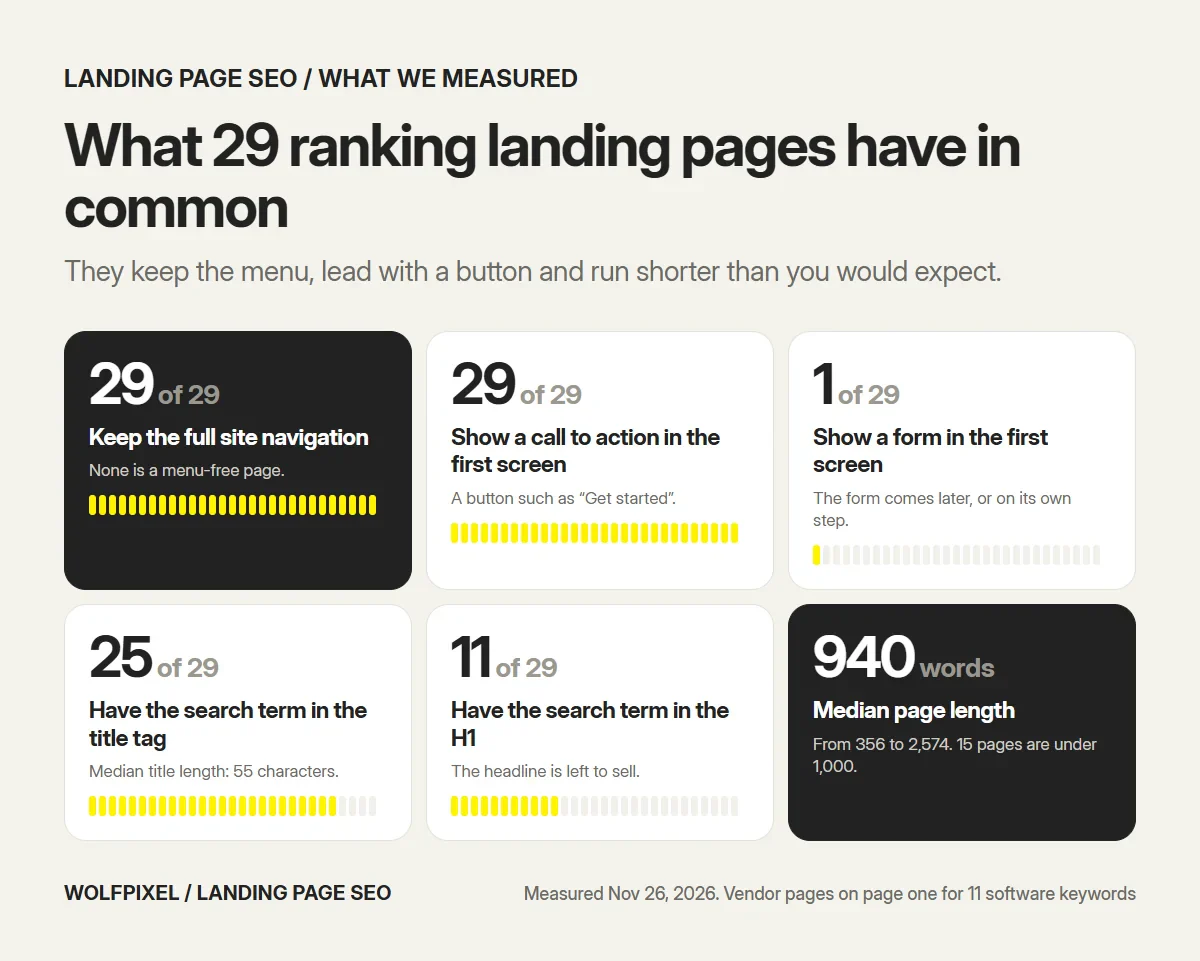
Short answer: they all keep the site navigation and show a call to action in the first screen, almost all have the keyword in the title tag, one H1 and a self-referencing canonical, and the median page has 940 words.
We searched Google in the US for 11 buying keywords, such as “payroll software”, “invoicing software” and “appointment scheduling software”, and collected the vendor pages on page one. We dropped guides, comparison lists, review sites and two pages that blocked our request. That left 29 landing pages from companies including HubSpot, QuickBooks, Square, Xero, Calendly, Clockify and Mailchimp.
| What we measured | Result |
|---|---|
| Keep the full site navigation | 29 of 29 |
| Call to action in the first screen | 29 of 29 |
| A form in the first screen | 1 of 29 |
| Search term in the title tag | 25 of 29 |
| Search term in the H1 | 11 of 29 |
| Search term in the URL or domain | 22 of 29 |
| Exactly one H1 | 28 of 29 |
| Meta description present | 29 of 29 |
| Canonical tag pointing to itself | 28 of 29 |
| Set to noindex | 0 of 29 |
| Link to pricing or plans | 26 of 29 |
| FAQ section on the page | 17 of 29 |
| Reviews or ratings mentioned | 17 of 29 |
| Some structured data | 27 of 29 |
A few numbers behind the table:
- Words: median 940, from 356 to 2,574. Fifteen pages have under 1,000 words and four have over 2,000.
- Title tag: median 55 characters. 24 of 29 are 60 characters or shorter.
- Meta description: median 152 characters.
- Internal links: a median of 142 links to other pages on the same site, most of them in the menu and footer.
- Structured data: the most common types are SoftwareApplication and AggregateRating, on 17 pages each.
What this tells you:
- The “remove the navigation” rule is for ads, not for search. Not one ranking page hides its menu. Navigation and footer links are how search engines and visitors reach the rest of the site.
- Title for search, headline for people. These companies put “payroll software” in the title tag and then write an H1 such as “Scheduling, solved.” or “The time tracker millions trust.” The title tells Google what the page is. The headline sells.
- Length is not the lever. The shortest page in the set has 356 words and still ranks on page one.
- The first screen asks for a click, not for details. A button such as “Get started” or “Start free trial” is universal. A form above the fold is rare.
These are large, well-known brands with strong domains, so on-page choices are only part of why they rank. Read the numbers as a picture of what a ranking landing page looks like, not as a formula.
SEO for landing pages: 10 steps
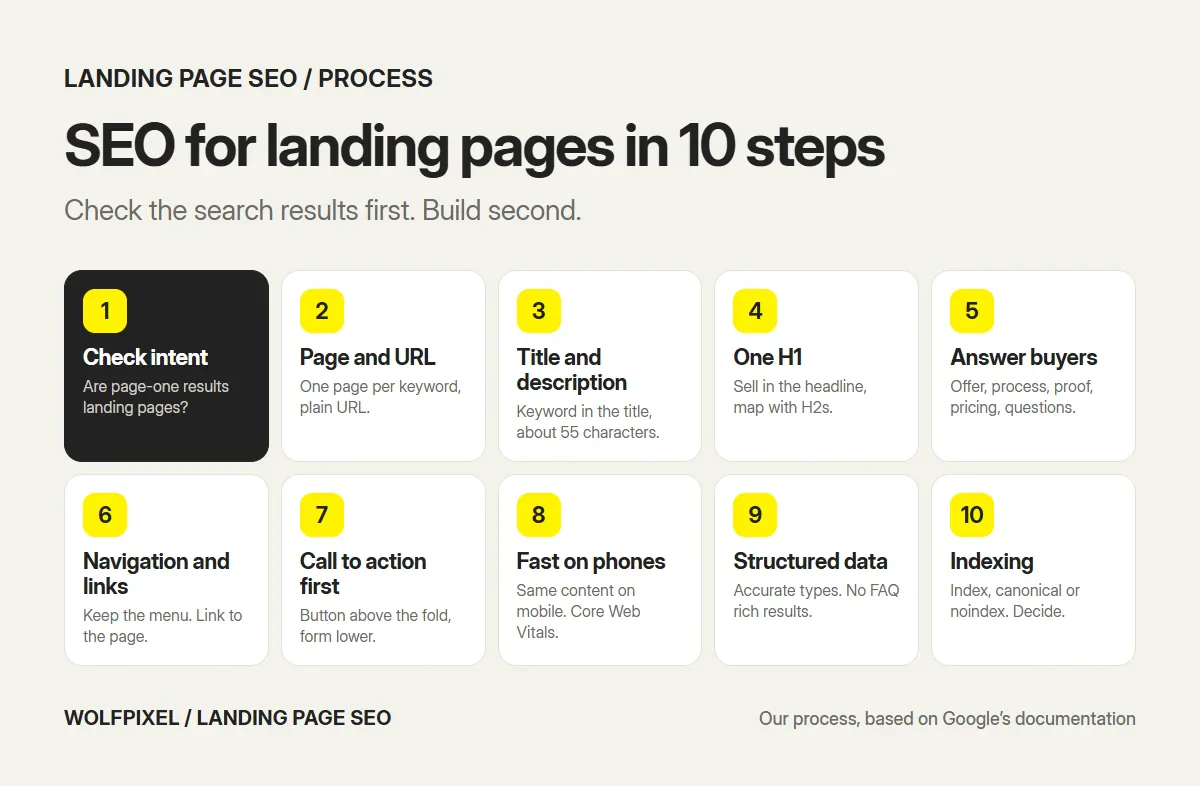
Short answer: check intent, choose the page and URL, write the title and description, write one H1, answer the buyer’s questions, keep navigation and links, put the call to action first, make it fast on phones, add honest structured data and decide what gets indexed.
1. Pick one keyword, and check the intent first
Search the keyword and look at page one before you write anything. Ask one question: are the results landing pages?
- If the results are product, service or pricing pages, a landing page can rank.
- If they are guides, definitions or “best of” lists, Google has decided the searcher wants to learn or compare. A landing page will struggle, and a guide or a comparison is the right format.
We saw this in our own data. For “payroll software” and “invoicing software”, four vendor landing pages ranked on page one. For “project management software”, almost every result was a list or a review. For “CRM software”, most of the vendor pages that ranked were long “what is CRM” guides, and only one was a product page.
Then choose one main keyword per page and a few close variations. Two pages aimed at the same keyword compete with each other.
2. Choose the page type and a plain URL
Decide which page should own the keyword. Often you already have it: a product, feature or service page that only needs improving. Build a new page only when no existing page fits the search.
Keep the URL short and readable, on your main domain. Google’s SEO Starter Guide suggests including words in the URL that are useful to users. In our sample, 22 of 29 pages have the search term in the URL or the domain, in forms like /payroll/software/ or /invoicing.
3. Write the title tag and meta description for the search
The title tag is one of the clearest places to state what the page is about, and it is what most searchers read first.
- Put the keyword in the title, near the start, with the brand at the end.
- Make it specific. “Payroll Software for Small Business | Brand” beats “Home | Brand.”
- Do not repeat it across pages. Google’s title link guidance asks for descriptive, concise titles and warns against keyword stuffing and boilerplate.
Google states that there is no limit on how long a title can be, but long titles are cut off in results. The pages we measured had a median of 55 characters, and that is a sensible target.
Write a meta description that says what the visitor gets and what to do next. Google mainly builds the snippet from the page content and may use your description when it describes the page better. Treat it as your sales line in the results.
4. Write one H1 that sells, and use headings as a map
Use one H1. It does not have to repeat the keyword word for word. Only 11 of the 29 ranking pages do. It does have to tell a visitor, in a few words, what they will get.
Then use H2s for the questions a buyer asks, in the order they ask them: what it is, how it works, who it is for, what it costs, why trust you. Clear headings help readers scan, and they help search engines and AI systems understand what each part of the page answers.
5. Answer the buyer’s questions, at whatever length that takes
Google’s SEO Starter Guide is direct on this point: the length of the content alone does not matter for ranking. What matters is whether the page satisfies the search.
For a landing page, that usually means covering:
- What the product or service is, in plain words.
- Who it is for, and who it is not for.
- How it works, with real screens or photos.
- What it costs, or how pricing works. 26 of 29 pages in our sample link to pricing.
- Proof: customers, reviews, numbers you can stand behind.
- The questions people ask before buying.
Write it for your buyer, with details only you have. Google’s guidance on helpful, people-first content asks whether a page offers original information or analysis. A page assembled from the same generic claims as every competitor gives Google no reason to prefer it.
6. Keep the navigation and link to the page
This is where SEO landing pages and ad landing pages part ways. Keep the header menu and the footer. Then link to the page from places that matter:
- The main menu or a product menu, if it is a core page.
- The homepage and related product or service pages.
- Blog posts on the same topic, with descriptive link text.
Google can generally only follow a link if it is an HTML link with an href attribute, and it recommends anchor text that is descriptive and relevant. A button that only works through JavaScript, or a link that says “click here,” wastes the signal.
A page nothing links to is called an orphan page. It may be in your sitemap and still be treated as unimportant.
7. Put the call to action in the first screen, and the form lower down
Every ranking page we measured shows a call to action above the fold. Almost none show a form there. The usual pattern is:
- A headline and one supporting line.
- One main button, such as “Start free trial” or “Get a quote,” and sometimes a quieter second one, such as “See pricing.”
- The form on its own step, or lower on the page after the proof.
This serves both goals. The searcher can see at once that they are in the right place, and the page still has room for the content that earns the ranking. Our guides to landing page best practices and landing page conversion rate cover the conversion side in detail.
8. Make it fast and usable on a phone
Google uses the mobile version of a page for indexing and ranking. If content, links or structured data are missing on mobile, Google does not see them.
- Keep the same content on mobile and desktop.
- Aim for Google’s Core Web Vitals targets: the largest element loading within 2.5 seconds, interactions responding within 200 milliseconds and a layout shift score under 0.1.
- Compress the hero image or video. It is usually the heaviest thing on the page.
- Avoid pop-ups that cover the content as the page opens.
The landing pages we measured are not light. Their median weight was 3.4 MB on desktop. Fast is an advantage precisely because many competitors are slow.
9. Add structured data that is true, and do not expect FAQ rich results
Structured data helps search engines understand what a page is about. Use the types that match the page: Organization for the company, Product or SoftwareApplication for what you sell, and review markup only for real, visible reviews.
One thing changed in 2026 that most guides have not caught up with. Google announced that the FAQ rich result would no longer appear in Search from May 7, 2026, and removed its documentation in June. The expandable questions under a result are gone.
That does not make FAQs useless. 17 of the 29 ranking pages have an FAQ section, because buyers have questions. Keep the section for readers. Just do not build a page around winning extra space in the results with it.
10. Decide what gets indexed
Each landing page needs one of three decisions.
| Page | What to do | Why |
|---|---|---|
| The page you want to rank | Index it, with a canonical tag to itself | It is the main version |
| Near-duplicate variants | Canonical tag to the main page | Signals come together on one URL |
| Ad-only, thank-you and test pages | noindex | They should not appear in search |
Two details from Google’s documentation are easy to get wrong:
- For noindex to work, the page must not be blocked in robots.txt. If Google cannot crawl the page, it never sees the noindex instruction.
- Google does not recommend using noindex to choose a canonical page within a site. Use the canonical tag for duplicates and noindex for pages that should not be in search at all.
In our sample, 28 of 29 pages have a self-referencing canonical tag and none is set to noindex.
Local SEO landing pages
Short answer: a local SEO landing page targets a service in a specific place. It works when every page has real local content, and it becomes a spam risk when the pages are copies with the city name changed.
There are three common types:
- Location pages for a physical branch: address, hours, directions, staff and photos of that branch.
- Service-area pages for places you serve without an office there.
- Service-in-location pages for one service in one place, such as “emergency plumbing in Austin.”
What a useful local page contains:
- The exact name, address and phone number, matching your Google Business Profile.
- A map or directions, opening hours and how to reach you.
- Work you have done in that area, with photos or short case studies.
- Reviews from customers in that place.
- Details that only apply there: local pricing, regulations, neighborhoods served, response times.
- A link from your Google Business Profile to the matching page, where you have one.
The risk is scale. Google’s spam policies define doorway abuse as creating sites or pages to rank for specific, similar queries, and give the example of multiple pages targeted at regions or cities that funnel users to one page. The same policies describe scaled content abuse as generating many pages mainly to manipulate rankings, including with generative AI.
A simple test: if you removed the city name from the page, would anything on it still be about that city? If not, it is a doorway page. Build fewer local pages and make each one worth visiting.
Landing page SEO for AI Overviews and AI Mode
Short answer: there is no separate set of rules. A page that is indexed, eligible for a snippet and useful can appear in Google’s AI features.
Google’s documentation says there are no additional requirements to appear in AI Overviews or AI Mode, and that a page must be indexed and eligible to be shown with a snippet. Its guide to generative AI features, published in 2026, goes further and says that for Google Search you can ignore tactics such as “chunking” content, creating AI text files like llms.txt or chasing inauthentic mentions.
What does help is the same work that helps ordinary rankings:
- Say something specific. Google’s guide stresses valuable, non-commodity content. Real prices, real process, real numbers and your own experience are what generic pages lack.
- Answer the question directly. Put a clear one or two sentence answer under each heading, then the detail.
- Use plain structure. Headings, short lists and tables are easy for people and for systems to read.
- Keep facts consistent. The same name, prices and claims across your site and profiles.
- Measure it. Search Console includes a report on performance in generative AI features.
Can one page serve both SEO and PPC?
Short answer: often yes. A fast, relevant, clear page is good for both, and one strong page is easier to maintain than two.
Google Ads calculates Quality Score from three components: expected clickthrough rate, ad relevance and landing page experience. The qualities that make a good landing page experience, relevance to the search, clear content and speed, are the same ones that help organic visitors.
When to use one page: the organic page already matches the ad’s promise, and its first screen has a clear action.
When to split: the campaign needs a different offer, a shorter page or no menu for testing. In that case set the ad variant to noindex, or canonicalize it to the main page, so it does not compete with the page you want to rank. Our guide to landing pages vs homepages covers how to decide which page each kind of traffic should land on.
Landing page SEO mistakes
- Targeting a keyword whose results are guides. Check the search results first.
- Leaving the ad page’s noindex on. A page copied from a campaign often carries its noindex tag with it.
- Removing the navigation. Right for some ad tests, wrong for a page that should rank.
- A page nothing links to. No internal links means little importance.
- A slogan for a title tag. “Welcome” and “Home” tell Google nothing.
- Several pages for one keyword. They compete, and usually none ranks well.
- City or industry pages that are copies. That is the doorway pattern.
- Text inside images. Headlines baked into a hero image cannot be read by search engines.
- Deleting seasonal pages. A page that earned links last year is worth updating, not removing.
- Chasing word count. Adding filler makes a page longer, not better.
- Building for FAQ rich results. They no longer exist.
Landing page SEO checklist
Use this before you publish, and again a month later.
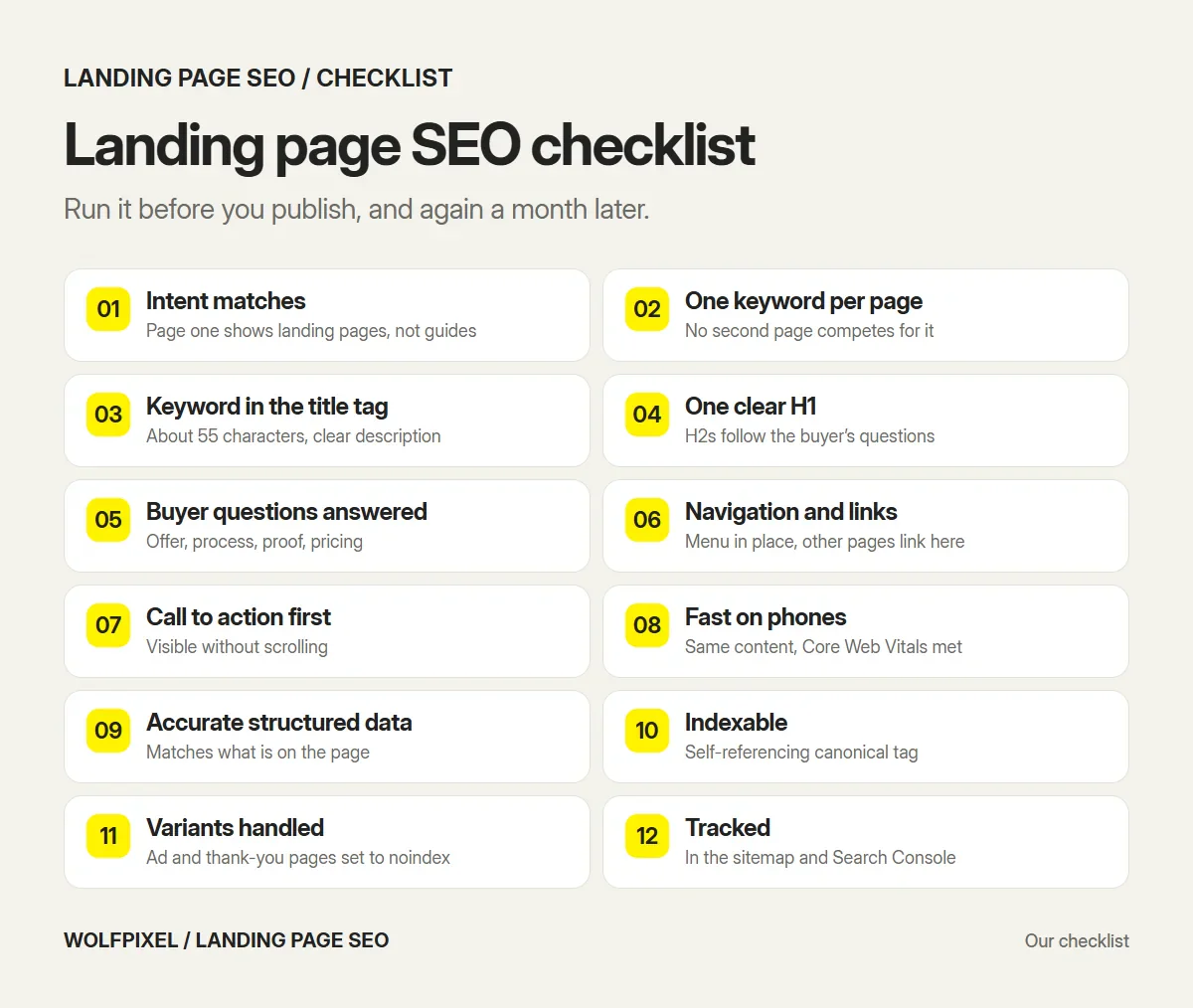
- Page one for the keyword shows landing pages, not guides.
- One main keyword, owned by this page only.
- The keyword is in the title tag, the title is about 55 characters, and the meta description says what the visitor gets.
- One H1, with H2s that follow the buyer’s questions.
- The content covers offer, process, proof, pricing and questions.
- The site navigation is in place, and other pages link here.
- A call to action is visible in the first screen.
- Content is the same on mobile, and the page meets Core Web Vitals.
- Structured data matches what is on the page.
- The page is indexable with a self-referencing canonical tag.
- Ad variants and thank-you pages are set to noindex.
- The page is in the XML sitemap and tracked in Search Console.
After launch, watch the page in Search Console: impressions and clicks for its keyword, the queries it actually appears for, and whether it is indexed. Update it when the product, price or proof changes. A landing page that ranks is an asset to maintain, not a campaign to switch off.
Landing pages we designed
These are landing page designs from our portfolio. They show structure and hierarchy, which is our part of the work. They are design projects, and we do not have ranking data to report for them.
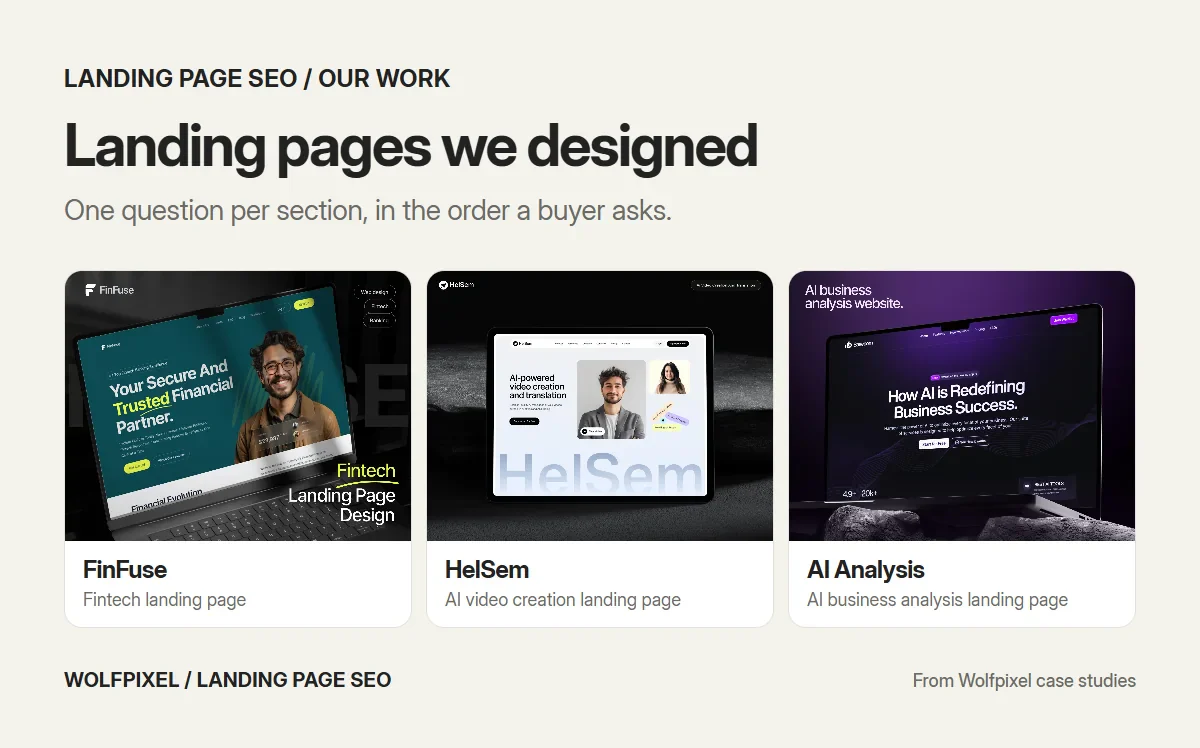
- FinFuse, a fintech landing page. A clear hero built around trust, a customer photo that makes the brand human, and two actions, Get Started and Watch Our Features, directly under the headline.
- HelSem, an AI video creation and translation tool. The page is organized around the product’s two capabilities, and it shows the output, real presenter faces, instead of describing it.
- AI Analysis, an AI business analysis product. A step-by-step structure where each section answers one question before the next is asked: what it is, what it does, what it costs and what to do next.
That last structure is the one this guide recommends for search as well: one question per section, in the order a buyer asks them.
Need a landing page built for search and conversion?
At Wolfpixel one senior designer writes, designs and builds your landing page, on your stack, with analytics set up before it goes live. A single page takes 3 days.
To be clear about scope: we design and build the page, including its structure, copy, speed and technical setup. Keyword research, content strategy and link building are not part of our landing page service, so bring your target keyword or work with your SEO partner on it.
- See what is included in landing page design.
- If the whole site needs work, see website design.
- If the page exists and underperforms, a UX audit shows where visitors drop off.
Sources and method
How we collected the data
- Keywords: on November 26, 2026 we searched Google in the US for 11 terms: CRM, project management, email marketing, payroll, invoicing, time tracking, appointment scheduling, help desk, inventory management, accounting and employee scheduling software.
- Pages: from page one of each result we took pages on a vendor’s own site. We left out review sites, comparison lists, forums, Wikipedia and blog posts, plus two vendor pages that were guides, one that was a list, and two that blocked our request. That left 29 landing pages.
- Measurements: each page was loaded at 1440 pixels wide. We recorded the title, meta description, headings, visible word count, links, structured data, canonical and robots tags. Navigation and first-screen calls to action were also checked by eye on a screenshot of each page.
- Keyword match: a page counts as having the search term when all the words of the query appear, allowing for singular and plural.
Limits. This is a small sample of large software brands on one day. These companies rank partly because of their brand and the links to their sites, not only because of how the pages are built. Search results differ by location and change over time. The figures describe what ranking landing pages look like. They do not prove that any one element causes a ranking.
Google documentation cited
- Search Engine Optimization (SEO) Starter Guide, for URLs and content length.
- Influencing your title links in search results.
- Control your snippets in search results.
- Creating helpful, reliable, people-first content.
- Link best practices for Google.
- Mobile-first indexing best practices.
- Understanding Core Web Vitals and Google search results.
- How to specify a canonical URL and Block Search indexing with noindex.
- Spam policies for Google web search, for doorway abuse and scaled content abuse.
- Latest Google Search documentation updates, for the removal of the FAQ rich result in May and June 2026.
- AI features and your website and Google’s guide to optimizing for generative AI features on Google Search.
- Google Ads Help: About Quality Score.
Other sources
- Ahrefs: 96.55% of content gets no traffic from Google (December 2023). Ahrefs’ traffic figures are estimates.
The ten steps, the mistakes and the checklist are our reading of these sources and of the data, applied to how we build landing pages at Wolfpixel.
FAQ
What is landing page SEO?
Landing page SEO is the work of making a landing page rank in organic search and still convert the visitors it gets. It covers choosing a keyword with the right intent, writing the title, headings and content for that search, keeping the page fast and crawlable, linking to it from the rest of the site and deciding whether campaign variants should be indexed.
What is an SEO landing page?
An SEO landing page is a page built to rank in organic search for a specific keyword and to guide those visitors to one action, such as a sign-up, a demo request or a purchase. Unlike a paid-ad landing page, it stays live long term, keeps the site navigation, is open to indexing and has enough content to answer the search.
Do landing pages help SEO?
Yes, when the page targets a specific search, matches what the searcher wants, is unique and can be indexed. A dedicated page lets you rank for a query your homepage is too broad for. Landing pages do not help SEO when they are set to noindex, are thin, or are near-copies of each other made only to target more keywords.
How do you do SEO for a landing page?
Pick one keyword whose results are already landing pages. Put it in the title tag and the URL, write one clear H1, answer the buyer’s questions in the content, keep the navigation and link to the page from your site, show a call to action in the first screen, make the page fast on phones, add accurate structured data and keep the page indexable.
How long should an SEO landing page be?
There is no required length. Google says the length of content alone does not matter for ranking. The 29 ranking landing pages we measured had a median of 940 words, and more than half had under 1,000. Write enough to answer what a buyer needs before acting, which usually means the offer, how it works, proof, pricing and questions.
Should landing pages be indexed or set to noindex?
Index a landing page you want to rank. Use noindex for pages that should stay out of search, such as paid-ad variants, thank-you pages and short-lived promotions. If several pages are near-duplicates, choose one and point the others to it with a canonical tag. For noindex to work, the page must not be blocked in robots.txt.
What is a local SEO landing page?
A local SEO landing page targets searches for a service in a specific place, such as a city or neighborhood. It works when each page has real local content: the address or service area, local staff, local projects, reviews and directions. Many near-identical city pages that funnel visitors to one page are what Google’s spam policies call doorway abuse.
Can one landing page work for both SEO and PPC?
It can. A fast, relevant, clear page helps both organic rankings and the landing page experience that Google Ads measures. Many teams use one indexable page for search and send ad traffic to it too. If you need a stripped-down version for a campaign, set that variant to noindex or canonicalize it to the main page so the two do not compete.
How much should I pay for a landing page?
It depends on who writes, designs and builds it. Published market prices run from about $750 for design only to $3,000 and more for a custom page. A page that needs copywriting, custom design, a build on your stack and analytics costs more than a template. Ask for a fixed written quote that lists exactly what is included.
Need a landing page built to rank and convert?
Send us the page or the offer. A senior designer replies within 4 business hours with what we would change first for search and for conversion, and a written quote.

Was this article helpful?

Written by
Maniruzzaman Jubayer
Co-founder & COO | Product Design Specialist at Wolfpixel
Maniruzzaman Jubayer is Wolfpixel’s Co-founder & COO and a product design specialist with 7 years of experience. He oversees website, landing page and digital product design at Wolfpixel. This guide explains landing page SEO using Google’s own documentation and our measurements of 29 landing pages that rank on page one. Wolfpixel designs and builds landing pages; it does not sell keyword research or link building.
View all articles