






 20 min read
 Published

UX research comes in many types, but they all answer one of two questions: what should we build? or does what we built work? The method you choose decides which question you can actually answer, how many people you need and how long it takes. Pick the wrong one and you get confident answers to the wrong question.
I’m Maniruzzaman Jubayer, Co-founder & COO and Product Design Specialist at Wolfpixel, with 7 years of experience. Most guides to UX research types either list categories without methods or list methods without telling you when each one is worth the time. This guide does both: the ways research is classified, 12 methods with participant numbers, and a decision table that maps a product question to the method that answers it.
The short answer: the main types of UX research come in three pairs. Generative vs evaluative (finding problems vs testing solutions), qualitative vs quantitative (why vs how many) and attitudinal vs behavioral (what people say vs what they do). The 12 methods most product teams use are user interviews, field studies, diary studies, surveys, moderated and unmoderated usability testing, card sorting, tree testing, concept and prototype testing, product analytics, A/B testing and heuristic evaluation.
Key takeaways:
- Start from the decision, not the method. “Why do trials stall at setup?” and “Which pricing page converts better?” need completely different research.
- Watch what people do when you can. Behavioral methods beat asking people to predict their own behavior.
- Small samples are fine for finding problems. Nielsen Norman Group recommends about 5 users per round of qualitative usability testing, but 40 for most quantitative studies.
- The strongest findings come from combining methods: analytics shows where users drop off, interviews and tests show why, a survey shows how many.
- A heuristic evaluation is a cheap first pass, not a replacement for research with real users.
How we wrote this: we reviewed the pages ranking for this topic in November 2026, including Nielsen Norman Group, User Interviews, Maze, UserTesting, Dovetail, MeasuringU and Caktus Group, and read the research behind their numbers. Sample sizes are linked to the original source. The participant ranges for interviews, field and diary studies, the time estimates and the decision tables are our own planning guidance from running research at Wolfpixel, and we label them that way. The full list is in Sources and method.
What is UX research?
UX research is the systematic study of the people who use a product: their needs, their context and how they actually behave with the product. Its job is to replace opinions with evidence before a team spends weeks designing and building.
It is not the same as market research. Market research asks whether people will buy, at what price and in which segment. UX research asks whether people can use the product, what gets in their way and what they are really trying to get done. In a SaaS company both matter, but they answer different questions and use different methods.
Every UX research method has to answer three practical questions before you run it:
- What decision will this inform? If nobody can name one, the study will produce a report nobody uses.
- Who do we need to learn from? Current users, trial users, churned customers, buyers who never signed up or the admin who sets the product up for everyone else.
- What kind of evidence do we need? A reason, a number or a behavior. That choice decides the type of research.
The types of UX research: four ways to classify it
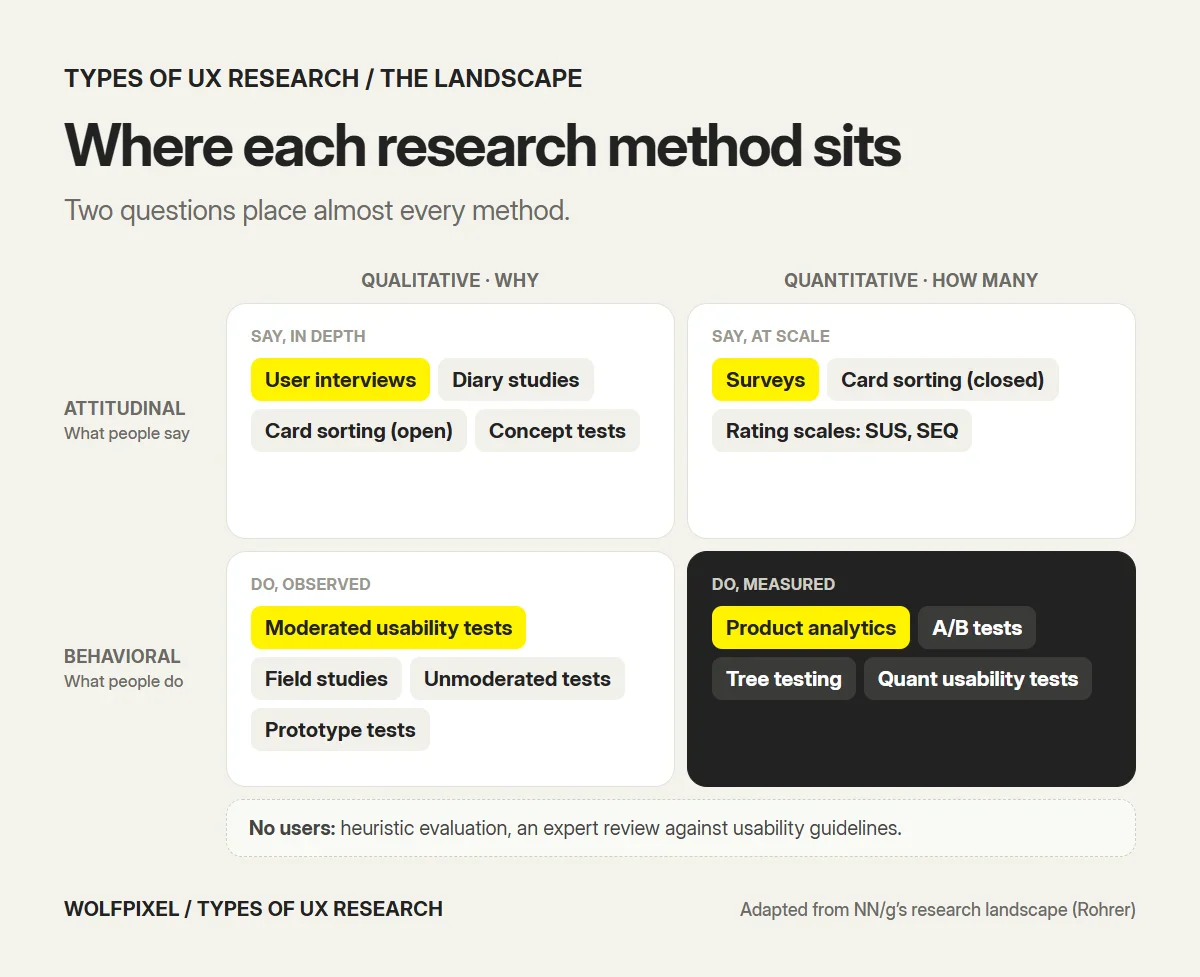
There is no single list of “types”. Researchers classify methods along a few dimensions, and every method sits somewhere on each of them. Nielsen Norman Group’s Christian Rohrer maps 20 user research methods on three dimensions: attitudinal vs behavioral, qualitative vs quantitative and the context of product use. Most teams also add a fourth, the stage of the work: generative vs evaluative.
Generative vs evaluative research
Generative research (also called exploratory or discovery research) happens before you have a solution. It looks for unmet needs, workarounds and opportunities. Interviews and field studies are the usual methods.
Evaluative research happens once there is something to test: a sketch, a prototype or a live product. It asks whether the design works and what to fix. Usability testing, tree testing and A/B tests are evaluative.
Rohrer’s article splits product development into three phases, each with its own kind of research: Strategize (generative research, to choose a direction), Design (formative research, to improve a design while it is being made) and Launch and assess (summative research, to measure how the finished product performs).
Qualitative vs quantitative research
Qualitative research collects observations and words from a small number of people to understand why something happens. A usability test where you watch five people struggle with the same setting is qualitative.
Quantitative research collects numbers from many people to measure how many, how much or how often. A survey of 400 customers or a funnel report is quantitative.
The mistake to avoid is using one to answer the other’s question. Five interviews cannot tell you that 40% of users feel a certain way. A funnel report cannot tell you why people leave at step three.
Attitudinal vs behavioral research
Rohrer’s summary is the clearest: this dimension contrasts “what people say” versus “what people do”. Interviews and surveys are attitudinal. Usability tests, analytics and A/B tests are behavioral.
The two often disagree. Users say they want more features and then use three. They say onboarding was easy and then call support. When the question is about behavior, observe the behavior.
Context of use, and how the research is run
The third NN/g dimension is whether and how participants use the product during the study: natural use (analytics, field studies), scripted use (a usability test with set tasks), limited use (card sorting, which uses only part of the product) or no product at all (an interview about needs).
In practice, teams also choose a mode:
- Moderated vs unmoderated: a researcher runs the session live, or participants complete tasks alone on a platform.
- Remote vs in person: remote sessions are cheaper and reach more people; in-person sessions show the physical context.
The 12 UX research methods we use, and when each pays off
These are the methods product teams use most often, grouped from generative to evaluative. The participant numbers come from the sources linked in each section. Where no source sets a number, the range is our own planning guidance, labeled as such.
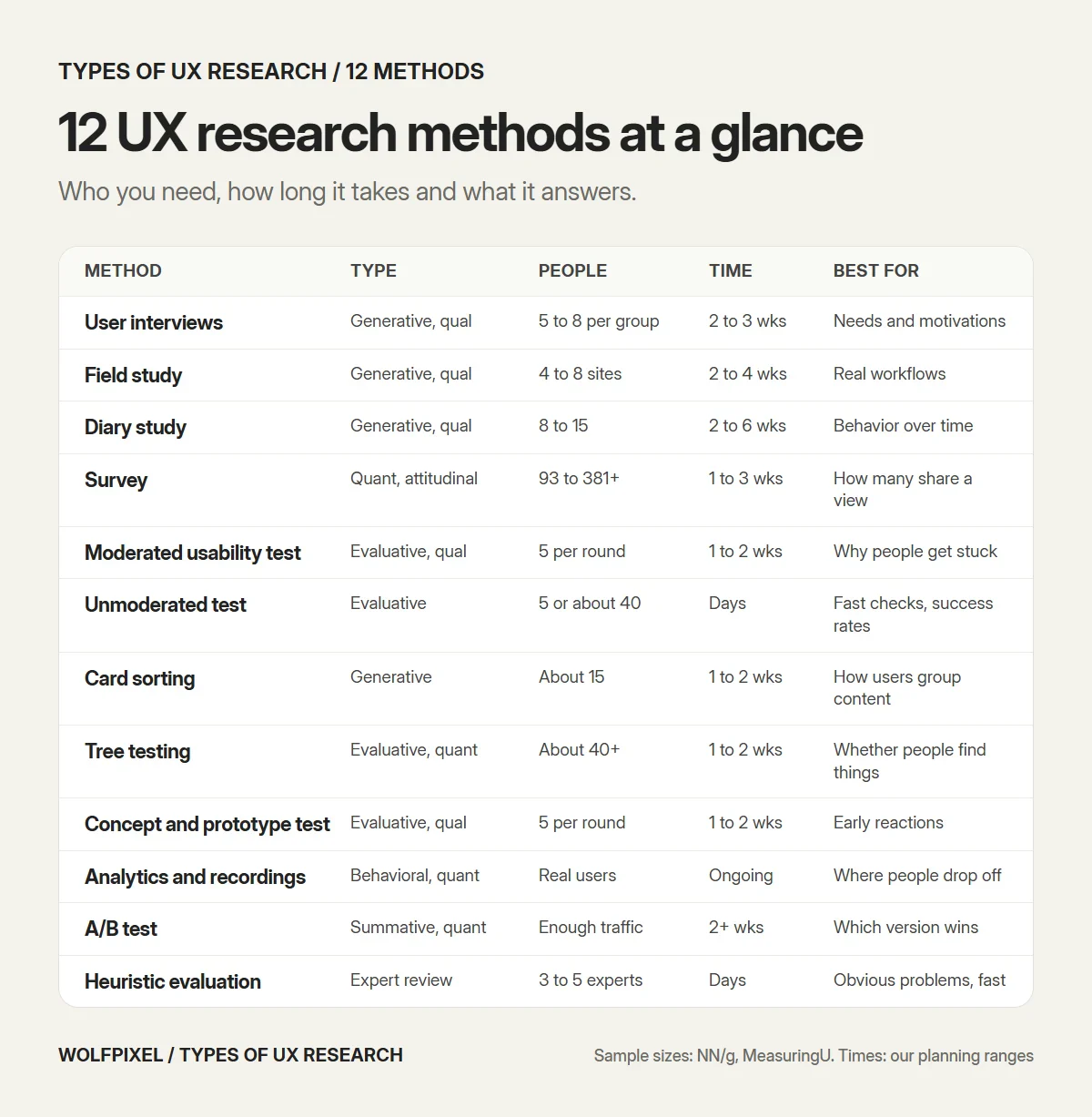
| Method | Type | Participants | Typical time (our planning) | Best for |
|---|---|---|---|---|
| User interviews | Generative, qual, attitudinal | 5 to 8 per user group (our range) | 2 to 3 weeks | Needs, motivations, language |
| Field study / contextual inquiry | Generative, qual, behavioral | 4 to 8 sites (our range) | 2 to 4 weeks | Real workflows and workarounds |
| Diary study | Generative, qual, both | 8 to 15 people (our range) | 2 to 6 weeks | Behavior over time |
| Survey | Generative or evaluative, quant, attitudinal | About 93 to 381+ responses | 1 to 3 weeks | How many people share a view |
| Moderated usability test | Evaluative, qual, behavioral | About 5 per round | 1 to 2 weeks | Why people get stuck |
| Unmoderated usability test | Evaluative, qual or quant, behavioral | 5 (qual) or about 40 (quant) | Days | Fast checks, success rates |
| Card sorting | Generative, qual or quant, attitudinal | About 15 | 1 to 2 weeks | How users group content |
| Tree testing | Evaluative, quant, behavioral | Quant sample, about 40+ | 1 to 2 weeks | Whether people find things |
| Concept and prototype testing | Evaluative, qual, both | About 5 per round | 1 to 2 weeks | Early reactions and usability |
| Product analytics and recordings | Evaluative, quant, behavioral | Your real users | Ongoing | Where people drop off |
| A/B testing | Evaluative, quant, behavioral | Enough traffic for significance | 2+ weeks | Which version performs better |
| Heuristic evaluation | Evaluative, expert review | 3 to 5 evaluators, no users | Days | Obvious problems, fast |
1. User interviews
What it is: one-to-one conversations with users, buyers or churned customers about their goals, their current process and their problems. You ask about past behavior (“Tell me about the last time you…”), not hypotheticals.
When it pays off: at the start of a product or feature, when the team disagrees about what users need, or when a metric moved and nobody knows why. In B2B SaaS, interviews are often the only way to understand the buying group: the admin who sets the product up, the end user and the person who signs the renewal.
Participants: we plan 5 to 8 interviews per distinct user group and stop when new sessions stop adding new themes. This is our planning range, not a published standard.
Watch out for: asking people what they want and treating the answer as a spec. Interviews are excellent at problems and weak at solutions.
2. Field studies and contextual inquiry
What it is: watching people work in their own environment, at their desk or on site, and asking questions as they go. Contextual inquiry is the structured version: you observe a real task and the participant explains as they work.
When it pays off: complex B2B workflows, operations tools and anything where the real process includes spreadsheets, sticky notes and phone calls the product never sees. It reveals workarounds people would never mention in an interview, because they have stopped noticing them.
Participants: 4 to 8 sites or teams is usually enough to see the pattern (our planning range). Remote screen-share sessions work well for software-only workflows.
Watch out for: turning it into an interview. The value is in what you see.
3. Diary studies
What it is: participants log their experience over days or weeks, usually with short entries, screenshots or voice notes prompted at set times or events. Maze describes them as running for a couple of weeks; Dovetail says a few days to a few weeks.
When it pays off: behavior that unfolds over time, such as onboarding over a first month, a weekly reporting routine or a habit you hope the product will form. A one-hour session cannot show how the product fits into someone’s week.
Participants: 8 to 15 people, recruited with some extra to allow for dropouts (our planning range).
Watch out for: too many prompts. Diary fatigue sets in fast, and the entries get shorter every day.
4. Surveys
What it is: the same written questions sent to many people so you can count and compare the answers. Surveys are quantitative and attitudinal: good at measuring what many people think, poor at explaining behavior.
When it pays off: sizing a problem that interviews found, tracking satisfaction or ease of use over time with a standard scale such as the SUS, or prioritizing a list of known problems. Our UX survey guide covers 40 questions, the standard scales and how to analyze the answers.
Participants: it depends on the precision you need. MeasuringU’s table puts about 93 responses at a margin of error of roughly ±10 points and about 381 at ±5 points, at 95% confidence.
Watch out for: asking people to predict their own behavior (“Would you use this feature?”). It mostly measures politeness.
5. Moderated usability testing
What it is: a facilitator gives a participant realistic tasks in the product or a prototype and watches them work, asking them to think aloud. It is the most useful single method in product design, because it shows exactly where and why people get stuck.
When it pays off: before launch, after a redesign, or whenever support tickets and drop-off data point to a flow. It is the method we use most often to check a design before it goes to development.
Participants: Jakob Nielsen’s research shows that 5 users find about 85% of the usability problems in a design, and his advice is to run several small tests rather than one big one: with a budget of 15 users, run 3 studies with 5 users each. If you have very different user groups, such as admins and end users, test 3 to 4 people from each.
Watch out for: leading tasks. “Click Settings and change your password” tests reading, not usability. Describe the goal, not the path.
6. Unmoderated usability testing
What it is: participants complete tasks on their own through a testing platform, which records their screen, clicks and often their voice. No facilitator is present.
When it pays off: quick checks on a specific flow, testing with people in many time zones, or collecting numbers such as success rates and task times across a larger group.
Participants: about 5 for a qualitative check. For quantitative measures, Nielsen Norman Group recommends 40 participants for most quantitative studies, which gives a margin of error of about ±15% at 95% confidence.
Watch out for: you can’t ask follow-up questions, so tasks must be crystal clear. Pilot them on one person first.
7. Card sorting
What it is: participants group cards (feature names, pages, settings) into categories that make sense to them. In an open sort they name the groups; in a closed sort they use your categories.
When it pays off: designing or reorganizing navigation, a settings area, a help center or a product with many features. It shows you the user’s mental model before you lock in the menu.
Participants: Nielsen recommends 15 users for card sorting. At 15 users, results correlated 0.90 with the full data set in his analysis.
Watch out for: card labels that give away the answer. If three cards contain the word “billing”, users will group them by the word, not the meaning.
8. Tree testing
What it is: the reverse of card sorting. Participants see a text-only version of your navigation and are asked where they would find something. It tests whether people can find things, without the visual design getting in the way.
When it pays off: after a card sort, before you design screens, or to compare an old navigation structure against a new one. Maze suggests keeping a tree test to 15 to 20 minutes and ten tasks at most.
Participants: tree testing produces success rates, so plan it as a quantitative study. NN/g’s general recommendation of about 40 participants for quantitative studies is a sensible starting point.
Watch out for: testing only the easy items. Include the tasks you suspect will fail.
9. Concept and prototype testing
What it is: showing people an early idea, a sketch, a clickable prototype or a few screens, and watching how they react and whether they understand it. Quick variants include first-click tests (where would you click to do X?) and five-second tests (what do you remember about this page?).
When it pays off: before you commit engineering time. Testing a Figma prototype costs a fraction of rebuilding a shipped feature. We test prototypes of key flows, such as onboarding and setup, before handoff.
Participants: treat it like qualitative usability testing, about 5 people per round, and iterate between rounds.
Watch out for: asking “Do you like it?” Liking is not using. Give a task.
10. Product analytics and session recordings
What it is: reviewing what real users do in the live product: funnels, feature usage, retention cohorts, heatmaps and recordings of real sessions. No recruiting is needed, because the participants are your users.
When it pays off: finding where problems are. Analytics shows the step where trials stall or the feature nobody uses. It rarely shows why, which is where interviews and usability tests come in.
Participants: your real traffic. Make sure the events you need are tracked before you need them.
Watch out for: vanity metrics. Page views and time on page often rise when users are confused.
11. A/B testing
What it is: showing two or more versions of a page or flow to randomly split groups of real users and comparing a metric, such as signups or activation.
When it pays off: choosing between versions of a high-traffic page, such as pricing, signup or an onboarding step, once qualitative research has produced good candidates. It is summative: it tells you which version won, not why.
Participants: enough traffic to reach statistical significance, which many early-stage SaaS products don’t have on most pages. Use a sample size calculator before you start, not after.
Watch out for: stopping the test as soon as one version looks ahead. Decide the sample size and duration in advance.
12. Heuristic evaluation (expert review)
What it is: evaluators review the interface against a set of usability guidelines, usually Jakob Nielsen’s 10 heuristics. No users take part, so strictly it is an inspection method rather than research with users.
When it pays off: as a fast first pass, before a usability test, or when there is no budget for participants. Nielsen Norman Group recommends that three to five people independently evaluate the same interface, with about 1 to 2 hours each, and says plainly that heuristic evaluations “cannot replace user research”.
Participants: 3 to 5 evaluators, no users.
Watch out for: treating every heuristic violation as a bug. NN/g’s own example is the mobile hamburger menu, which violates a heuristic but is often the right trade-off. Our UX audit guide shows how an expert review fits with analytics and recordings.
What about focus groups?
Focus groups are on most lists of UX research methods. NN/g’s landscape places them as an attitudinal method with 3 to 12 participants. We rarely use them for product decisions. A group discussion shows how people talk about a topic, but the loudest voice shapes the room, and nobody uses software as a group. For product questions, one-to-one interviews and usability tests give cleaner evidence. That is our view, not a rule.
Which type of UX research should you use?
Choose by the question you need answered, not by the method your team already knows. This is the table we use when a client asks where to start.
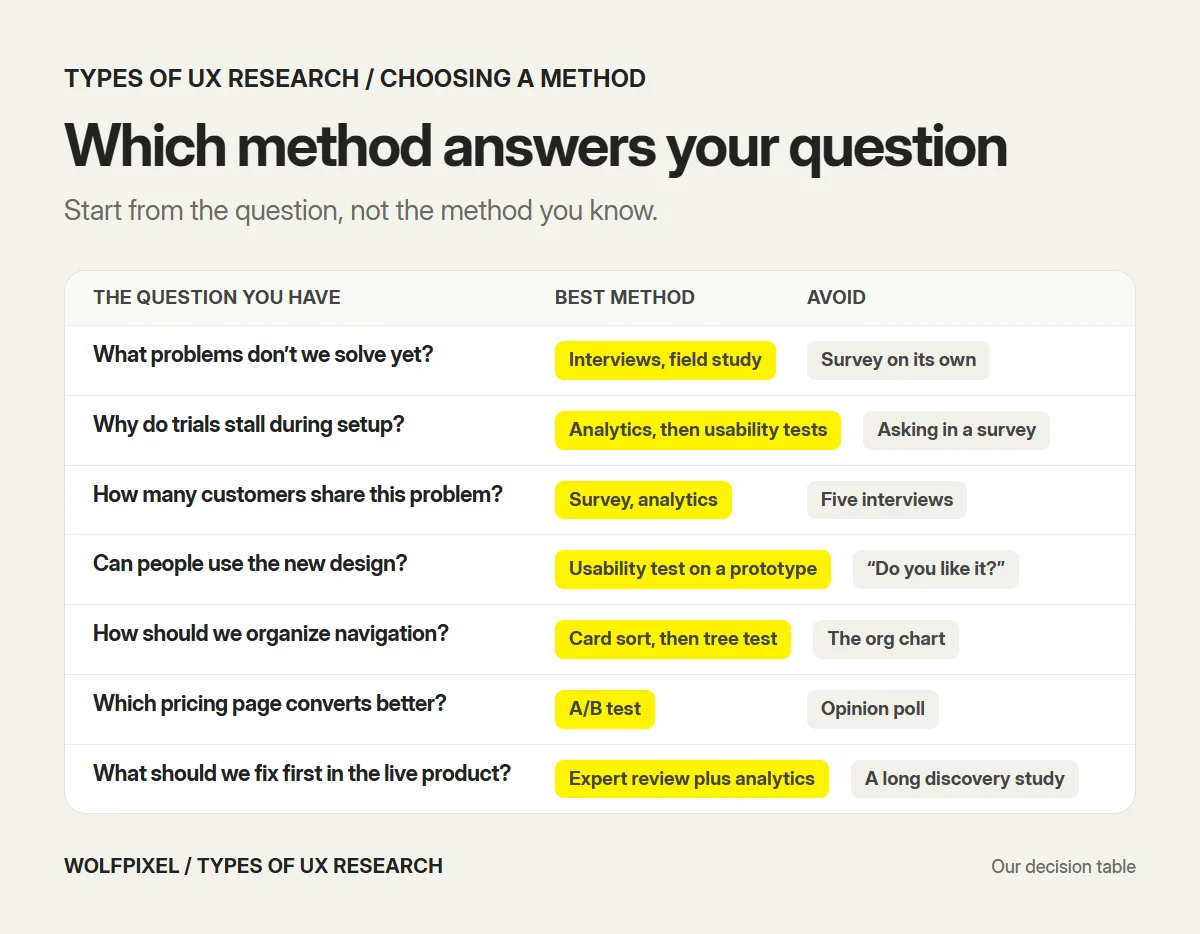
| The question you have | Best method | Avoid |
|---|---|---|
| What problems do our users have that we don’t solve? | User interviews, field study | Survey on its own |
| Why do trials stall during setup? | Analytics to find the step, then usability tests | Asking in a survey |
| How many customers share this problem? | Survey, analytics | Five interviews |
| Can people complete the main task in our new design? | Moderated usability test on a prototype | Asking “Do you like it?” |
| How should we organize our navigation? | Card sort, then tree test | Designing the menu from the org chart |
| Which pricing page converts better? | A/B test | Opinion poll |
| How does the product fit into someone’s month? | Diary study | One-hour session |
| What should we fix first in the live product? | Heuristic evaluation plus analytics and recordings | Starting a long discovery study |
| How do we compare with a competitor? | Competitive usability test, benchmarking survey | Feature checklist |
Three questions narrow it down quickly:
- Do you need to find problems or test a solution? Finding means generative methods; testing means evaluative ones.
- Do you need a reason or a number? A reason means qualitative; a number means quantitative.
- Can you watch the behavior? If yes, a behavioral method beats asking about it.
UX research methods by product stage
The right method also depends on where the product is. A pre-launch startup has no analytics to read; a mature product has more data than it uses.
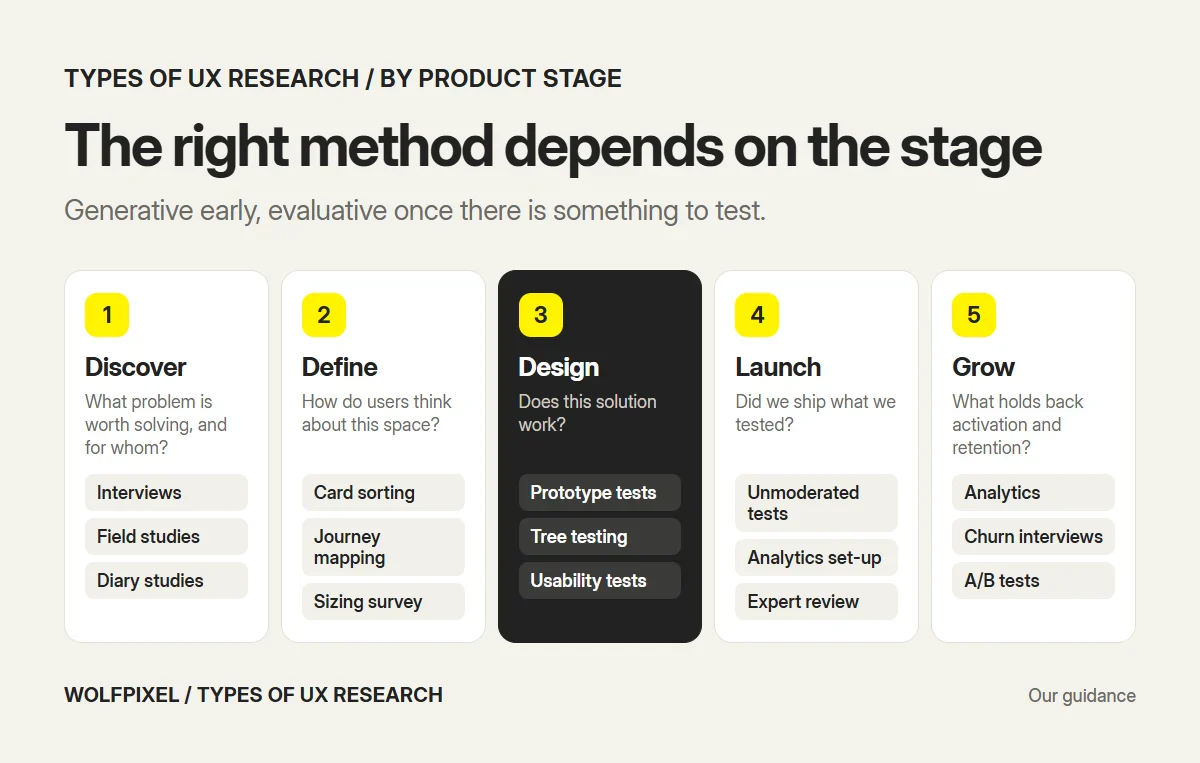
| Stage | Main question | Methods that fit |
|---|---|---|
| Discover | What problem is worth solving, and for whom? | Interviews, field studies, diary studies |
| Define | How do users think about this space? | Card sorting, journey mapping, a survey to size what interviews found |
| Design | Does this solution work? | Concept and prototype testing, tree testing, moderated usability tests |
| Launch | Did we ship what we tested? | Unmoderated usability tests, analytics set-up, heuristic evaluation |
| Grow | What is holding back activation, retention and expansion? | Analytics and recordings, interviews with churned users, A/B tests, tracking surveys |
The Define stage often produces a journey map. Our guide to the B2B customer journey map shows how to build one by role. If you want to plan research across all of these stages instead of one study at a time, see our guide to building a UX research strategy for a SaaS product.
How to combine UX research methods
No single method gives the whole picture. The best findings come from triangulation: two or three methods that cover each other’s blind spots. A sequence we run often on live SaaS products:
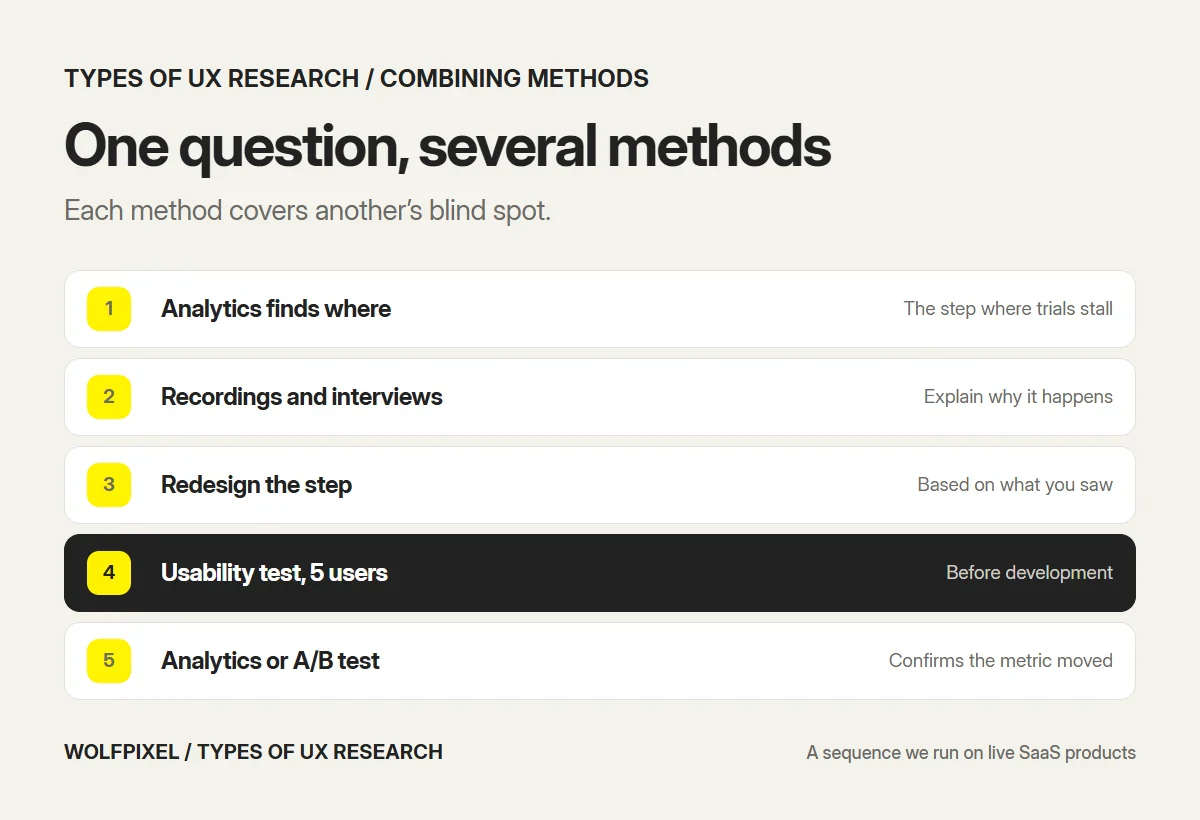
- Analytics finds where: for example, the step in setup where most trials stall.
- Session recordings and interviews explain why: what people expected, what confused them, what they did instead.
- A redesign of that step, based on what you heard and saw.
- A usability test of the redesign with about 5 people, before development.
- Analytics or an A/B test after release confirms the change moved the metric.
For a new product, the sequence starts earlier: interviews to find the problem, a survey to size it, then prototype tests before anything is built. In our UX research projects, findings from each step are shared at weekly check-ins, so the team can act on them before the final readout.
Common mistakes when choosing UX research types
- Using a survey to answer a “why” question. Surveys measure attitudes at scale. For reasons, talk to people or watch them.
- Running 5 tests and reporting percentages. “60% failed the task” from five people is three people. Report what happened and why, not a percentage.
- Testing with the wrong people. In B2B SaaS, an end user and an admin can have opposite problems with the same screen. Recruit for the role.
- Treating an expert review as user research. A heuristic evaluation finds likely problems; only users confirm them.
- Researching after the decision is made. Research that arrives after the sprint is planned is decoration. Time it to the decision.
- One big study instead of several small ones. Three rounds of five users, with fixes in between, beat one round of fifteen.
UX research in our own work
Our case studies show the generative end of research most clearly, because that is where a project’s direction is set:
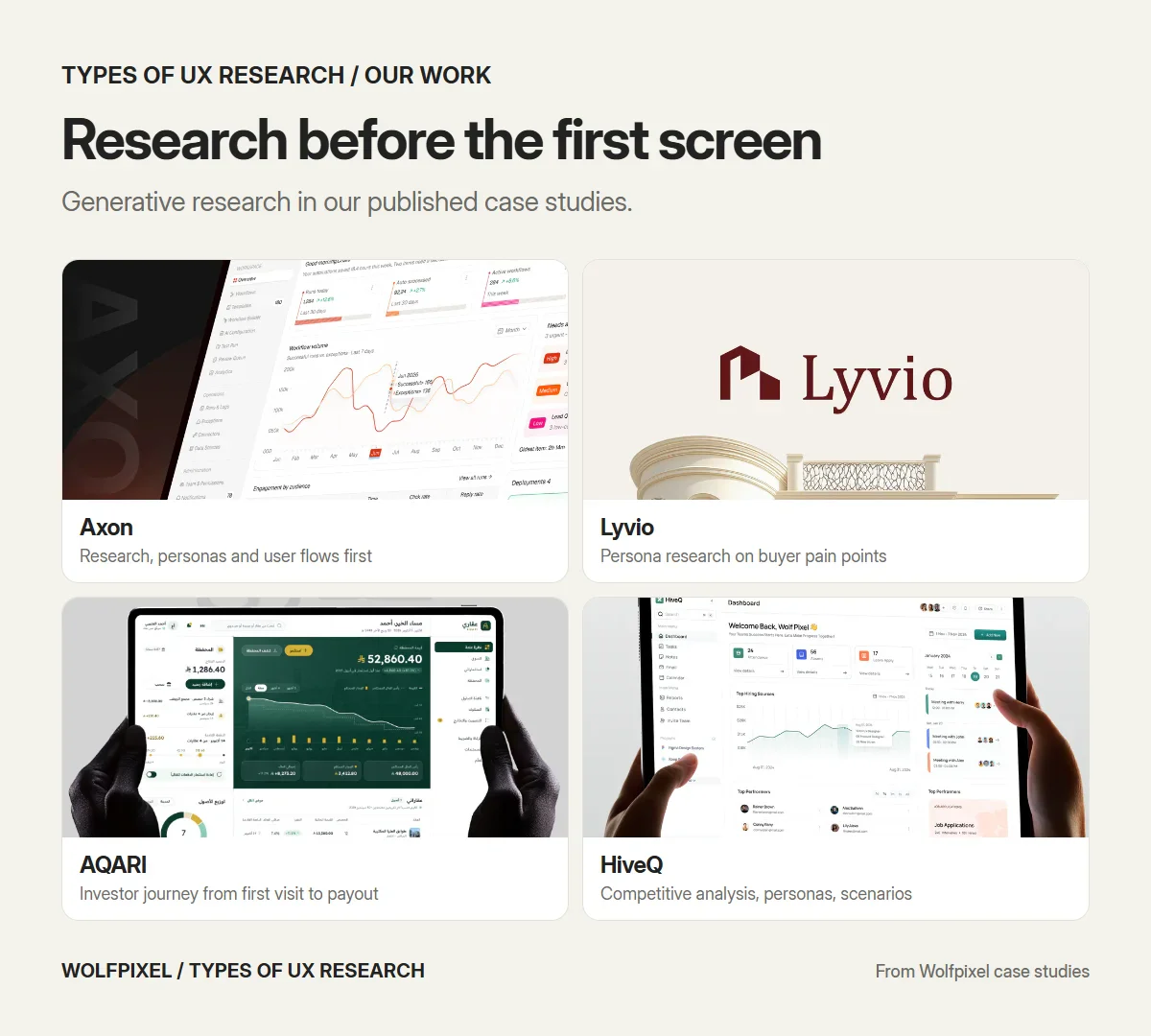
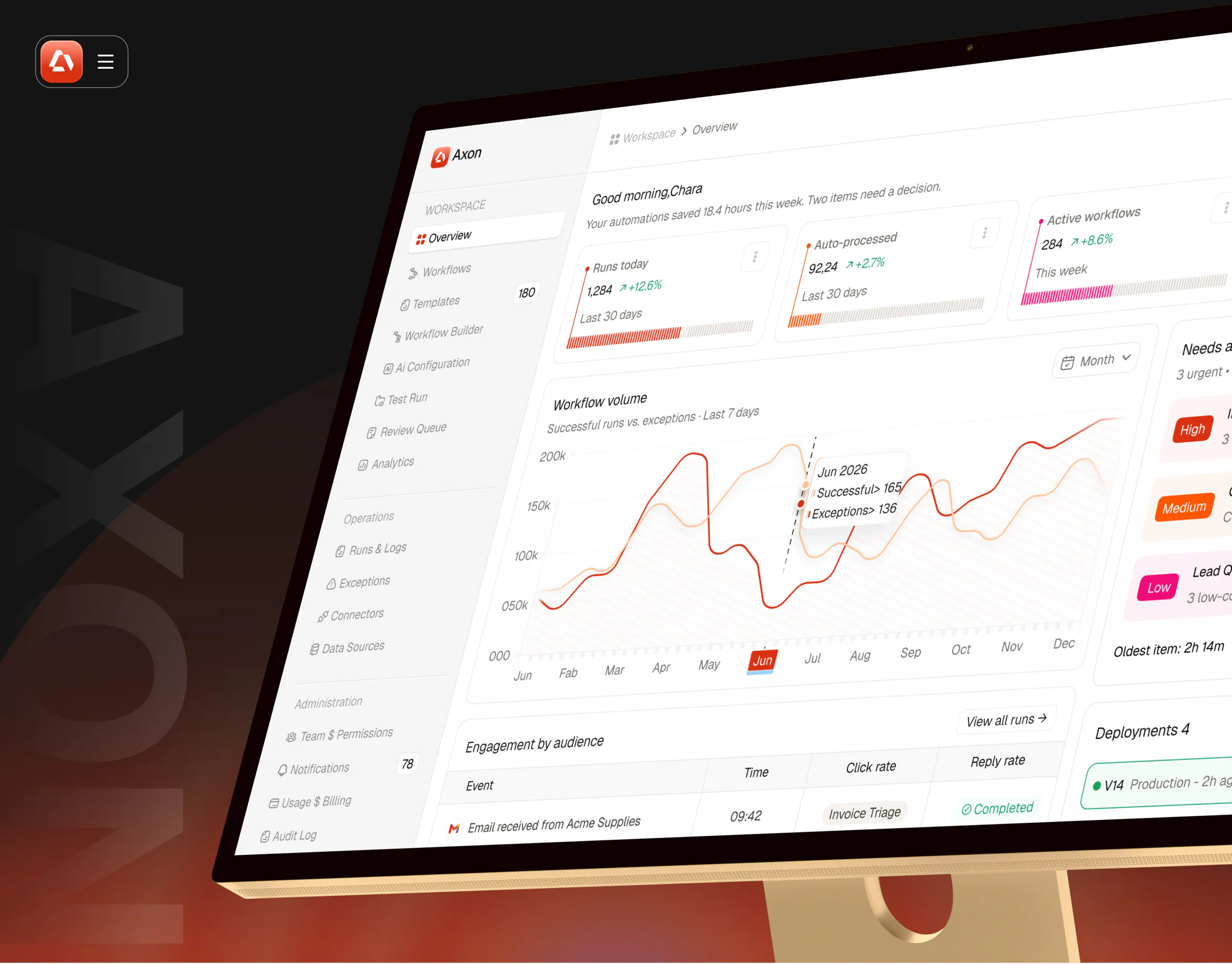
- Axon, an AI workflow automation dashboard for finance and operations teams. Research, personas and end-to-end user flows came first, and they shaped a navigation that keeps daily work, operations and administration apart.
- Lyvio, an AI property discovery app. Persona research focused on buyer pain points, motivations and how people choose a property, and it informed the onboarding and recommendation flows.
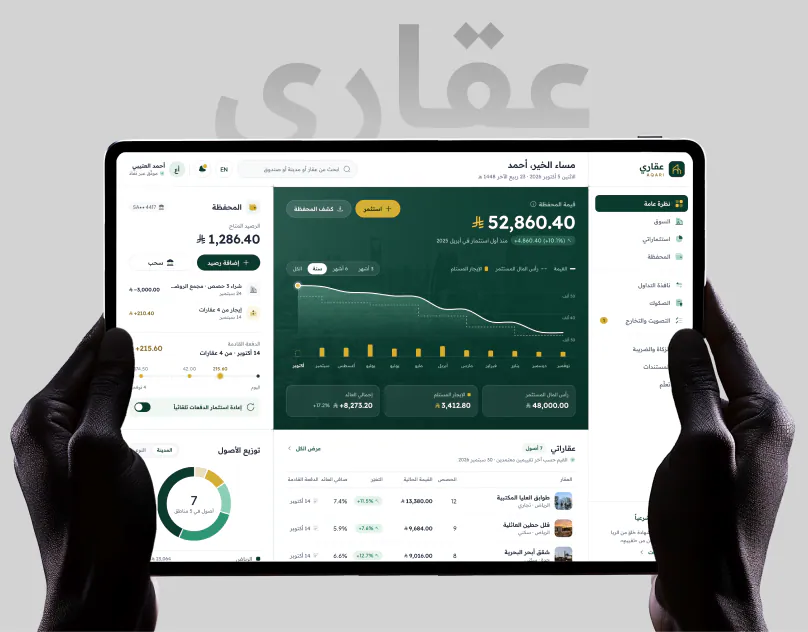
- AQARI, a real estate investment app. Research and problem framing came first, and the investor journey was mapped from first visit to first payout before the product was organized into 32 modules.
- HiveQ, an HR and project management dashboard. The work moved from competitive analysis and a site map to user personas and scenarios, then wireframes and a prototype.
Evaluative research, such as usability tests and analytics reviews, usually happens inside client products under NDA, so it rarely appears in public case studies. If your product is already live and you need a ranked list of what to fix, a UX audit is often the fastest place to start.
Is AI replacing UX research?
AI is now part of most research work. In Maze’s 2026 report, 69% of respondents use AI in at least some of their research projects, and the share of organizations where research is essential to business strategy rose from 8% in 2025 to 22% in 2026.
In our experience AI helps most with the slow parts: transcribing sessions, tagging notes, drafting discussion guides and a first pass at themes. It does not replace the core of research, which is watching real people use your real product and judging what a finding means for the next decision. Synthetic “AI users” can help you rehearse a study, but they can’t tell you what your customers actually do.
Sources and method
We reviewed every source below in November 2026.
- Nielsen Norman Group: When to use which user-experience research methods (Christian Rohrer, July 17, 2022, reviewed July 2026), for the 20 methods, the three dimensions, the product development phases and the focus group size.
- Nielsen Norman Group: Why you only need to test with 5 users (Jakob Nielsen, March 18, 2000), for the 85% finding, the 3 studies of 5 users and testing several user groups.
- Nielsen Norman Group: How many participants for quantitative usability studies (Raluca Budiu and Kate Moran, July 25, 2021), for the 40-participant recommendation.
- Nielsen Norman Group: Card sorting, how many users to test (Jakob Nielsen, July 18, 2004), for the 15-user recommendation and the 0.90 correlation.
- Nielsen Norman Group: How to conduct a heuristic evaluation (Kate Moran and Kelley Gordon, June 25, 2023), for three to five evaluators, the 1 to 2 hour timebox and the hamburger menu example.
- MeasuringU: Tree testing, with a sample size and margin of error table (March 26, 2013), for the 93 and 381 response figures.
- MeasuringU: A taxonomy of common UX research methods (Jeff Sauro and Jim Lewis, September 6, 2022), for the split between empirical and analytic methods.
- Maze: UX research methods and when to use them (undated), for diary study duration and tree test length.
- Dovetail: What is UX research? (February 2023), for diary study duration.
- Maze: The future of user research report 2026 (March 11, 2026), for AI use in research and research’s role in strategy.
Our own recommendations
- The participant ranges for interviews, field studies and diary studies, the typical times, the decision table, the product stage table, the combined sequence and the view on focus groups, based on how we run research at Wolfpixel.
Types of UX Research FAQs
What are the main types of UX research?
UX research is usually grouped in three pairs. Generative research finds problems and needs, while evaluative research tests a solution. Qualitative research explains why, while quantitative research measures how many or how much. Attitudinal research collects what people say, while behavioral research observes what people do. Most methods sit somewhere on all three.
What are the most common UX research methods?
The methods product teams use most are user interviews, usability testing (moderated and unmoderated), surveys, product analytics and session recordings, card sorting, tree testing, concept and prototype testing, A/B testing, diary studies, field studies and heuristic evaluation.
What is the difference between generative and evaluative research?
Generative research happens before you have a solution. It uncovers needs, problems and opportunities, usually through interviews and field studies. Evaluative research happens once you have something to test, such as a prototype or a live product, and checks whether it works, usually through usability testing, tree testing or A/B tests.
How many participants do you need for UX research?
It depends on the method. Nielsen Norman Group recommends about 5 users per round for qualitative usability testing, 15 for card sorting and 40 for most quantitative studies. Interviews usually need 5 to 8 people per user group. Surveys and A/B tests need far more, because they measure differences across a population.
Which UX research method should I start with?
Start from the decision you need to make. If you don’t yet know what problem to solve, start with user interviews. If you have a design and need to know whether people can use it, run a usability test. If you need to know how many users share a problem, use a survey or analytics.
Is usability testing qualitative or quantitative?
It can be either. Qualitative usability testing watches about 5 people per round to find problems and understand why they happen. Quantitative usability testing uses a larger sample, around 40 people according to Nielsen Norman Group, to measure success rates or task times with a known margin of error.
Is a heuristic evaluation UX research?
It is an expert review rather than research with users. Three to five evaluators check the interface against usability heuristics, so it is fast and cheap and finds obvious problems. Nielsen Norman Group is clear that it cannot replace testing with real users, so treat it as a complement to research, not a substitute.
Are focus groups good for UX research?
They are useful for collecting opinions and reactions, but they are weak for usability questions because people describe what they think they would do, and group dynamics shape the answers. To learn whether people can use a product, watch individuals use it in a usability test.
Is AI replacing UX research?
Not the core of it. AI is now common in research work. Maze found that 69% of respondents use AI in at least some research projects. It speeds up transcription, tagging and first-pass analysis, but it cannot watch your real users struggle with your real product. The judgement about what a finding means still needs people.
How long does UX research take?
A focused usability study can run in one to two weeks, including recruiting. Interview studies usually take two to three weeks. Diary studies run for days to weeks before analysis starts. Most of the time goes into recruiting the right participants and synthesizing the findings, not the sessions themselves.
Not sure which research method fits your question?
Tell us the decision you need to make. A senior designer replies within 4 business hours with the method we would use, the number of participants and a fixed quote.

Was this article helpful?

Written by
Maniruzzaman Jubayer
Co-founder & COO | Product Design Specialist at Wolfpixel
Maniruzzaman Jubayer is Wolfpixel’s Co-founder & COO and a product design specialist with 7 years of experience. He personally oversees website, app, dashboard and digital product design at Wolfpixel, including the user research that comes before the design. This guide explains the types of UX research and how to pick the right method for a product question. Wolfpixel offers the UX research services discussed in the article.
View all articles