


 15 min read
 Published
A software prototype is an early, testable model of a product that you build before writing the real code. It can be a sketch, a set of linked wireframes, a clickable design or a small piece of working software. What makes it a prototype is its job: it exists to answer a question about your product while changing the answer is still cheap.
I’m Maniruzzaman Jubayer, Co-founder & COO and Product Design Specialist at Wolfpixel, with 7 years of experience. Clickable prototypes are part of every product we design, from dashboards like HiveQ to mobile apps like RoomMind AI. This guide explains the types of software prototypes, the fidelity levels, and how to choose the one that answers your question.
The short answer: a software prototype is a model of your product built to test an idea before you build it. Engineers describe four types (throwaway, evolutionary, incremental and extreme) and designers describe three fidelity levels (low, mid and high). Pick the cheapest prototype that can answer your riskiest question, then test it with about five real users.
Key takeaways:
- A prototype is a question in physical form. Decide what you need to learn before deciding what to build.
- The type tells you what happens to the prototype afterwards. The fidelity tells you how real it looks and behaves.
- Low fidelity tests structure and flow. High fidelity tests details, copy and trust.
- About five users per round find most usability problems, according to Nielsen Norman Group.
- A prototype can’t tell you about performance, real data or market demand. That is what an MVP is for.
How we wrote this: we reviewed the pages that rank for this topic in November 2026, including Wikipedia, GeeksforGeeks and several agency guides, and the research they cite. Definitions and research findings are linked to their sources. The choice matrix and time ranges are our own, based on how we run product projects, and we label them that way. The full list is in Sources and method.
What is a software prototype?
A software prototype is an incomplete version of a product that lets people see and try how it will work. Wikipedia describes prototyping as creating incomplete versions of the software being developed, so that users can evaluate a proposal before the real thing is built.
Nielsen Norman Group puts it more usefully for product teams: a prototype is a hypothesis, a candidate solution to a specific design problem. That framing matters. A prototype is not a smaller version of your product. It is a test. If you can’t say what the test is, you are probably building a demo, not a prototype.
In practice, a software prototype is usually one of these:
- A paper sketch of a screen or flow, used in a workshop or a hallway test.
- Wireframes linked together so someone can click from step to step.
- A clickable high-fidelity design in a tool like Figma that looks almost real but has no backend.
- A small piece of working code that proves one technical question, such as whether an integration or algorithm works.
Prototype vs wireframe vs mockup vs MVP
These four words get mixed up in briefs all the time, and the confusion costs money. Here is how they differ.
| Wireframe | Mockup | Prototype | MVP | |
|---|---|---|---|---|
| What it is | A grey-box layout of a screen | A static, visually finished screen | An interactive model of a flow | A real, working product released to users |
| Interactive? | No, unless linked | No | Yes | Yes |
| Real data and backend? | No | No | Usually no | Yes |
| What it tests | Structure and content priority | Visual direction and brand | Whether people can complete a task | Whether people want and keep using the product |
| Typical time | Hours to days | Days | Days to two weeks | Weeks to months |
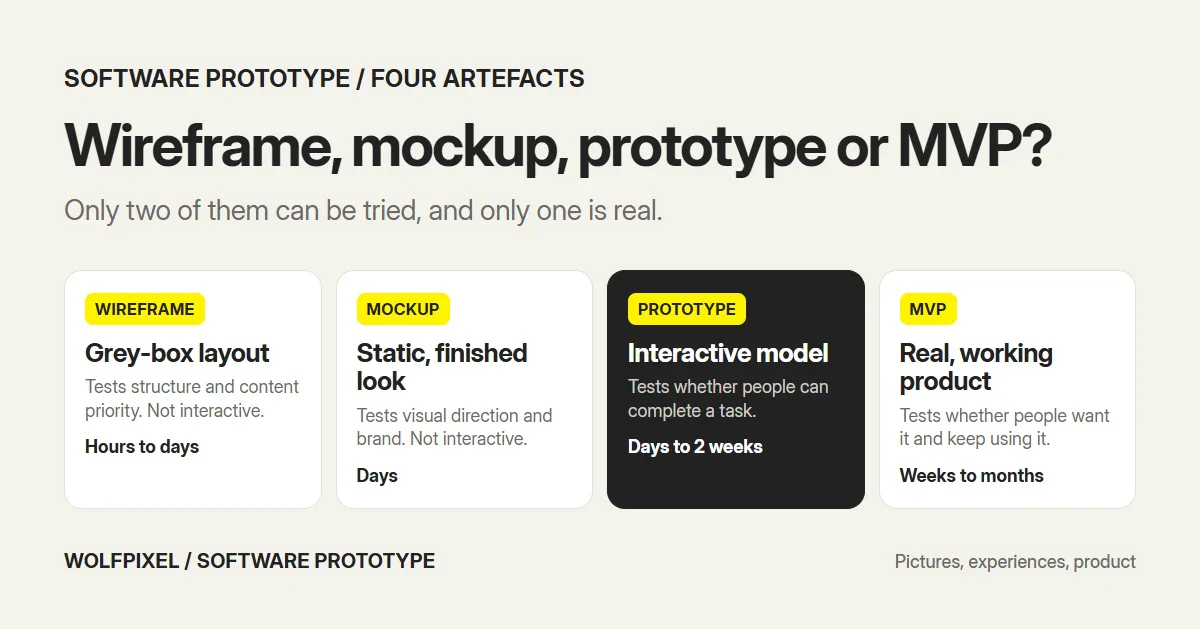
The short version: wireframes and mockups are pictures, prototypes are experiences you can try, and an MVP is the product itself. If you are deciding between a prototype and an MVP, our guide on what an MVP means in software development covers the second half of that choice.
The four types of software prototypes
Software engineering describes four prototyping approaches. They differ in what happens to the prototype after it has done its job.
| Type | Also called | What happens to it | Best for | Watch out for |
|---|---|---|---|---|
| Throwaway | Rapid, close-ended | Built fast, learned from, discarded | Unclear requirements, new ideas | Teams keeping quick code and shipping it |
| Evolutionary | Breadboard | Refined in rounds until it becomes the product | Products whose requirements firm up over time | Early shortcuts becoming permanent |
| Incremental | — | Separate pieces are prototyped, then combined | Large systems with distinct modules | Pieces that don’t fit together |
| Extreme | — | Static screens, then simulated services, then real services | Web applications | Treating the simulated layer as finished |
These definitions follow Wikipedia’s software prototyping article, which also notes that extreme prototyping is mainly used for web applications.
Most design work today is throwaway or evolutionary. A Figma prototype you test and then rebuild in code is throwaway in the engineering sense, even though the design files carry forward. A prototype that slowly gains real code until it ships is evolutionary.
Prototype fidelity: low, mid and high
Type describes the prototype’s future. Fidelity describes how real it feels today. Nielsen Norman Group breaks fidelity into three dimensions: interactivity, visual refinement and content. A prototype can be high on one and low on another, for example real copy on grey boxes.
| Fidelity | What it looks like | What it tests well | What it can’t test |
|---|---|---|---|
| Low | Paper sketches, rough wireframes | Flow, navigation, what goes on each screen | Trust, copy details, visual hierarchy |
| Mid | Grey-box wireframes linked into a clickable path | Task completion, labels, step order | Brand perception, micro-interactions |
| High | Clickable design that looks almost real | Copy, hierarchy, trust, interaction details | Performance, real data, edge cases at scale |
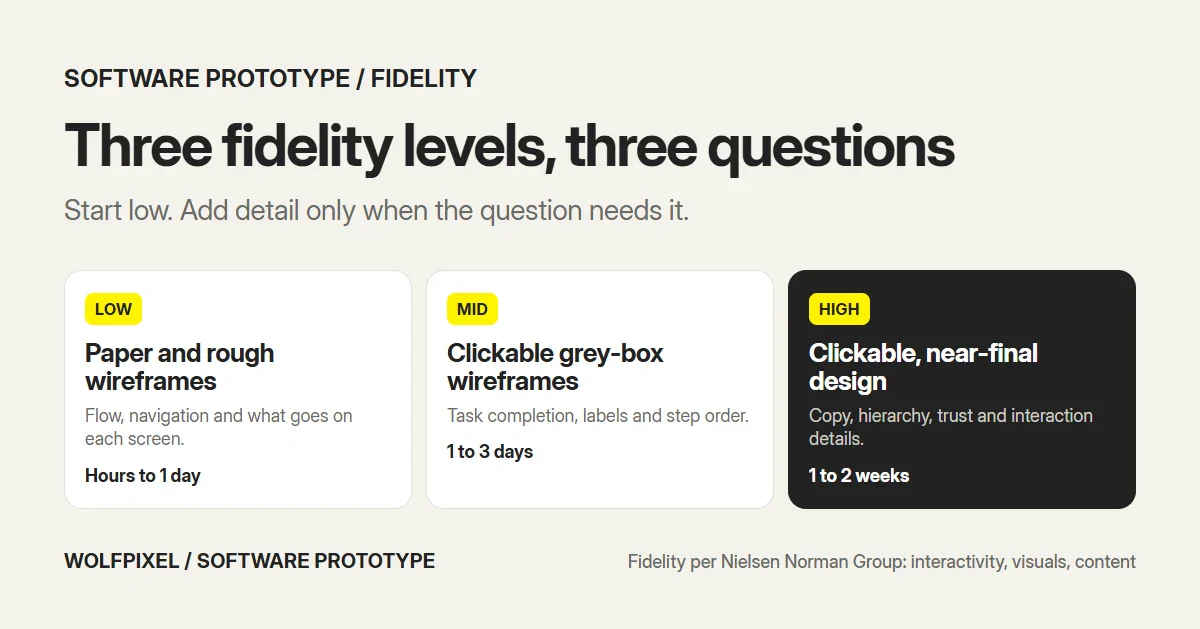
A common mistake is jumping straight to high fidelity. Polished screens make people comment on colors and fonts instead of whether the flow makes sense, and they make the team reluctant to throw work away. On our own projects, structure comes first. For RoomMind AI, low-fidelity wireframes and user flows set the structure before any visual design, and for HiveQ the work moved from competitive analysis and a site map through user scenarios and wireframes to a prototype.
Which prototype answers which question?
The fastest way to choose is to start from the question, not the format. This is the matrix we use when we scope a prototype.
| Your question | Cheapest prototype that answers it |
|---|---|
| Do people understand what the product is for? | A landing page or a short concept video |
| Can people find their way through the main flow? | Low-fidelity clickable wireframes |
| Do people finish the key task, such as signup or checkout? | Mid-fidelity clickable prototype |
| Do people trust the product with money, health or data? | High-fidelity prototype with real copy |
| Does this interaction or animation feel right? | High-fidelity prototype of that one interaction |
| Will this integration or algorithm work? | A small throwaway code prototype |
| Will people pay and keep using it? | Not a prototype. That takes an MVP |
If two rows apply, answer the earlier one first. There is no point polishing a checkout screen if people can’t find their way to it.
How to create a software prototype in 6 steps
- Write down the question. One sentence, such as “Can a new user set up their first project without help?” Everything else follows from it.
- Pick the flow that answers it. Usually three to eight screens. Leave out everything that doesn’t touch the question.
- Sketch before you design. Paper or rough wireframes first, so you can try several structures in an afternoon.
- Link the screens into a clickable path. Use a design tool such as Figma, Framer or ProtoPie. Make the happy path work and stub the rest.
- Test with about five people who match your users. Give them a task, not a tour, and watch where they hesitate.
- Fix and repeat. Change what failed, then test again with a new group before any production code is written.
How to test a prototype
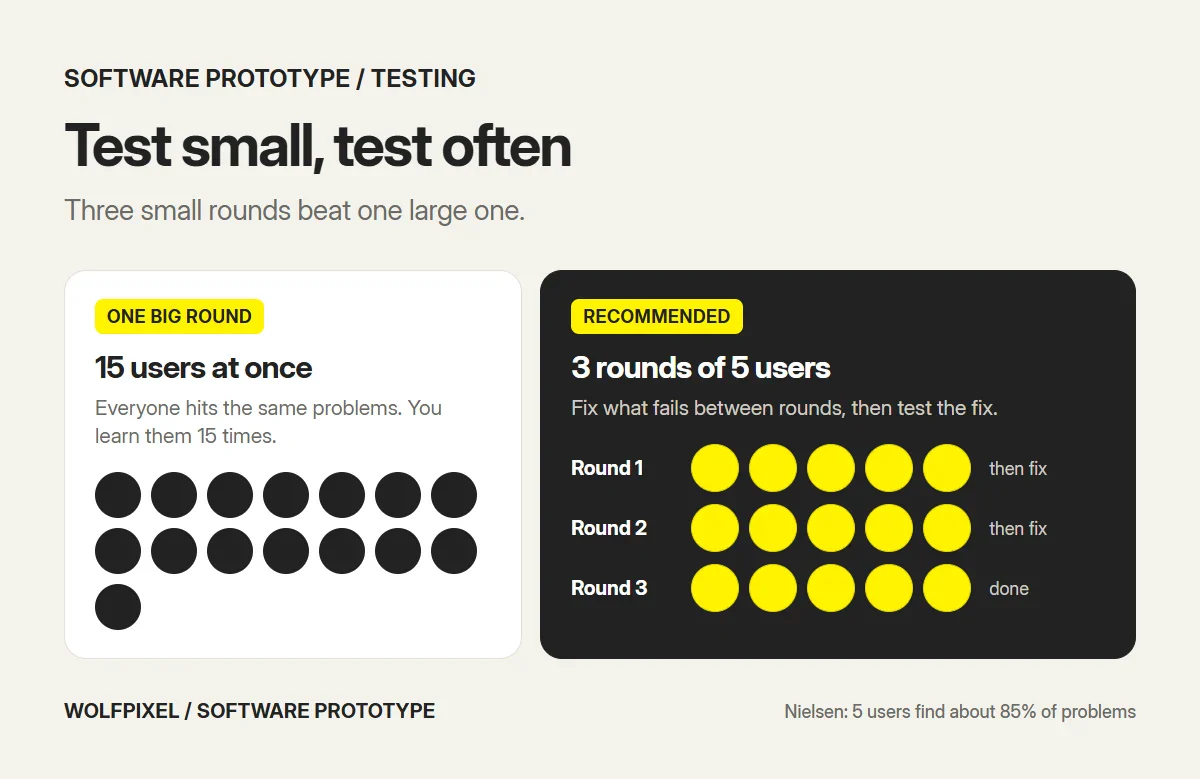
A prototype that nobody tests is a mockup with extra steps. The good news is that testing doesn’t need a big sample. In his widely cited research, Jakob Nielsen found that five users find about 85% of usability problems, and recommended three rounds of five users rather than one round of fifteen, fixing problems between rounds.
Two caveats keep that finding honest. It applies to qualitative usability tests, where the goal is to find problems, not to measure them. Nielsen notes that quantitative studies, such as comparing success rates between two designs, need more participants. And it assumes one type of user: if your product serves very different groups, such as admins and end users, test a few people from each.
A few rules make those sessions useful:
- Give tasks, not instructions. “Invite a teammate to your project” tells you far more than “click the invite button.”
- Recruit real users. Colleagues already know too much. Use customers, prospects or a recruiting panel that matches your audience.
- Watch, don’t explain. When someone gets stuck, note it and let them try. Every explanation hides a problem.
- Test separate user groups separately. If admins and end users do different jobs, run small rounds with each.
If you need help running these sessions, that is the core of our UX research services.
What a prototype can’t tell you
Prototypes are good at one thing: showing whether people can understand and use a design. They are poor at everything that depends on the real product existing.
- Performance. A prototype loads instantly. Your product won’t, and slow screens change behavior.
- Real data. Prototype dashboards have tidy sample numbers. Real accounts have empty states, long names and messy history.
- Demand. Someone completing a task in a test doesn’t prove they will pay for it or come back next week. A prototype test is a usability test, not a market test. Nielsen Norman Group’s advice runs the other way too: it calls testing final products uninformed and risky, which is why you prototype first and then validate demand with a real release.
- Edge cases at scale. Permissions, errors and unusual paths only show up with real use.
That is the point where you move from prototype to MVP, and the prototype becomes the design source for the build.
Prototyping tools in 2027
The tool matters less than the question, but it does shape speed. The common options:
| Tool type | Examples | Good for |
|---|---|---|
| Design tools with prototyping | Figma, Sketch | Clickable flows from the same files developers build from |
| Interaction prototyping | ProtoPie | Realistic gestures, sensors and multi-device interactions |
| Website builders | Framer, Webflow | Prototypes of marketing pages and simple web apps that can go live |
| AI prototype generators | Figma Make and similar tools | Fast first drafts of screens to react to, not final design |
| Code | HTML, React, Flutter | Throwaway technical tests and evolutionary prototypes |
AI tools can now produce a rough clickable prototype from a text prompt in minutes. They are useful for exploring options, but the output still needs a designer to check the flow against the question and against what real users do. Tool features change quickly, so check each vendor’s current documentation before you commit a team to one.
We prototype in Figma on almost every project, because the same file becomes the design system and the developer handoff. We reach for code only when the question is technical, and for ProtoPie when a mobile interaction has to feel right on a real device, as in our mobile app design work.
How long a software prototype takes, and what it costs
No public study puts reliable prices on prototypes, because the range of what people call a prototype is huge. From our own work, these are realistic time ranges for one core flow:
| Prototype | Fidelity | Typical time for one flow |
|---|---|---|
| Paper or whiteboard sketches | Low | Hours to 1 day |
| Clickable grey-box wireframes | Mid | 1 to 3 days |
| Clickable high-fidelity prototype | High | 1 to 2 weeks |
| Throwaway code prototype | Varies | Days to weeks, depending on the technical question |
These are our estimates for one flow of three to eight screens, not published benchmarks. Cost follows time: the same prototype costs more from a senior agency than from a junior freelancer, and more if it covers several user roles or platforms. For wider budgets, see our guide to UI/UX design cost.
How we prototype at Wolfpixel
This is the process we follow on product projects, so you can see where a prototype fits in a real timeline:
| When | What happens | Prototype stage |
|---|---|---|
| Days 1 to 3 | Interviews with your team and users, analytics and competitor review | None yet, only questions |
| Days 3 to 5 | User flows, a sitemap and a prioritized feature list | Low fidelity: flows and sketches |
| Days 5 to 14 | High-fidelity screens and a clickable prototype, first screens in your Figma by day 7 | Mid to high fidelity |
| Final week | Test the prototype with users, fix what they trip on, hand off specs and components | High fidelity, tested |
Two real examples from our work:
- HiveQ, an HR and project management dashboard. The work moved from competitive analysis and a site map to user scenarios, wireframes, a moodboard and a prototype before the final screens.
- RoomMind AI, an AI interior design iOS app. Low-fidelity wireframes and user flows set the structure before any visual design.
The pattern we see most often: teams that skip the low-fidelity step end up debating colors in their first review while a navigation problem goes unnoticed until development.
Which service do you need?
| Your situation | Where to start |
|---|---|
| A new product or MVP, nothing designed yet | Product design: flows, a clickable prototype and product UI, from $3,150 for up to 10 screens |
| An existing web product that needs new flows or screens | UI/UX design |
| A mobile app idea for iOS or Android | Mobile app design |
| A prototype ready, but no time to test it | UX research: recruiting and usability testing |
| A live product with problems you can’t pin down | UX audit before you prototype fixes |
For the full design process around prototyping, see our UI/UX design process guide.
Sources and method
We reviewed every source below in November 2026.
Definitions and research
- Wikipedia: Software prototyping, for the definition and the throwaway, evolutionary, incremental and extreme types.
- Nielsen Norman Group: UX prototypes, high fidelity vs low fidelity, for prototypes as hypotheses and the three dimensions of fidelity.
- Nielsen Norman Group: Why you only need to test with 5 users, for the five-user finding and the three-rounds recommendation.
Our own estimates
- The question-to-prototype matrix.
- The time ranges per fidelity level.
- The day-by-day process and starting price, from our product design page and pricing page.
- The HiveQ and RoomMind AI examples, from our own case studies.
Software Prototype FAQs
What is a software prototype?
A software prototype is an early, testable model of a software product, built before the real code to check whether an idea, flow or interface works. It can be a paper sketch, a set of wireframes, a clickable design in a tool like Figma or a small piece of working code. What makes it a prototype is that it exists to answer a question, not to ship.
What are the types of software prototypes?
Software engineering describes four types. A throwaway (rapid) prototype is built quickly to learn and then discarded. An evolutionary prototype is refined step by step until it becomes the product. An incremental prototype builds separate pieces that are later combined. An extreme prototype, used for web apps, moves from static screens to simulated services to real services.
What are the three fidelity levels of a prototype?
Low fidelity is paper sketches or rough wireframes that test structure and flow. Mid fidelity is grey-box wireframes linked into a clickable path. High fidelity is a clickable design that looks and behaves close to the final product, used to test details, copy and visual hierarchy.
What is the difference between a prototype and a mockup?
A mockup is a static, visually detailed picture of a screen. A prototype is interactive and simulates how the product behaves, so you can put it in front of users and watch them try to complete a task.
What is the difference between a prototype and an MVP?
A prototype tests whether a solution works before you build it, usually with no real backend. An MVP is a real, working product released to real users to test whether they want it and will use it. Teams often prototype first, then build the MVP from what the prototype proved.
How do you create a software prototype?
Start with the one question you need answered, map the flow that answers it, sketch the key screens, link them into a clickable prototype in a design tool, then test it with about five people who match your users. Fix what they trip on and repeat before any production code is written.
How many users do you need to test a prototype?
Nielsen Norman Group’s research found that about five users uncover most usability problems in a test round. Its advice is to run several small rounds with five users each, fixing problems in between, rather than one large test.
How long does it take to build a software prototype?
Paper sketches of one flow take hours to a day, clickable grey-box wireframes one to three days, and a clickable high-fidelity prototype of a core flow usually one to two weeks. At Wolfpixel, first screens land in your Figma within 7 days and a clickable prototype is part of every product UI project.
Can a prototype become the final product?
An evolutionary prototype is designed to become the final product, so yes. A throwaway prototype is not, and turning quick test code into production code is a common source of technical debt. Design prototypes in Figma are usually reused as the visual source for the real build rather than shipped themselves.
Want a clickable prototype before you build?
Send us the flow you want to test. A senior designer replies within 4 business hours with the scope and a fixed quote, and we’re happy to sign an NDA before you share anything.

Was this article helpful?

Written by
Maniruzzaman Jubayer
Co-founder & COO | Product Design Specialist at Wolfpixel
Maniruzzaman Jubayer is Wolfpixel’s Co-founder & COO and a product design specialist with 7 years of experience. He personally oversees website, app, dashboard and digital product design at Wolfpixel, where clickable prototypes are part of every product project. This guide explains software prototype types and fidelity levels and when each one is worth building. Wolfpixel offers the product design services discussed in the article.
View all articles